Integrations: model providers, sandboxes, browsers, messaging, and observability vendors
---
# Bashkit
> Run agent shell commands inside a virtual Bash interpreter with sandboxed filesystems, resource limits, network controls, and async execution.
Source:
[Bashkit](https://github.com/everruns/bashkit) is a virtual Bash interpreter written in Rust. It provides sandboxed, in-process execution with no real filesystem access by default, purpose-built for running untrusted bash scripts in multi-tenant agent environments. ## Why Bashkit? Agents need shell access to be effective, installing packages, running builds, inspecting files. But spawning real bash processes in a shared environment creates isolation, security, and resource control problems. Bashkit solves this by interpreting bash in-process against a virtual filesystem, giving agents a full shell experience without host access. ## Core Capabilities * **POSIX-compliant shell language**: variables, parameter expansion, command substitution, arithmetic, pipelines, redirections, control flow, functions, arrays, globs, here-documents * **85 built-in commands**: core I/O (`echo`, `cat`, `printf`), navigation (`cd`, `ls`, `find`), text processing (`grep`, `sed`, `awk`, `jq`, `sort`), file operations (`mkdir`, `rm`, `cp`, `mv`), archives (`tar`, `gzip`), network (`curl`, `wget` with domain allowlist, optional `http_client` feature), and more * **Virtual filesystem**: pluggable backends: `InMemoryFs`, `OverlayFs`, `MountableFs` * **Resource limits**: configurable caps on command count, loop iterations, and function call depth * **Network allowlist**: HTTP requests via `curl`/`wget` require explicit per-domain authorization (optional `http_client` feature) * **Async-native**: built on tokio ### Experimental Features * **Git**: virtual git operations within the VFS (no host access) * **Python**: embedded Monty interpreter (pure Rust, Python 3.12 compatible) with VFS bridging ## How Everruns Uses Bashkit Everruns integrates bashkit as the execution backend for the **Bashkit Shell** agent capability. When an agent runs shell commands, they execute inside bashkit rather than a real shell. Everruns compiles bashkit **without** the `http_client` feature, so the `curl`/`wget` network builtins listed above are not available inside sessions, the Bashkit Shell capability has no network access. Use the Web Fetch capability for HTTP. ### Session Filesystem Bridge Bashkit’s pluggable filesystem trait lets Everruns bridge the interpreter directly to the session file store. Files created by other tools are immediately visible inside bash, and vice versa, no pre/post sync needed. Session files are mounted at `/workspace` in the bash environment. * **Live file visibility**: files written by other tools during bash execution are immediately visible * **No sync overhead**: eliminates pre/post execution sync of the entire filesystem * **Memory efficiency**: files read on-demand instead of loading all into memory * **Single source of truth**: consistent file state across all agent capabilities ### Resource Controls Bashkit’s execution limits map directly to Everruns’ per-session resource constraints, preventing runaway scripts from consuming shared infrastructure. The network allowlist ensures agents can only reach explicitly authorized domains. ## Links * [GitHub repository](https://github.com/everruns/bashkit)
---
# Integrations
> Connect Everruns agents to cloud sandboxes, browsers, search providers, and messaging channels. Integrations are auto-registered and surface as agent capabilities.
Source:
Integrations connect Everruns agents to external services, cloud sandboxes, browsers, search providers, and messaging channels. Tool integrations surface as [capabilities](https://docs.everruns.com/features/capabilities/). Messaging integrations use endpoints owned by the Agent. ## Sandboxes & execution Give agents an isolated environment to run code, edit files, and persist state. | Integration | What it provides | | ------------------------------------------------------------------------------ | -------------------------------------------------------------------------- | | [Daytona](https://docs.everruns.com/integrations/daytona/) | Cloud sandbox environments via the Daytona REST API | | [E2B](https://docs.everruns.com/integrations/e2b/) | Cloud sandboxes via the E2B management + runtime APIs (bring your own key) | | [Container Sandbox](https://docs.everruns.com/integrations/container-sandbox/) | Self-hosted container sandboxes via Docker Engine, no external SaaS | | [Sprites](https://docs.everruns.com/integrations/sprites/) | Persistent Firecracker microVMs with checkpoints and HTTP services | | [Cursor](https://docs.everruns.com/integrations/cursor/) | Launch and manage asynchronous Cursor Cloud coding agents | ## Browser & web | Integration | What it provides | | -------------------------------------------------------------------- | ---------------------------------------------------------------------- | | [Browserless](https://docs.everruns.com/integrations/browserless/) | Cloud browser automation, screenshots, DOM, scraping, multi-step flows | | [Brave Search](https://docs.everruns.com/integrations/brave-search/) | Web search via the Brave Search API | | [DuckDuckGo](https://docs.everruns.com/integrations/duckduckgo/) | Instant answers via the DuckDuckGo API | | [Parallel](https://docs.everruns.com/integrations/parallel/) | Web search, extract, and task APIs (free and paid tiers) | ## Reasoning & judgment | Integration | What it provides | | ------------------------------------------------------------ | -------------------------------------------------------------------- | | [TypeSafe](https://docs.everruns.com/integrations/typesafe/) | Typed judgments: probabilities, single-choice routing, graded scores | Agents on the [OpenRouter provider](https://docs.everruns.com/providers/openrouter/) can also get web reach without a separate integration via the [OpenRouter Server Tools capability](https://docs.everruns.com/capabilities/openrouter-server-tools/) (`web_search`, `web_fetch`), which OpenRouter executes server-side. ## Messaging channels | Integration | What it provides | | ------------------------------------------------------ | -------------------------------------------------- | | [Slack](https://docs.everruns.com/integrations/slack/) | Deploy an Agent as a Slack bot through an endpoint | ## Credentials | Guide | What it provides | | --------------------------------------------------------------------------------- | ------------------------------------------------------------------- | | [Secure MCP Credentials](https://docs.everruns.com/integrations/mcp-credentials/) | Write-only Agent credential bindings for secret MCP tool parameters | ## Discovery | Integration | What it provides | | -------------------------------------------------- | ----------------------------------------------------------------------- | | [ARD](https://docs.everruns.com/integrations/ard/) | Client-side discovery of external MCP servers and A2A agents at runtime | ## Model providers Integrations connect agents to tools and services. **[Providers](https://docs.everruns.com/providers/)** connect Everruns to the AI model vendors that run your agents, OpenAI, Anthropic, Google Gemini, AWS Bedrock, OpenRouter, and more. See the [Providers overview](https://docs.everruns.com/providers/) to configure one. ## Adding an integration New integrations follow a parity checklist (connection provider, tests, live-API coverage, docs, and a threat-model section) before they ship. Daytona is the reference implementation. See the in-repo [`knowledge/integrations/integrations.md`](https://github.com/everruns/everruns/blob/main/knowledge/integrations/integrations.md) for the full contract.
---
# Agentic Resource Discovery (ARD)
> Discover and attach external MCP servers and A2A agents at runtime via the ARD protocol, with registry configuration and trust gating.
Source:
Everruns integrates with [Agentic Resource Discovery (ARD)](https://agenticresourcediscovery.org/spec/) as a **client**: a running agent can search ARD registries for capabilities it was not pre-provisioned with, MCP servers and A2A agents, and attach them to its session on the fly. Newly attached MCP tools appear on the next turn; attached A2A agents become `spawn_agent` targets. ARD is the discovery layer *above* `tool_search`. `tool_search` defers schemas for tools already attached to a session; ARD decides **which** MCP server / A2A agent to attach in the first place. > **Status:** Experimental (available in Dev environments). ## What You Get * **Runtime discovery**: `discover_resources` runs a semantic search against a configured registry, outside the model context (like `tool_search`). * **Dynamic attachment**: `attach_resource` materializes a result as a session-scoped MCP server or external A2A agent, reusing existing Everruns config-overlay machinery. The agent loop is unchanged. * **Safety by construction**: registry allowlist, `trustManifest` verification, SSRF-safe URL validation, and a per-session attachment cap. ## Quick Start ### 1. Enable the capability on an agent Add the `resource_discovery` capability and point it at one or more registries. The model selects a registry by `id`, it can never supply a raw URL.
```json
{
"registries": [
{ "id": "public", "url": "https://agenticresourcediscovery.org/api/v1", "federation": "none" }
],
"require_trust": [],
"allow_attach_types": ["application/mcp-server+json", "application/a2a-agent-card+json"],
"max_attachments": 5,
"allow_local_urls": false
}
```
The ready-made **Capability Scout** seed agent (Dev) ships with this wired to the public reference registry plus `tool_search`. ### 2. (Optional) Connect a registry token For registries that require authentication, connect **Agentic Resource Discovery** under **Settings → Connections** (provider `ard`) and paste a bearer token, or set the `ARD_REGISTRY_TOKEN` session secret. Public anonymous-read registries need no token. ### 3. Discover and attach From a session, ask for something the agent can’t yet do. It will: 1. `discover_resources({ text: "..." })`, search the registry and get ranked candidates, each with a `urn`. 2. `attach_resource({ urn })`, verify trust, validate the URL, and attach. 3. Use the new capability on the next turn, MCP tools appear prefixed `mcp___*` (surfaced through `tool_search`); A2A agents are reachable via `spawn_agent`. 4. `list_attached_resources()`, see what’s attached this session. ## Tools | Tool | Description | | ----------------------------------------------------- | ---------------------------------------------------------------------------------------------------------------------------------------------------------------------------------------------- | | `discover_resources({ text, filter?, registry_id? })` | Search a configured registry (`POST /search`). Returns ranked `{ urn, displayName, type, score, source, description, attachable }`. `registry_id` is optional when one registry is configured. | | `attach_resource({ urn })` | Resolve a discovered entry, verify `trustManifest` + `require_trust`, SSRF-validate the URL, and attach it. Idempotent per URN. | | `list_attached_resources()` | List attachments for the session (visibility / audit). | ## Attachment Lifecycle * Attachments are **session-scoped** and torn down when the session ends. * MCP entries become a session-scoped `mcpServers` record; their tools are then subject to `tool_search` deferral. * A2A entries merge into the session’s A2A delegation config and are driven through the existing `spawn_agent` / `wait_task` / `message_task` tools. * Re-attaching the same URN is a no-op (reports `already_attached`). ## Security * **Registry allowlist**: only configured registries are queryable; the model picks a `registry_id`, never a URL. * **Trust gate**: an entry’s `trustManifest` identity domain must match its URN publisher, and any `require_trust` attestations (e.g. `["soc2"]`) must be present, before it can be attached. * **SSRF protection**: every resolved artifact and endpoint URL is validated (DNS-pinned; loopback, private, link-local, and cloud-metadata addresses are blocked). `allow_local_urls` relaxes this for local testing only. * **Attachment cap**: `max_attachments` bounds how many capabilities a single session can attach, limiting prompt-injection-driven attach storms. * **Untrusted data**: all registry-returned text is treated as untrusted external input. See the co-located [`SPEC.md`](https://github.com/everruns/everruns/blob/main/crates/ard/SPEC.md) for architecture and the full security review.
---
# Brave Search
> Web search through Brave: ranked results, freshness filters, pagination, source attribution, and safe search. Requires a Brave API key.
Source:
Everruns integrates with [Brave Search](https://brave.com/search/api/) to give agents full web search capabilities. Agents can search the web and get relevant results including titles, URLs, and descriptions, perfect for research, fact-checking, and finding current information. ## What You Get * **Full Web Search**: Query the web and get ranked results with titles, URLs, and descriptions * **Freshness Filters**: Filter results by time (past day, week, month, year) * **Pagination**: Navigate through large result sets * **Source Attribution**: Every result includes a URL for citation and verification * **Free Tier**: Brave Search offers a free plan with 2,000 queries/month ## Quick Start ### 1. Get Your API Key 1. Go to [Brave Search API](https://brave.com/search/api/) 2. Sign up for a **free** plan (2,000 queries/month) 3. Copy your **API Key** from the dashboard ### 2. Connect in Everruns 1. Go to **Settings** > **Connections** 2. Find **Brave Search** in the available providers 3. Click **Connect** and paste your API key Once connected, the Brave Search capability is automatically available in agent sessions. ### 3. Use in Sessions Agents with the Brave Search capability can use this tool: | Tool | Description | | ------------------ | ------------------------------------------ | | `brave_web_search` | Search the web and return relevant results | ### Parameters | Parameter | Type | Required | Description | | ----------- | ------- | -------- | ----------------------------------------------------------------------------------- | | `query` | string | Yes | Search query | | `count` | integer | No | Number of results (1-20, default: 10) | | `offset` | integer | No | Pagination offset | | `freshness` | string | No | Time filter: `pd` (past day), `pw` (past week), `pm` (past month), `py` (past year) | ### Response Fields The tool returns a JSON object with: | Field | Description | | --------- | -------------------------- | | `query` | The original query | | `results` | Array of result objects | | `count` | Number of results returned | Each result object contains: | Field | Description | | ------------- | ----------------------------------------------------- | | `title` | Page title | | `url` | Page URL (use for citations) | | `description` | Snippet/description of the page | | `age` | How old the result is (e.g., “2 hours ago”), optional | ## When to Use Brave Search vs DuckDuckGo | Use Case | Brave Search | DuckDuckGo | | ---------------------------- | ------------------------- | -------------- | | Full web search results | Best choice | Not available | | Current news and articles | Best choice | Limited | | Quick facts and definitions | Works but slower | Best choice | | Wikipedia-style summaries | Not available | Best choice | | Calculations and conversions | Not available | Direct answers | | API key required | Yes (free tier available) | No | Both capabilities can be enabled simultaneously, the agent will choose the right tool based on the task. ## Security * API keys are encrypted at rest (AES-256-GCM envelope encryption) * Keys are validated on connection (test query to Brave Search API) * API key never appears in tool results or message history * Rate limiting deferred to Brave Search API (returns 429 on limit) ## Status **Experimental**: available in dev mode only. This capability may change in future releases. ## Links * [Brave Search API](https://brave.com/search/api/) * [Brave Search API Documentation](https://api.search.brave.com/app/#/documentation/web-search)
---
# Browserless
> Configure Browserless for headless Chrome automation: API keys, connection pooling, screenshots, and scraping.
Source:
Everruns integrates with [Browserless](https://www.browserless.io/) to provide cloud-based browser automation. Agents can navigate web pages, take screenshots, read DOM content, scrape structured data, and interact with UI elements (click, type, keyboard, mouse, touch). ## What You Get * **Screenshots**: Capture full-page or element-specific PNG screenshots * **DOM Reading**: Get fully rendered HTML including JavaScript-generated content * **Structured Scraping**: Extract data from pages using CSS selectors * **Browser Interactions**: Click, type, press keys, use mouse/touch events * **Persistent Sessions**: Keep a browser alive across tool calls for login-protected pages (CDP mode) ## Quick Start ### 1. Get Your API Token 1. Go to the [Browserless Dashboard](https://www.browserless.io/account/home) 2. Navigate to **API Keys** in your account settings 3. Copy your API token ### 2. Connect in Everruns 1. Go to **Settings** > **Connections** 2. Find **Browserless** in the available providers 3. Click **Connect** and paste your API token Once connected, the Browserless capability is automatically available in agent sessions. ### 3. Use in Sessions Agents with the Browserless capability can use these tools: | Tool | Description | | --------------------------- | ------------------------------------------------------------- | | `browserless_open_browser` | Open a persistent browser session (CDP mode) | | `browserless_close_browser` | Close the persistent browser session | | `browserless_navigate` | Navigate to a URL and get page metadata | | `browserless_screenshot` | Take a PNG screenshot of a page | | `browserless_content` | Get the fully rendered HTML/DOM content | | `browserless_scrape` | Extract structured data via CSS selectors | | `browserless_interact` | Multi-step interactions (click, type, keyboard, mouse, touch) | ## Two Operating Modes ### Stateless Mode (Default) Each tool call launches a fresh browser that is destroyed after the response. No state persists between calls. Best for one-shot operations like screenshots or scraping. ### Persistent Session Mode (CDP) Use `browserless_open_browser` to create a persistent browser via Chrome DevTools Protocol. The browser stays alive between tool calls, preserving login state, cookies, and navigation history. Use `browserless_close_browser` when done. **Example workflow for login-protected pages:** 1. `browserless_open_browser` with the login page URL 2. `browserless_interact` to fill credentials and submit the form 3. `browserless_navigate` to browse authenticated pages 4. `browserless_screenshot` to capture authenticated page state 5. `browserless_close_browser` to release resources ## Use Cases * **Accessibility testing**: Navigate pages, read DOM, check ARIA attributes and heading structure * **Regression testing**: Screenshot pages and verify content after changes * **Login flows**: Use persistent sessions to authenticate and test protected pages * **Web scraping**: Extract structured data from any website * **Visual QA**: Take before/after screenshots to verify UI changes ## Resource Management * **Stateless mode**: No cleanup needed, browsers are ephemeral * **CDP mode**: Browsers auto-expire after 60 seconds of inactivity. Always call `browserless_close_browser` when done for immediate cleanup. ## Security * API tokens are encrypted at rest (AES-256-GCM envelope encryption) * Browser sessions are fully isolated on Browserless servers * CDP session state stores only the WebSocket endpoint (no secrets), scoped per session * Large DOM responses are truncated to 100KB to prevent context flooding ## Links * [Browserless Website](https://www.browserless.io/) * [Browserless Dashboard](https://www.browserless.io/account/home) * [Browserless Documentation](https://docs.browserless.io/)
---
# Container Sandbox
> Self-hosted container sandboxes for code execution via Docker Engine, with no external SaaS dependency.
Source:
Everruns provides self-hosted container sandboxes via Docker Engine for secure, isolated code execution. Agents can create, manage, and interact with multiple containers per session, each an isolated Linux environment with real filesystem, process execution, and network access. ## What You Get * **Self-Hosted**: Runs on your own infrastructure, no SaaS dependency * **Isolated Containers**: Each sandbox is an isolated Linux container with cgroup resource limits * **Multi-Sandbox Sessions**: Create and manage multiple containers within a single session * **File Operations**: Read, write, upload, and download files between session storage and containers * **Shell Execution**: Run arbitrary commands with stdout/stderr/exit\_code capture ## Quick Start ### 1. Docker Engine Access Ensure Docker Engine is accessible from the server/worker. The capability communicates via Docker Engine REST API (not the CLI). * **Local**: Docker Desktop or `dockerd` on the host (default socket: `/var/run/docker.sock`) * **Remote**: TCP or TCP+TLS endpoint (e.g., `http://10.0.0.3:2375`) Set `CONTAINER_SANDBOX_DOCKER_HOST` to override the default Docker host. ### 2. Enable the Feature and Assign the Capability Set `FEATURE_CONTAINER_SANDBOX=true` anywhere capabilities are registered or executed to enable the capability and built-in **Coding (Container)** harness. In most deployments, that means both the server and any workers. For legacy deployments, `FEATURE_DOCKER_CAPABILITY=true` still enables the same feature until operators switch to the new flag name, and it must be enabled in the same places. Once the flag is enabled in the relevant processes, add the `container_sandbox` capability to a custom harness or use the built-in **Coding (Container)** harness. ### 3. Use in Sessions Agents with the Container Sandbox capability can use these tools: | Tool | Description | | -------------------- | ----------------------------------------------------- | | `sandbox_create` | Create and start a new container with resource limits | | `sandbox_exec` | Execute shell commands in a container | | `sandbox_read_file` | Read files from container filesystem | | `sandbox_write_file` | Write files to container filesystem | | `sandbox_upload` | Copy files from session storage into container | | `sandbox_download` | Copy files from container to session storage | | `sandbox_list` | List active containers in the session | | `sandbox_manage` | Stop, start, or remove containers | ## Container Lifecycle 1. **Create**: `sandbox_create` pulls the image, creates an isolated network, and starts the container 2. **Use**: `sandbox_exec`, `sandbox_read_file`, `sandbox_write_file` for coding work 3. **Transfer**: `sandbox_upload`/`sandbox_download` to move files between session storage and container 4. **Remove**: `sandbox_manage` with action “remove” deletes the container and network Containers auto-stop after 10 minutes of inactivity (configurable). Leased resource cleanup handles abandoned containers after 20 minutes. ## Configuration | Parameter | Default | Description | | -------------- | -------------- | ----------------------------------------------------------- | | `docker_host` | Auto-detect | Docker Engine endpoint | | `runtime` | `runc` | Container runtime (`runc`, `sysbox-runc`, `kata`, `gvisor`) | | `image` | `ubuntu:24.04` | Default container image | | `memory_limit` | 2 GiB | Memory limit per container | | `cpu_limit` | 1 core | CPU limit per container | | `pids_limit` | 256 | Max processes per container | ## Security * Each container runs in its own isolated Docker network * Resource limits (memory, CPU, PIDs) enforced via cgroups * Container names derived from session ID, no cross-session access * Docker socket never mounted into containers * Configurable runtime: use `sysbox-runc` for user-namespace isolation in production ## Links * [Docker Engine API Reference](https://docs.docker.com/engine/api/) * [Sysbox Runtime](https://github.com/nestybox/sysbox)
---
# Cursor
> Launch and manage Cursor Cloud Agents from Everruns agents.
Source:
Everruns integrates with [Cursor Cloud Agents](https://docs.cursor.com/en/background-agents) so agents can delegate asynchronous coding work to Cursor. A triage agent can inspect a request, split it into focused tasks, launch Cursor agents against GitHub repositories, send follow-ups, and summarize status or results. ## What You Get * **Launch Cloud Agents**: Start Cursor agents with repository, base ref, task prompt, optional branch name, and PR behavior. * **Track Progress**: Read status, target branch, PR URL, summary, and conversation history. * **Send Follow-ups**: Add more instructions to running Cursor agents. * **Connection Prompt**: Configure a Cursor Cloud Agents API key in Settings > Connections. * **Seed Agent**: Use the built-in **Cursor Agent Manager** example to triage and delegate work. ## Quick Start ### 1. Get a Cursor API Key 1. Open [Cursor Dashboard](https://cursor.com/dashboard?tab=cloud-agents) 2. Go to **Cloud Agents** > **My Settings** > **API Keys** 3. Create a Cloud Agents API key 4. Make sure Cursor’s GitHub app can access the repositories agents should work on Use a Cloud Agents API key. A general Cursor dashboard API key may not be enough to create agents. ### 2. Connect in Everruns 1. Go to **Settings** > **Connections** 2. Find **Cursor** 3. Click **Connect** 4. Paste the Cloud Agents API key ### 3. Use in Sessions Agents with the Cursor capability can use these tools: | Tool | Description | | -------------------------- | -------------------------------------------- | | `cursor_launch_agent` | Start a Cursor Cloud Agent | | `cursor_get_agent` | Get one agent’s status and result metadata | | `cursor_list_agents` | List agents for the connected Cursor account | | `cursor_add_followup` | Send extra instructions to a running agent | | `cursor_get_conversation` | Read an agent’s conversation transcript | | `cursor_delete_agent` | Delete an agent record/resources | | `cursor_list_models` | List recommended Cursor model ids | | `cursor_list_repositories` | List GitHub repositories Cursor can access | | `cursor_key_info` | Check the active Cursor connection | ## Delegation Pattern Use **Cursor Agent Manager** when you want Everruns to triage first and then delegate: 1. Provide the repository URL and base branch 2. Ask the agent to break the work into scoped tasks 3. Let it launch Cursor agents with clear acceptance criteria 4. Review returned Cursor links, branches, PR URLs, summaries, and transcripts ## Lifecycle Cursor owns Cloud Agent lifecycle state. Everruns stores no per-agent state beyond normal session messages and tool results. Keep the returned `agent_id` if you want to poll, send follow-ups, read the conversation, or delete the agent later. `cursor_list_repositories` is heavily rate-limited by Cursor and can be slow for large accounts. Prefer passing the repository URL directly. ## Security * Cursor API keys are encrypted at rest when stored as Everruns user connections * Everruns prompts for missing Cursor credentials through the inline connection dialog, not chat text * Cursor agents run in Cursor-managed remote environments with internet access and command execution * Repository access is controlled by the Cursor GitHub app and Cursor account settings * Webhook secrets and image prompt payloads are intentionally not exposed in the first tool surface ## Links * [Cursor Cloud Agents](https://docs.cursor.com/en/background-agents) * [Cursor Background Agents API](https://docs.cursor.com/en/background-agent/api/overview) * [Launch Agent API](https://docs.cursor.com/en/background-agent/api/launch-an-agent) * [Cursor GitHub app](https://docs.cursor.com/en/github)
---
# Daytona
> Configure Daytona cloud sandboxes: API keys, workspace templates, and session-scoped sandbox lifecycle.
Source:
 Everruns integrates with [Daytona](https://www.daytona.io/) to provide cloud-based sandbox environments for secure, isolated code execution. Agents can create, manage, and interact with multiple sandboxes per session, each a fully isolated Linux environment with network access. ## What You Get * **Isolated Sandboxes**: Each sandbox is a secure, isolated Linux environment * **Multi-Sandbox Sessions**: Create and manage multiple sandboxes within a single session * **File Operations**: Read, write, and download files from sandbox filesystems * **Git Integration**: Clone repositories with automatic GitHub credential forwarding * **Shell Execution**: Run arbitrary commands with configurable timeouts ## Quick Start ### 1. Get Your API Key 1. Go to the [Daytona Dashboard](https://app.daytona.io) 2. Navigate to **API Keys** in your account settings 3. Click **Create New API Key** 4. Copy the key ### 2. Connect in Everruns 1. Go to **Settings** > **Connections** 2. Find **Daytona** in the available providers 3. Click **Connect** and paste your API key Once connected, the Daytona capability is automatically available in agent sessions. ### 3. Use in Sessions Agents with the Daytona capability can use these tools: | Tool | Description | | ---------------------------- | --------------------------------------------------- | | `daytona_create_sandbox` | Create and start a new sandbox | | `daytona_exec` | Execute shell commands | | `daytona_read_file` | Read files from sandbox | | `daytona_write_file` | Write files to sandbox | | `daytona_download_workspace` | Download workspace to session storage | | `daytona_list_sandboxes` | List active sandboxes | | `daytona_manage_sandbox` | Stop or delete sandboxes | | `daytona_git_clone` | Clone repositories (auto-authenticates with GitHub) | | `daytona_git_credentials` | Configure git push/pull credentials | ## Git Integration Daytona sandboxes integrate with your connected GitHub account: * **Clone private repos**: `daytona_git_clone` automatically uses your GitHub credentials * **Push/pull/fetch**: Call `daytona_git_credentials` once after creating a sandbox, then use `daytona_exec` for any git command * **Shorthand syntax**: Use `user/repo` format instead of full URLs ## Sandbox Lifecycle Sandboxes auto-stop after 5 minutes of inactivity as a safety net. Best practice is to explicitly delete sandboxes when done, stopping only pauses them (they remain visible on your Daytona dashboard). ## Security * API keys are encrypted at rest (AES-256-GCM envelope encryption) * Each sandbox is fully isolated from other sandboxes and the host * Git credentials are short-lived and scoped to the sandbox * Sandbox state is stored in encrypted session secrets ## Links * [Daytona Website](https://www.daytona.io/) * [Daytona Dashboard](https://app.daytona.io) * [Daytona Documentation](https://www.daytona.io/docs)
---
# DuckDuckGo
> Instant answers, definitions, and topic summaries via DuckDuckGo. No API key required.
Source:
Everruns integrates with [DuckDuckGo](https://duckduckgo.com/) to provide instant answers via the [DuckDuckGo Instant Answer API](https://api.duckduckgo.com/api). Agents can look up facts, definitions, topic summaries (from Wikipedia and other sources), and related topics, all without an API key. ## What You Get * **Instant Answers**: Direct answers for calculations, IP lookups, conversions, and more * **Topic Abstracts**: Wikipedia-style summaries for well-known topics * **Definitions**: Dictionary definitions from Wiktionary and other sources * **Related Topics**: Links to related topics for deeper exploration * **No API Key Required**: The DuckDuckGo Instant Answer API is completely free ## Quick Start ### 1. No Setup Needed Unlike other integrations, DuckDuckGo requires no API key or configuration. The DuckDuckGo Instant Answer API is free and public. ### 2. Enable the Capability Add the `duckduckgo` capability to your agent or harness configuration. In dev mode, it’s available as an experimental capability. ### 3. Use in Sessions Agents with the DuckDuckGo capability can use this tool: | Tool | Description | | --------------------------- | --------------------------------------------------------------------------------------------------------------------------- | | `duckduckgo_instant_answer` | Look up instant answers, abstracts, definitions, and related topics. Instant-answer lookup only, not a full web/SERP search | ### Parameters | Parameter | Type | Required | Description | | --------- | ------- | -------- | --------------------------------------------- | | `query` | string | Yes | Search query | | `no_html` | boolean | No | Strip HTML from result text (default: `true`) | ### Response Fields The tool returns a JSON object with available fields: | Field | Description | | ---------------- | ---------------------------------------------------------------------------------------------------------------------------------------------- | | `query` | The original query | | `type` | Response type: `article`, `disambiguation`, `category`, `name`, `exclusive`, or `nothing` | | `heading` | Topic heading | | `abstract` | `{ text, source, url }`, topic summary | | `answer` | `{ text, type }`, direct answer (calculations, etc.) | | `definition` | `{ text, source, url }`, dictionary definition | | `related_topics` | Array of `{ text, url }`, related topics (max 10) | | `results` | Array of `{ text, url }`, official/direct results | | `note` | Present only when no instant answer was found, a caveat that this is not a definitive web-search result and matching web pages may still exist | Only non-empty fields are included in the response. ## When to Use DuckDuckGo vs Brave Search | Use Case | DuckDuckGo | Brave Search | | ---------------------------- | ---------------- | ---------------- | | Quick facts and definitions | ✅ Best choice | Works but slower | | Wikipedia-style summaries | ✅ Best choice | Not available | | Calculations and conversions | ✅ Direct answers | Not available | | Full web search results | ❌ Not available | ✅ Best choice | | Current news and articles | ❌ Limited | ✅ Best choice | | API key required | No | Yes | Both capabilities can be enabled simultaneously, the agent will choose the right tool based on the task. ## Security * **No secrets**: No API key or credentials to manage * **Read-only**: The API only returns information, no write operations * **Privacy**: DuckDuckGo does not track searches ## Status **Experimental**: available in dev mode only. This capability may change in future releases. ## Links * [DuckDuckGo](https://duckduckgo.com/) * [DuckDuckGo Instant Answer API](https://api.duckduckgo.com/api)
---
# E2B
> Configure E2B cloud sandboxes: bring your own API key, create multiple sandboxes per session, and manage their lifecycle.
Source:
Everruns integrates with [E2B](https://e2b.dev/docs) to provide cloud sandbox environments for secure, isolated code execution. Agents can create, pause, resume, delete, and interact with multiple isolated Linux sandboxes per session. You bring your own E2B API key, there is no platform-owned or environment-variable fallback, so sandbox costs and quotas stay scoped to your own E2B account. ## What You Get * **Isolated Sandboxes**: Each sandbox is a secure, isolated Linux environment * **Multi-Sandbox Sessions**: Create and manage multiple sandboxes within a single session * **File Operations**: Read and write files in sandbox filesystems * **Shell Execution**: Run commands with stdout/stderr/exit-code capture * **Lifecycle Control**: Pause, resume, and delete sandboxes; auto-timeout limits cost ## Quick Start ### 1. Get Your API Key 1. Go to the [E2B Dashboard](https://e2b.dev/dashboard) 2. Create an API key 3. Copy the key ### 2. Connect in Everruns 1. Go to **Settings** > **Connections** 2. Find **E2B** in the available providers 3. Click **Connect** and paste your API key Once connected, the E2B capability is automatically available in agent sessions. Every E2B operation requires a user-provided key, if none is configured, the agent surfaces an inline connection prompt. ### 3. Use in Sessions Agents with the E2B capability can use these tools: | Tool | Description | | -------------------- | -------------------------------------------------------------------- | | `e2b_create_sandbox` | Create a sandbox from a template, optionally uploading session files | | `e2b_exec` | Execute a shell command | | `e2b_read_file` | Read a file from the sandbox filesystem | | `e2b_write_file` | Write a file into the sandbox filesystem | | `e2b_list_sandboxes` | List sandboxes created in this session | | `e2b_manage_sandbox` | Pause, resume, or delete a sandbox | `e2b_create_sandbox` accepts an optional `template` (default `base`), a `timeout_seconds` (default `3600`), `env_vars`, and `upload_files` mapping session paths into the sandbox. ## How It Works E2B exposes two surfaces, and the integration uses both: * **Management API** (`api.e2b.app`), sandbox lifecycle, metadata, and timeout control. * **envd sandbox endpoint**: in-sandbox file access and command execution. Per-sandbox state (sandbox ID, domain, access token, workspace path, timeout) is stored in encrypted session secrets and registered as a leased resource, so orphaned sandboxes are cleaned up on the worker side. Every sandbox is tagged with Everruns ownership metadata (session, harness, org, and agent IDs) for dashboard traceability and audit review. ## Security * API keys resolve fresh from your user connection on each tool call, never stored in sandbox state, env vars, or emitted in tool output * envd access tokens are session-scoped and stored only in encrypted session secrets (AES-256-GCM envelope encryption) * Sandbox isolation depends on E2B’s runtime boundaries plus Everruns session-scoped secret lookups * Resource leaks are mitigated by E2B timeouts and auto-pause plus Everruns leased-resource cleanup ## Links * [E2B Documentation](https://e2b.dev/docs) * [E2B Dashboard](https://e2b.dev/dashboard)
---
# Secure MCP Credentials
> Configure write-only Agent credentials for MCP tools that require a secret parameter.
Source:
Use an Agent credential binding when an MCP tool requires a secret in its input, such as Visti’s `visti_send.channel_key`. Do not paste the value into chat, Agent instructions, memory, or session storage. 1. Attach the MCP server capability to the Agent. 2. Open the Agent and select **Credentials**. 3. Add or open the exact server, tool, and parameter binding. 4. Enter the value in the masked form and save it. The value is encrypted and is never shown again. Everruns removes the bound parameter from the model-visible tool schema and injects the value only when it sends the MCP request. The same Agent binding works for a shared session and for triggers that create a new session per invocation. Use **Rotate** to replace a value. Use the revoke action to delete the binding; future calls then return a setup-required result with a link back to the Credentials tab. Session Storage has a separate encrypted secret lifecycle for session-local workflows. Those secrets do not follow per-invocation sessions, and a model can read them with `secret_store get`, so they are not a substitute for an MCP credential binding.
---
# Parallel
> Use Parallel's hosted MCP server for free web search and URL fetching, with optional API-key authentication and OAuth-compatible endpoint selection.
Source:
# Parallel Parallel provides hosted MCP tools for web search and URL fetching. ## Setup Add the `parallel_search` capability to an agent or harness. It works for free without any connection. To use a Parallel API key, add a `Parallel` connection in Settings > Connections, then configure the capability with `auth: "connection"`. To use Parallel’s OAuth-compatible MCP endpoint, configure the capability with `endpoint: "oauth"`. This mode requires the `Parallel` connection because the endpoint rejects anonymous requests. ## Tools | Tool | Purpose | | -------------------------- | ---------------------------------------------------- | | `mcp_parallel__web_search` | Search the web and return ranked URLs with excerpts. | | `mcp_parallel__web_fetch` | Fetch and extract focused content from known URLs. | Agents should reuse one stable `session_id` across Parallel tool calls in the same conversation. ## Paid machine payments Operators can separately enable Parallel’s paid search, extraction, and task tools with `FEATURE_MACHINE_PAYMENTS=true`. This deployment flag is off by default in every environment. When it is off, Everruns does not expose Settings > Payments or the payment account, policy, and attempt APIs, so the deployment does not ask organization owners to entrust wallet keys for a capability that cannot spend.
---
# Slack
> Deploy Everruns agents as Slack bots that respond to messages, threads, and mentions. Configure endpoint publishing, Slack installation, and channel routing.
Source:
Everruns connects an Agent to Slack through an Agent-owned endpoint. The endpoint receives Slack Events API requests, routes each conversation to a session, and posts the Agent’s responses back to Slack. ## What You Get * **Conversational agents in Slack**: Users interact with the Agent in channels, threads, direct messages, or Slack’s agent pane. * **Session routing**: Conversations map to sessions by thread, channel, or user. * **Secure webhooks**: Everruns verifies requests with Slack’s signing secret. * **Async responses**: Everruns acknowledges Slack immediately and posts the Agent’s response when it is ready. * **Per-endpoint Slack bots**: Each Slack endpoint has its own Slack app, credentials, identity, and lifecycle. ## Before You Start * Create an active Agent. * Give Everruns a public HTTPS origin. Set `PUBLIC_APP_URL` to that origin and restart Everruns. * Ask a Slack workspace administrator for permission to install an app. Slack cannot verify `localhost`. For local development, expose Everruns through a public HTTPS tunnel before you create the Slack app. ## Connect an Agent to Slack ### 1. Create a Slack Endpoint 1. Open the Agent. 2. Select **Integrations**. 3. Select **Add endpoint**. 4. Select **Slack**. 5. Choose the session strategy and reply mode. Leave the Slack credentials empty. 6. Select **Save endpoint**. Everruns opens the endpoint editor after it saves the endpoint. ### 2. Publish the Endpoint Select **Publish** in the endpoint editor. Publishing makes only this endpoint live. Publish before you create the Slack app. The generated Slack manifest contains the endpoint’s Request URL, and Slack verifies that URL when it creates the app. ### 3. Connect to Slack Select **Connect to Slack** in the endpoint editor. Approve the Slack consent screen and choose a workspace. Everruns creates and installs the Slack app, then stores its signing secret, bot token, and workspace ID on this endpoint. Some self-hosted deployments do not configure one-click Slack app creation. If Everruns reports that one-click setup is unavailable: 1. Return to the Agent’s **Integrations** tab. 2. Expand the live Slack endpoint. 3. Select **Create Slack app**. 4. Review Slack’s pre-filled manifest and select **Create**. 5. Install the app to your workspace. 6. Copy the **Signing Secret** from **Basic Information**. 7. Copy the **Bot User OAuth Token** (`xoxb-...`) from **OAuth & Permissions**. 8. Select **Configure** on the endpoint, enter both values, and select **Save**. The manifest already contains the bot scopes, event subscriptions, interactivity URL, and canonical endpoint Request URL:
```text
https://your-everruns-host/api/v1/e/{endpoint_id}/slack/events
```
Do not replace `{endpoint_id}` with an Agent ID or an App ID. ### 4. Invite and Test 1. In Slack, enter `/invite @botname` in a channel. 2. Mention the bot or send it a direct message. 3. Return to the Agent’s **Integrations** tab and expand the Slack endpoint. 4. Confirm that the setup checklist records the first message. ## Configure a Slack App Manually Use this flow only when you cannot use **Connect to Slack** or **Create Slack app**. 1. Create and publish a Slack endpoint from the Agent’s **Integrations** tab. 2. Copy its Request URL from the expanded endpoint row. 3. In [Slack API Apps](https://api.slack.com/apps), select **Create New App** > **From scratch**. 4. Add these bot token scopes under **OAuth & Permissions**: * `chat:write` * `channels:history` * `groups:history` * `im:history` * `mpim:history` * `app_mentions:read` * `users:read` 5. Add these bot events under **Event Subscriptions**: * `message.channels` * `message.groups` * `message.im` * `message.mpim` * `app_mention` 6. Paste the endpoint Request URL into Slack’s **Request URL** field. 7. Install the Slack app to your workspace. 8. Copy the signing secret and bot token into the endpoint’s **Configure manually** fields. 9. Save the endpoint. ## Existing Installs Existing Slack installs that use `/v1/apps/{app_id}/…` URLs continue to work. Everruns keeps those routes as permanent compatibility aliases. New installs use `/v1/e/{endpoint_id}/…`, which is the canonical endpoint-owned form. ## Endpoint Configuration | Field | Required | Description | | ----------------------- | ---------- | ------------------------------------------------------------------------------------------------------------------------------------------------------------------ | | `signing_secret` | Before use | Slack app signing secret for HMAC-SHA256 verification. It can be empty while you create the endpoint, but the endpoint rejects all Slack requests until it is set. | | `bot_token` | Before use | Bot User OAuth Token (`xoxb-...`) for sending responses. It can be empty while you create the endpoint. | | `channel_id` | No | Restrict the endpoint to one channel, such as `C0123456789`. | | `team_id` | No | Slack workspace ID. | | `session_strategy` | No | `per_thread` by default, `per_channel`, or `per_user`. | | `agent_surface_enabled` | No | `false` by default. Also serve Slack’s agent pane; see [Agent Surface](#agent-surface). | ## Agent Surface Slack apps can also appear as an **agent**, a dedicated assistant pane separate from channel conversations. Enabling `agent_surface_enabled` adds this pane without changing channel replies. The generated manifest adds: * the `features.agent_view` block with an `agent_description` derived from the Agent; * the `assistant:write` bot scope; and * the `app_home_opened`, `app_context_changed`, `agent_session_stopped`, and `agent_session_title_changed` bot events. Enabling the pane on an existing Slack app requires a reinstall because a configuration change cannot grant the new `assistant:write` OAuth scope. Generate a fresh manifest, update the Slack app, and reinstall it. Channel replies continue while you do this. Session strategy in the pane is always `per_thread`. The configured strategy still applies to channel conversations. ### Streaming Replies Replies in the agent pane render as the Agent produces them. Channel threads receive one finished message instead of token-by-token updates. ## Session Strategies | Strategy | Behavior | Tag Pattern | | ------------- | ---------------------------------------- | -------------------------- | | `per_thread` | Each Slack thread is a separate session. | `slack:thread:{thread_ts}` | | `per_channel` | One session serves the channel. | `slack:channel:{channel}` | | `per_user` | One session serves each Slack user. | `slack:user:{user}` | Use `per_thread` for most Slack bots. ## How It Works ### Architecture 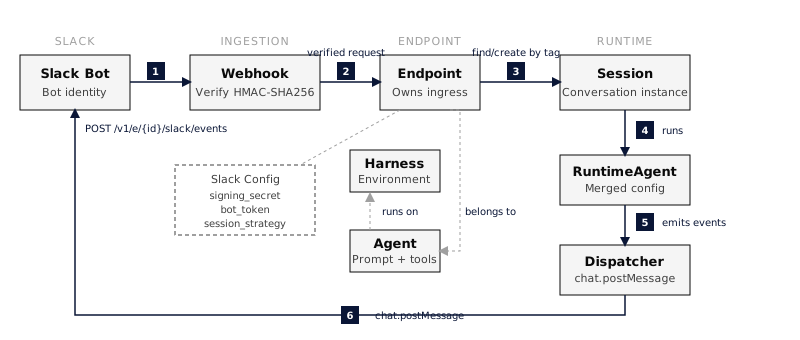 ### Message Flow 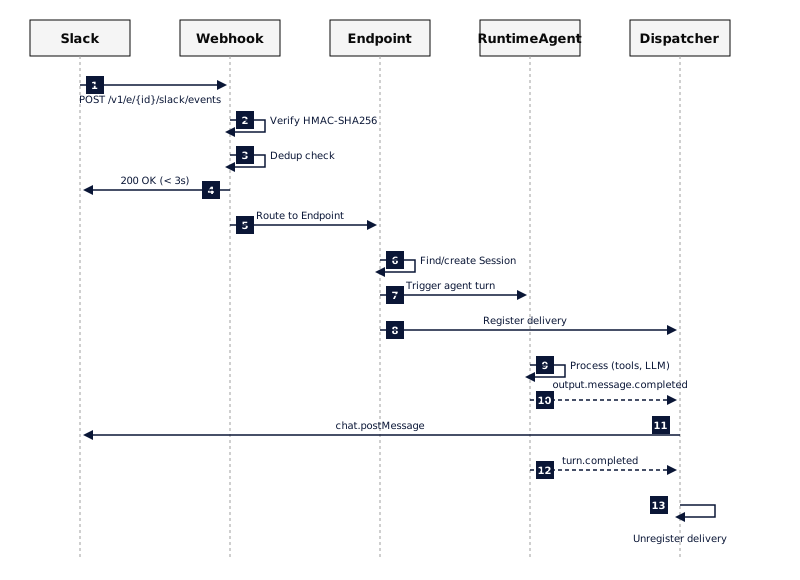 **Inbound path:** 1. Slack posts a message event to `/v1/e/{endpoint_id}/slack/events`. 2. The endpoint verifies the signing secret and rejects duplicates. 3. Everruns acknowledges Slack within three seconds. 4. The endpoint finds or creates a session from the configured strategy. 5. Everruns creates a user message and starts an Agent turn. **Outbound path:** 6. The Slack delivery dispatcher watches the turn. 7. The RuntimeAgent emits completed output messages. 8. The dispatcher posts each response with `chat.postMessage`. 9. Transient delivery failures retry with exponential backoff. 10. The dispatcher unregisters when the turn completes or fails. ## Troubleshooting ### URL Verification Failed * Confirm that the endpoint is published. * Confirm that `PUBLIC_APP_URL` is a public HTTPS origin and that Everruns restarted after the value changed. * Confirm that the Request URL contains `/v1/e/{endpoint_id}/slack/events`. ### Bot Does Not Respond * Confirm that the endpoint is published and enabled. * Invite the bot to the channel with `/invite @botname`. * Confirm that the Slack app has the required bot events and the `chat:write` scope. * Confirm that the endpoint has the correct signing secret and bot token. ### Request Verification Failed * Confirm that the endpoint’s signing secret matches the value under the Slack app’s **Basic Information** page. * Confirm that the Everruns server clock is accurate. ## Approvals When an Agent pauses for approval, Slack renders **Approve** and **Decline** buttons in the thread. Only the person whose message the Agent is answering can use them. The generated manifest already points Slack interactivity at this endpoint. A Slack app created before interactive approvals existed must save a fresh manifest once. ## Task Progress When an Agent delegates work, Slack shows one **Tasks** message and updates it as workers finish. The message lists up to five tasks and summarizes larger groups by count. ## Links * [Slack API Documentation](https://api.slack.com/docs) * [Slack Events API](https://api.slack.com/events-api) * [Publish an Agent to Slack](https://docs.everruns.com/how-to/publish-to-slack/) * [Retired Apps compatibility](https://docs.everruns.com/features/apps/)
---
# Sprites
> Sprites persistent Firecracker microVMs for code execution, with filesystem persistence, checkpoints, and HTTP services.
Source:
Everruns integrates with [Sprites](https://sprites.dev/) to provide persistent, hardware-isolated Linux microVMs powered by Firecracker. Unlike ephemeral sandboxes, Sprites maintain their filesystem across idle periods, support instant checkpoint/restore, and expose public HTTP endpoints. ## What You Get * **Persistent Filesystem**: Full ext4 filesystem survives between sessions, backed to durable object storage * **Hardware Isolation**: Firecracker VM-level isolation (stronger than containers) * **Checkpoints**: Snapshot filesystem state in \~300ms for safe rollback before risky operations * **HTTP Services**: Each sprite gets a unique public URL for exposing web services * **Instant Wake**: Sprites wake from hibernation in <1 second * **Multi-Sprite Sessions**: Create and manage multiple sprites per session ## Quick Start ### 1. Get Your API Token 1. Install the Sprites CLI: `curl https://sprites.dev/install.sh | bash` 2. Run `sprite login` to authenticate 3. Copy your token from the CLI output or dashboard ### 2. Connect in Everruns 1. Go to **Settings** > **Connections** 2. Find **Sprites** in the available providers 3. Click **Connect** and paste your API token Once connected, the Sprites capability is automatically available in agent sessions. Sprites default to `/home/sprite` as the working directory for commands and file paths. ### 3. Use in Sessions Agents with the Sprites capability can use these tools: | Tool | Description | | ---------------------------- | ---------------------------------------------------- | | `sprites_create_sprite` | Create a new Firecracker microVM | | `sprites_exec` | Execute shell commands (wakes sprite if hibernating) | | `sprites_read_file` | Read files from sprite filesystem | | `sprites_write_file` | Write files to sprite filesystem | | `sprites_list_sprites` | List sprites in this session | | `sprites_manage_sprite` | Delete sprites | | `sprites_checkpoint` | Create a filesystem checkpoint | | `sprites_restore_checkpoint` | Restore to a previous checkpoint | | `sprites_service_url` | Get the public HTTP URL for a sprite | ## Checkpoints Sprites support instant filesystem checkpointing, a unique capability not found in other sandbox providers: 1. **Before risky operations**: Call `sprites_checkpoint` to snapshot the current state 2. **If something goes wrong**: Call `sprites_restore_checkpoint` to roll back 3. **Checkpoints are fast**: \~300ms without interrupting the running sprite This makes Sprites ideal for iterative development where agents need to experiment safely. ## HTTP Services Each sprite gets a unique public URL. To expose a web service: 1. Start a web server inside the sprite listening on **port 8080** 2. Call `sprites_service_url` to get the public URL 3. Share the URL for testing or preview ## Sprite Lifecycle 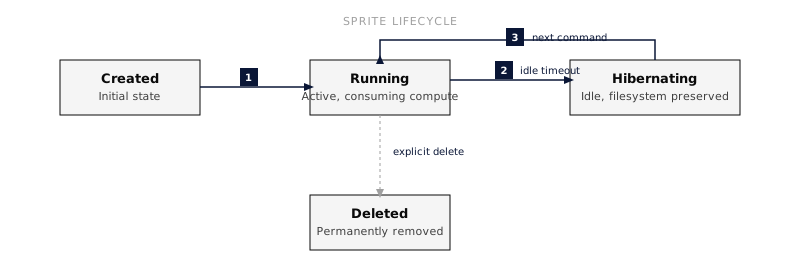 * **Running**: Active, consuming compute resources * **Hibernating**: Idle, no compute charges, filesystem preserved on durable storage * **Deleted**: Permanently removed, all data lost Sprites persist indefinitely until explicitly deleted. They hibernate automatically when idle (no compute charges while idle). Always delete sprites when done to avoid storage charges. ## Pricing Sprites bill per-second for compute and per-GB-hour for storage: * **CPU**: $0.07/CPU-hour * **Memory**: $0.04375/GB-hour * **Storage**: $0.000027/GB-hour (persistent), $0.000683/GB-hour (hot NVMe cache) * **Idle**: No compute charges (filesystem still persisted) New users receive $30 trial credits (\~500 sprite sessions). ## Security * **Firecracker VMs**: Hardware-level isolation between sprites * **L3 Network Policies**: Domain whitelisting for outbound connections * **Encrypted Credentials**: API token stored in user connections (encrypted at rest) * **Leased Resources**: Sprites registered for automatic cleanup on session end
---
# TypeSafe
> Typed decision from TypeSafe's System One model: calibrated probabilities, single-choice routing, and graded scores. Requires a TypeSafe API key.
Source:
Everruns integrates with [TypeSafe](https://typesafe.ai) so agents can ask for a **judgment** rather than an opinion. TypeSafe’s System One model answers typed questions about content and returns numbers your agent — and your code — can act on directly: the probability that something is true, which option out of a set applies, or where something falls on a scale you define. It does not write prose. That is the point: there is no answer to interpret, and no JSON to parse out of a paragraph. ## What You Get * **Yes/no with a probability**: “Is a refund being requested?” → `0.97`, not “Yes, it appears so.” * **Single choice with a distribution**: pick one option and see how close the runners-up were * **Graded scores**: rate against ordered levels you write, with the probability of each level * **Confidence**: how concentrated the answer is, so the agent can escalate instead of guessing * **One call, many questions**: every question in a call is answered together over the same content ## Quick Start ### 1. Get Your API Key 1. Sign in at [typesafe.ai](https://typesafe.ai) 2. Create an **API key** in the dashboard 3. Copy it ### 2. Connect in Everruns 1. Go to **Settings** > **Connections** 2. Find **TypeSafe** in the available providers 3. Click **Connect** and paste your API key Once connected, the TypeSafe capability is available in agent sessions. ### 3. Use in Sessions Agents with the TypeSafe capability get one tool: | Tool | Description | | -------------- | ------------------------------------------------------------ | | `jev_decision` | Ask typed questions about content and get calibrated answers | A call gives it the content plus the questions to ask about it:
```json
{
"state": "Why did the chicken cross the road? To get to the other side.",
"questions": [
{
"id": "is_funny",
"type": "noul",
"instructions": "Would a general audience laugh at this?"
},
{
"id": "humor",
"type": "score",
"instructions": "How funny is this joke?",
"levels": ["Not funny at all", "Mildly amusing", "Genuinely funny", "Hilarious"]
}
]
}
```
And gets back numbers, not a review:
```json
{
"model": "jev-1.13.0",
"answers": {
"is_funny": { "type": "noul", "probability_yes": 0.43 },
"humor": {
"type": "score",
"score": 0.58,
"normalized": 0.19,
"level": 1,
"label": "Mildly amusing",
"probabilities": { "0": 0.44, "1": 0.55, "2": 0.01, "3": 0.0 },
"confidence": 0.57
}
}
}
```
## Question Types | Type | Ask it when | You get | | ------------------------------------------------------ | --------------------------------------- | ---------------------------------------------------------------------------------- | | [`noul`](https://docs.typesafe.ai/primitives/noul) | A condition either holds or it doesn’t | The probability of yes, from 0 to 1 | | [`choice`](https://docs.typesafe.ai/primitives/choice) | Exactly one option out of a set applies | The selected option, every option’s probability, and a confidence | | [`score`](https://docs.typesafe.ai/primitives/score) | Something falls somewhere on a scale | A weighted position across your levels, each level’s probability, and a confidence | These are System One’s own primitives, kept under the same names here; TypeSafe documents them in full under [Primitives](https://docs.typesafe.ai/primitives). Two things worth knowing when you write the questions: * A `noul` near **0.5** means yes and no are roughly equally likely. It does not mean “somewhat” — for degree, use a `score`. * `choice` options and `score` levels must each describe a concrete situation and stand on their own. The question id is never shown to the model, so the instructions have to carry the whole meaning. The `confidence` on a `choice` or `score` is a second axis, not a restatement of the probability: the answer tells you *what*, confidence tells you *whether to act*. See [Confidence](https://docs.typesafe.ai/confidence), and [confidence-gated routing](https://docs.typesafe.ai/patterns/confidence-routing) for the pattern it enables. ## Good Fits * **Verification**: does this answer actually follow from the source it cites? * **Rating**: how severe is this report, how good is this draft, how funny is this joke * **Routing**: which handler, team, or tool should take this — with a confidence to gate on * **Screening**: does this content match a policy, and how clearly ## Embedding the Framework Running the Everruns Framework in your own application rather than on the platform? The same capability attaches to an agent you build yourself, and the decisions is also callable directly with no agent at all. See [Direct decision](https://docs.everruns.com/framework/direct-decisions/). ## Guardrails The same model backs Everruns [guardrails](https://docs.everruns.com/capabilities/guardrails/) when a `llm_judge` or `moderation` check sets `"engine": "jev"`. Instead of asking the utility model to write a verdict, the check gets a calibrated probability and your configured `threshold` decides — and every check on a stage is answered in a single call. That path uses a deployment-owned key (`UTILITY_TYPESAFE_API_KEY`), not your personal connection. ## Security * The API key is stored as a user connection and never exposed to the agent or written into session transcripts. * Content passed to `jev_decision` leaves the platform for TypeSafe, like any other integration that inspects content. Calls are capped at 20 questions and 32 KiB of content. * The content being judged is sent as **data**, and every question states so — a document that tries to instruct the model is being rated, not obeyed. ## Learn more The model and its concepts are TypeSafe’s, and their documentation is the reference for both: * [System One](https://docs.typesafe.ai/concepts/system-one) — the class of model, and how it differs from an LLM * [Primitives](https://docs.typesafe.ai/primitives) — [Noul](https://docs.typesafe.ai/primitives/noul), [Choice](https://docs.typesafe.ai/primitives/choice), [Score](https://docs.typesafe.ai/primitives/score), and [structured criteria](https://docs.typesafe.ai/primitives/advanced) * [State](https://docs.typesafe.ai/concepts/state) — what to send as the thing being judged * [Confidence](https://docs.typesafe.ai/confidence) — certainty as a second axis, distinct from the probability * [Patterns](https://docs.typesafe.ai/patterns) — including [speculative fan-out](https://docs.typesafe.ai/patterns/fan-out) and [confidence-gated routing](https://docs.typesafe.ai/patterns/confidence-routing)
---
# Observability
> Send Everruns session traces, token usage, and tool-call timings to your observability platform of choice.
Source:
Everruns emits structured events for every agent turn, model calls, tool invocations, retries, token usage, latency. The integrations in this section forward those signals to observability platforms so you can monitor agents in production, evaluate prompt changes, and debug failures with full trace context. ## Available Integrations * [OpenTelemetry](https://docs.everruns.com/observability/opentelemetry/), export traces over OTLP to any tracing backend. Spans follow the Gen-AI semantic conventions and the OpenInference conventions at once, so Grafana Tempo, Jaeger, Datadog, Langfuse, and Arize Phoenix all read them. * [Braintrust](https://docs.everruns.com/observability/braintrust/), LLM observability, evaluation, and trace visualization. Turn traces are grouped by session, with token usage, time-to-first-token, and tool execution times. ## Related * [Events](https://docs.everruns.com/features/events/), the streaming event protocol that backs every observability export. * [Environment Variables](https://docs.everruns.com/sre/environment-variables/), configure exporters, sampling, and OTLP endpoints.
---
# Braintrust
> Send Everruns traces to Braintrust for evaluation and trace visualization.
Source:
 Everruns integrates with [Braintrust](https://www.braintrust.dev/) to provide LLM observability, evaluation, and trace visualization for your agentic workflows. ## What You Get * **Turn Traces Grouped by Session**: Keep one trace per turn while grouping the conversation by `metadata.session_id` * **Token Usage Tracking**: Monitor input/output tokens and prompt cache efficiency * **Performance Metrics**: Time-to-first-token, LLM call duration, tool execution times * **Durable-ish Delivery**: Buffered batch delivery with retries for rate limits, `5xx`, and timeout/connect failures * **Privacy Controls**: Raw content, thinking, tool args, and tool results are independently configurable ## Quick Start ### 1. Get Your API Key 1. Sign up at [braintrust.dev](https://www.braintrust.dev/) 2. Go to **Settings** → **API Keys** 3. Create a new API key ### 2. Configure Everruns Set environment variables:
```bash
# Optional explicit switch
export BRAINTRUST_ENABLED=true
# Required
export BRAINTRUST_API_KEY=sk-bt-your-api-key
# Recommended: specify your project name
export BRAINTRUST_PROJECT_NAME="My Project"
# Conservative defaults
export BRAINTRUST_RECORD_CONTENT=false
export BRAINTRUST_RECORD_THINKING=none
export BRAINTRUST_TOOL_ARGS_MODE=redacted
export BRAINTRUST_TOOL_RESULTS_MODE=summary
```
| Variable | Required | Default | Description | | -------------------------------- | -------- | ------------------------------- | --------------------------------------------------------------- | | `BRAINTRUST_ENABLED` | No | enabled when API key is present | Explicit Braintrust on/off switch | | `BRAINTRUST_API_KEY` | Yes | - | API key from Braintrust settings | | `BRAINTRUST_PROJECT_NAME` | No | `My Project` | Project name for organizing traces | | `BRAINTRUST_PROJECT_ID` | No | - | Direct project UUID (skips name lookup) | | `BRAINTRUST_API_URL` | No | `https://api.braintrust.dev` | API base URL | | `BRAINTRUST_QUEUE_CAPACITY` | No | `1024` | Buffered event capacity before new exports are dropped | | `BRAINTRUST_MAX_BATCH_SIZE` | No | `50` | Max events per Braintrust insert call | | `BRAINTRUST_FLUSH_INTERVAL_MS` | No | `500` | Max delay before a partial batch flushes | | `BRAINTRUST_REQUEST_TIMEOUT_MS` | No | `10000` | Per-request timeout | | `BRAINTRUST_MAX_RETRIES` | No | `3` | Retries for `429`, `5xx`, and timeout/connect failures | | `BRAINTRUST_RETRY_BASE_DELAY_MS` | No | `250` | Initial retry backoff | | `BRAINTRUST_RETRY_MAX_DELAY_MS` | No | `5000` | Retry backoff cap | | `BRAINTRUST_RECORD_CONTENT` | No | `false` | Export raw turn and LLM text content | | `BRAINTRUST_RECORD_THINKING` | No | `none` | Export thinking as `none`, `summary`, or `full` | | `BRAINTRUST_TOOL_ARGS_MODE` | No | `redacted` | Export tool args as `full`, `redacted`, or `none` | | `BRAINTRUST_TOOL_RESULTS_MODE` | No | `summary` | Export tool results as `full`, `summary`, `redacted`, or `none` | | `BRAINTRUST_DEBUG_PAYLOADS` | No | `false` | Print full outbound Braintrust payload JSON to local debug logs | ### 3. View Traces 1. Open the Braintrust dashboard 2. Navigate to your project 3. Go to **Logs** 4. Group or filter by `metadata.session_id` to reconstruct the full session timeline across turn traces ## Trace Hierarchy Each Everruns turn creates its own trace with the following structure:
```plaintext
agent turn (root span)
├── reason (iteration 1)
│ └── llm.generation (gpt-5.2)
├── act (iteration 1)
│ ├── tool.call (search)
│ └── tool.call (fetch)
├── reason (iteration 2)
│ └── llm.generation (gpt-5.2)
└── (no more tool calls - turn complete)
```
### Span Types | Span | Type | Description | | -------------- | ------ | ------------------------------------- | | Agent Turn | `task` | Root span for the entire user request | | Reason | `task` | LLM reasoning phase (may iterate) | | Act | `task` | Tool execution phase | | LLM Generation | `llm` | Individual LLM API call | | Tool Call | `tool` | Individual tool execution | ## Session Grouping Everruns does not export one giant trace for the whole conversation. * Each turn remains its own Braintrust trace. * Every root turn span carries `metadata.session_id`. * Session lifecycle events (`session.started`, `session.activated`, `session.idled`) are exported as lightweight logs with the same `session_id`. * Root turn metadata also carries stable filtering fields when available, such as `input_message_id`, monotonic event ordering, deployment grade, session status, model/provider summary, retry info, and compaction info. Use Braintrust grouping, timeline, or thread views on `metadata.session_id` to analyze the session as a whole while keeping per-turn debugging sharp. ## Metrics Captured ### LLM Generations * `prompt_tokens` - Input token count * `completion_tokens` - Output token count * `cache_read_tokens` - Tokens read from prompt cache (Claude) * `cache_creation_tokens` - Tokens written to prompt cache (Claude) * `time_to_first_token` - Time until first token received * `duration_ms` - Total LLM call duration ### Tool Calls * `status` - Success/failure * `duration_ms` - Execution time * `error` - Error message (on failure) ## Delivery Behavior * Exports enqueue into a bounded in-memory buffer. * The exporter flushes batches to `POST /v1/project_logs/{project_id}/insert`. * `429`, `5xx`, timeout, and connect failures are retried with jittered backoff. * If the queue fills, new events are dropped and the exporter logs the drop counter. This is best-effort durability, not a disk-backed queue. ## Privacy Controls The Braintrust exporter defaults to conservative content handling: * raw turn and LLM text are off unless `BRAINTRUST_RECORD_CONTENT=true` * when raw content is off, the exporter emits structural metadata only; it does not emit truncated prompt/completion previews * extended thinking is off unless `BRAINTRUST_RECORD_THINKING` says otherwise * tool arguments default to `redacted` * tool results default to `summary` * tool arg/result modes still apply inside recorded LLM input/output payloads * full outbound payload logging is off unless `BRAINTRUST_DEBUG_PAYLOADS=true` ## Troubleshooting ### Traces Not Appearing 1. **Check API key**: Verify `BRAINTRUST_API_KEY` is set correctly 2. **Check project resolution**: If `BRAINTRUST_PROJECT_NAME` does not match an existing project, startup logs will show a project resolution failure 3. **Check exporter logs**: Look for rate-limit retries, timeout retries, queue drops, or permanent insert failures ### Session Views Are Fragmented 1. Confirm root turn spans include `metadata.session_id` 2. Group Braintrust logs by `metadata.session_id` 3. Check whether privacy controls removed content you expected; the default is conservative ## Links * [Braintrust Documentation](https://www.braintrust.dev/docs) * [API Reference](https://www.braintrust.dev/docs/api-reference/introduction) * [Insert Logs API](https://www.braintrust.dev/docs/api-reference/logs/insert-project-logs-events)
---
# OpenTelemetry
> Export Everruns agent traces over OTLP. Spans follow the OpenTelemetry Gen-AI and OpenInference conventions, so any tracing backend reads them.
Source:
Everruns turns every agent run into an OpenTelemetry trace and exports it over OTLP. Spans carry two attribute vocabularies at once, the [OpenTelemetry Gen-AI semantic conventions](https://github.com/open-telemetry/semantic-conventions-genai/tree/main/docs/gen-ai) and the [OpenInference conventions](https://arize-ai.github.io/openinference/spec/semantic_conventions.html), so one endpoint feeds general-purpose backends such as Grafana Tempo, Jaeger, and Datadog as well as LLM-native ones such as Arize Phoenix and Langfuse. ## What You Get * **A trace per turn**: an `invoke_agent` root span named after your agent, with model calls, tool runs, and reasoning phases nested underneath * **Real timings**: spans start and end at the moment each event happened, so waterfalls show true model latency and tool duration * **Token and cost detail**: input, output, and prompt-cache tokens per call and per turn, plus cost where the provider reports it * **Tool visibility**: every tool call is its own span with name, description, call id, and outcome * **Failure detail**: a low-cardinality `error.type`, an error span status carrying the message, and an `exception` event * **Privacy by default**: prompts, completions, reasoning, and tool payloads are never exported unless you turn them on ## Quick Start ### 1. Point Everruns at a collector Set one variable. Any OTLP/HTTP endpoint works.
```bash
# Local collector, Grafana Tempo, Datadog agent, ...
export OTEL_EXPORTER_OTLP_ENDPOINT=http://localhost:4318
# Name the service in your traces
export OTEL_SERVICE_NAME=everruns-server
```
Traces are exported over OTLP HTTP/protobuf. Point the variable at the base endpoint, usually port `4318`, and Everruns appends the `/v1/traces` path; a full signal URL is used as given. ### 2. Configure | Variable | Required | Default | Description | | ---------------------------------------------------- | -------- | ------------------------------------ | --------------------------------------------------------- | | `OTEL_EXPORTER_OTLP_ENDPOINT` | Yes | - | OTLP/HTTP endpoint. Tracing stays off while unset | | `OTEL_SERVICE_NAME` | No | `everruns-server`, `everruns-worker` | Service name on the spans | | `OTEL_SERVICE_VERSION` | No | - | Service version on the spans | | `OTEL_ENVIRONMENT` | No | - | Deployment environment label | | `OTEL_SDK_DISABLED` | No | `false` | Disable tracing without unsetting the endpoint | | `OTEL_INSTRUMENTATION_GENAI_CAPTURE_MESSAGE_CONTENT` | No | `false` | Export instructions, messages, tool arguments and results | | `EVERRUNS_TRACE_CONVENTIONS` | No | `gen_ai,openinference` | Which attribute vocabularies to write | ### 3. View traces Open your backend and look for the `invoke_agent` spans. In Arize Phoenix, point the same variable at Phoenix and its spans appear as AGENT, LLM, and TOOL rows with no extra configuration:
```bash
export OTEL_EXPORTER_OTLP_ENDPOINT=http://localhost:6006
```
## Trace Structure Each turn is one trace. Reasoning and acting phases give the trace its shape, and extended thinking sits inside the model call it belongs to:
```plaintext
invoke_agent {agent name} (root, INTERNAL)
├── reason reasoning phase
│ └── chat {model} model call (CLIENT)
│ └── thinking extended thinking, when enabled
├── act tool execution phase
│ ├── execute_tool {name}
│ └── execute_tool {name}
├── reason
│ └── chat {model}
└── (no further tool calls, turn complete)
```
| Span | Kind | `gen_ai.operation.name` | `openinference.span.kind` | | --------------------------- | ---------- | ----------------------- | ------------------------- | | `invoke_agent {agent name}` | `INTERNAL` | `invoke_agent` | `AGENT` | | `chat {model}` | `CLIENT` | `chat` | `LLM` | | `execute_tool {name}` | `INTERNAL` | `execute_tool` | `TOOL` | | `reason`, `act`, `thinking` | `INTERNAL` | none | `CHAIN` | The reason, act, and thinking spans are Everruns phases rather than Gen-AI operations, so they carry no `gen_ai.operation.name` and backends do not count them as model calls. ## OpenTelemetry Gen-AI Support | | Supported | Attributes | | - | -------------------------------- | ------------------------------------------------------------------------------------------------------------------------------------------------------------------- | | ✅ | Agent span per turn | `gen_ai.agent.id`, `gen_ai.agent.name`, `gen_ai.agent.description` | | ✅ | Model call spans | `chat {model}`, CLIENT kind, real call duration | | ✅ | Provider and model identity | `gen_ai.provider.name`, `gen_ai.request.model`, `gen_ai.response.model`, `gen_ai.response.id` | | ✅ | Finish reasons | `gen_ai.response.finish_reasons` as a string array | | ✅ | Token usage with cache split | `gen_ai.usage.input_tokens`, `output_tokens`, `cache_read.input_tokens`, `cache_write.input_tokens` | | ✅ | Request parameters | `gen_ai.request.temperature`, `max_tokens`, `reasoning.level`, `stream` | | ✅ | Streaming latency and compaction | `gen_ai.response.time_to_first_chunk`, `gen_ai.conversation.compacted` | | ✅ | Tool execution spans | `gen_ai.tool.name`, `gen_ai.tool.type`, `gen_ai.tool.call.id`, `gen_ai.tool.description` | | ✅ | Extended thinking | Nested inside the model call it belongs to | | ✅ | Errors | `error.type`, error span status, `exception` events | | ✅ | Conversation correlation | `gen_ai.conversation.id` on every span | | ✅ | Content capture (opt-in) | `gen_ai.system_instructions`, `gen_ai.input.messages`, `gen_ai.output.messages`, `gen_ai.tool.definitions`, `gen_ai.tool.call.arguments`, `gen_ai.tool.call.result` | | ✅ | Accurate timestamps | Spans start and end at the times the events record | Not emitted yet: `server.address` and `server.port` on model calls, and parameter schemas inside `gen_ai.tool.definitions`. ## OpenInference Support | | Supported | Attributes | | - | -------------------------------- | ---------------------------------------------------------------------------------------- | | ✅ | Span kinds | `openinference.span.kind`: `AGENT`, `CHAIN`, `LLM`, `TOOL` | | ✅ | Session and agent identity | `session.id`, `agent.name`, `metadata` | | ✅ | Model identity | `llm.model_name`, `llm.provider`, `llm.system` | | ✅ | Token counts | `llm.token_count.prompt`, `.completion`, `.total` | | ✅ | Prompt cache detail | `llm.token_count.prompt_details.cache_read`, `.cache_write` | | ✅ | Cost | `llm.cost.total` in USD, when the provider reports it | | ✅ | Invocation parameters and tools | `llm.invocation_parameters`, `llm.tools.N.tool.json_schema` | | ✅ | Input and output values (opt-in) | `input.value`, `output.value`, with `input.mime_type` and `output.mime_type` | | ✅ | Flattened messages (opt-in) | `llm.input_messages.N.message.*`, `llm.output_messages.N.message.*`, tool calls included | | ✅ | Tool spans | `tool.name`, `tool.description`, arguments and results as input and output values | | ✅ | Errors | Error span status with `exception` events | | ✅ | Phoenix out of the box | Point the OTLP endpoint at Phoenix, nothing else to configure | ## Everruns Attributes Spans also carry a few Everruns-specific attributes under their own namespace, so they never collide with either convention: | Attribute | Spans | Description | | ------------------------------------------------------------------------------------------------------------------- | --------------------------- | ----------------------------------------------------------------------------------------- | | `everruns.turn.id`, `everruns.exec.id`, `everruns.input_message.id` | All | Correlation ids that match the [event stream](https://docs.everruns.com/features/events/) | | `everruns.phase` | `reason`, `act`, `thinking` | Which phase the span represents | | `everruns.turn.iterations`, `everruns.turn.tool_call_count`, `everruns.turn.llm_call_count`, `everruns.turn.status` | `invoke_agent` | Turn counters and outcome | | `everruns.tool.status`, `everruns.tool.capability.id` | `execute_tool` | Tool outcome and the capability that provided it | | `everruns.usage.cost_usd` | `chat`, `invoke_agent` | Cost when known | | `everruns.llm.retry.attempts`, `everruns.llm.retry.total_wait_ms` | `chat` | Provider retries behind a single call | | `everruns.span.orphaned`, `everruns.span.unterminated` | Any | Diagnostics: a span rebuilt from a terminal event, or closed because its turn ended first | ## Choosing Conventions Both vocabularies are written by default. Narrow to one when a backend only reads one and you want smaller spans:
```bash
# OpenTelemetry Gen-AI only (Tempo, Jaeger, Datadog, Langfuse)
export EVERRUNS_TRACE_CONVENTIONS=gen_ai
# OpenInference only (Arize Phoenix)
export EVERRUNS_TRACE_CONVENTIONS=openinference
```
Span names, kinds, and hierarchy are the same either way; only the attributes differ. An unrecognized value falls back to writing both. ## Content Capture Prompts, completions, reasoning, and tool payloads are **not** exported by default. Turn them on with the standard OpenTelemetry variable:
```bash
export OTEL_INSTRUMENTATION_GENAI_CAPTURE_MESSAGE_CONTENT=true
```
With capture on: * model call spans carry `gen_ai.system_instructions`, `gen_ai.input.messages`, `gen_ai.output.messages`, and `gen_ai.tool.definitions` in the conventions’ `{role, parts}` JSON, plus the OpenInference `input.value` and `output.value` and the flattened `llm.input_messages.N.message.*` keys * tool spans carry their arguments and results * the turn root carries the user’s message and the final answer * the thinking span carries the model’s reasoning text Two details worth knowing. Everruns keeps the agent’s instructions separate from the conversation, so system messages are exported as `gen_ai.system_instructions` and left out of `gen_ai.input.messages`. Image bytes are never copied into a span; an image becomes a reference that names its media type only. Treat this as a data-retention decision. Everything captured leaves your deployment for whatever backend the OTLP endpoint points at. ## Troubleshooting ### No traces appear 1. Confirm `OTEL_EXPORTER_OTLP_ENDPOINT` is set and reachable from the server and worker processes; without it, tracing is off and startup logs say so 2. Confirm the endpoint speaks OTLP over **HTTP**, typically port `4318`, not the gRPC port `4317` 3. Check startup logs for `OpenTelemetry tracing enabled` with your endpoint, or a warning that the exporter failed to initialize 4. Confirm `OTEL_SDK_DISABLED` is not set to `true` ### Traces appear but spans look empty 1. Prompts and completions require `OTEL_INSTRUMENTATION_GENAI_CAPTURE_MESSAGE_CONTENT=true`; without it, spans carry structure and metrics only, which is the default 2. If your backend reads only one vocabulary, check `EVERRUNS_TRACE_CONVENTIONS` has not been narrowed to the other one ### Turns are split across traces Each turn is deliberately its own trace. Group by `gen_ai.conversation.id`, or `session.id` in Phoenix, to follow a whole session. ## Related * [Braintrust](https://docs.everruns.com/observability/braintrust/), LLM observability and evaluation with a dedicated exporter * [Events](https://docs.everruns.com/features/events/), the event stream every exporter is built on * [Environment Variables](https://docs.everruns.com/sre/environment-variables/), the full operator reference
---
# Model Providers
> Connect Everruns to OpenAI, Anthropic, Google Gemini, Meta Model API, AWS Bedrock, OpenRouter, Fireworks AI, and more.
Source:
A **provider** is an organization-scoped account on an AI model vendor, OpenAI, Anthropic, AWS Bedrock, OpenRouter, and others. You configure a provider once with credentials and connection settings, and it powers the models your agents run on. Everruns abstracts every vendor behind one uniform driver interface, so the same agent, prompt, and capabilities run unchanged whether the model is served by OpenAI, Claude, Gemini, or any OpenAI-compatible endpoint. ## Supported providers | Provider | Driver | Notes | | ----------------------------------------------------------------- | ------------------------------ | ------------------------------------------------------------------------------------------------------------------------ | | [OpenAI](https://docs.everruns.com/providers/openai/) | `openai`, `openai_completions` | Responses API (recommended) and Chat Completions. Also drives OpenAI-compatible endpoints via a base URL. | | [Azure OpenAI](https://docs.everruns.com/providers/azure-openai/) | `azure_openai` | OpenAI models deployed in your Azure OpenAI resource. A dedicated provider type. | | [Anthropic](https://docs.everruns.com/providers/anthropic/) | `anthropic` | Claude models via the Messages API, with extended thinking. | | [Google Gemini](https://docs.everruns.com/providers/gemini/) | `gemini` | Gemini models, with implicit and explicit context caching. | | [AWS Bedrock](https://docs.everruns.com/providers/bedrock/) | `bedrock` | Models hosted on Amazon Bedrock via the `ConverseStream` API. | | [OpenRouter](https://docs.everruns.com/providers/openrouter/) | `openrouter` | One key for a large multi-vendor catalog, with provider routing controls. | | [Microsoft MAI](https://docs.everruns.com/providers/mai/) | `mai` | Microsoft MAI models via Azure AI Foundry, with API-key or Entra ID (OAuth) auth. | | [Fireworks AI](https://docs.everruns.com/providers/fireworks/) | `fireworks` | Fast, low-cost inference for open models (Llama, Qwen, DeepSeek, Kimi, GLM, gpt-oss, …), with automatic model discovery. | | [Meta Model API](https://docs.everruns.com/providers/meta/) | `meta` | Muse Spark through Meta’s stateful, OpenAI-compatible Responses API. | Need a vendor that isn’t listed? Any OpenAI-compatible endpoint works through the [OpenAI](https://docs.everruns.com/providers/openai/) provider with a custom base URL (use the dedicated [Azure OpenAI](https://docs.everruns.com/providers/azure-openai/) provider for Azure deployments), and embedders can register additional drivers through the platform definition. ## Configure a provider Providers are managed by organization admins: 1. Go to **Settings** → **Providers**. 2. Click **Add provider** and choose the provider type. 3. Enter the credentials (API key, or the provider-specific fields described on each provider’s page). Credentials are validated before they are saved. 4. Save. Everruns discovers the provider’s available models and makes them selectable for agents and sessions. You can configure more than one provider for the same vendor, for example two Azure OpenAI regions, or a direct OpenAI key alongside an OpenRouter key. ## Providers vs. connections Providers and [connections](https://docs.everruns.com/integrations/) look similar but are deliberately separate: | | **Provider** | **Connection** | | ------------- | ------------------------------- | ------------------------------------------------------- | | Scope | Organization | User | | Purpose | Infrastructure that runs agents | A user’s identity on an external service, used by tools | | Configured in | Settings → Providers | Settings → Connections | | Examples | OpenAI, Anthropic, Bedrock | Daytona, GitHub, Slack | Use a provider to decide **which model runs your agents**. Use a connection to give an agent access to an **external tool or service**. ## Models and switching providers Agents and sessions bind to a specific model on a specific provider. Because the driver interface is uniform, you can move an agent from one provider to another without rewriting prompts or capabilities. See [Migrate between providers](https://docs.everruns.com/how-to/migrate-providers/) for the model-resolution rules and the API calls to add a provider, switch an agent’s default model, or run an A/B comparison per session. ## Credential security * Credentials are encrypted at rest with AES-256-GCM envelope encryption. * Credential values are never returned by the API, only a “configured” flag is exposed. * Resolution is **fail-closed**: each organization resolves its own configured credentials. A turn with no configured provider fails with a clear error rather than running on another organization’s credentials.
---
# Anthropic
> Run Everruns agents on Anthropic Claude models via the Messages API, with streaming, tool use, and extended thinking.
Source:
Everruns runs agents on [Anthropic](https://www.anthropic.com/) Claude models through the Claude Messages API, mapping its provider-neutral messages, tools, and reasoning onto the Anthropic wire format. ## What you get * **Claude Messages API** streaming. * **Tool use** mapped to provider-neutral Everruns tools. * **Extended thinking**: adaptive thinking on recent Claude families and budget-based thinking on older ones, with the chain-of-thought signature preserved across multi-turn conversations. * **Prompt caching** via bounded `cache_control` breakpoints on stable, high-value sections of the request. ## Configure in Everruns 1. Go to **Settings** → **Providers** and click **Add provider**. 2. Choose **Anthropic**. 3. Paste your Anthropic API key. Get one from the [Anthropic Console](https://console.anthropic.com/). 4. Save. Everruns discovers available Claude models automatically. ## Models Anthropic’s `/v1/models` endpoint returns capability metadata, which Everruns merges with its built-in model profiles. Hardcoded profiles take precedence for cost data; discovered data fills gaps for newer models. `max_tokens` is required on every Anthropic request, so Everruns always resolves a value from the model profile (falling back to a safe default) and will retry once with a lower limit if a stale profile causes the provider to reject it. Thinking counts toward `max_tokens`. When you set `max_tokens` yourself, Everruns treats it as the budget for the visible answer and adds room for thinking on top, so a small limit does not come back empty. Claude models that always think (Opus 5.5, Fable 5.x) always get an explicit effort: the model’s default when you choose none, and `low` when you choose `none`. These and the other adaptive-thinking models reject assistant prefill, so a conversation must end with a user or tool message. ## Links * [Anthropic](https://www.anthropic.com/) * [Anthropic Console](https://console.anthropic.com/) * [`everruns-anthropic` on crates.io](https://crates.io/crates/everruns-anthropic) * [Migrate between providers](https://docs.everruns.com/how-to/migrate-providers/)
---
# Azure OpenAI
> Run Everruns agents on OpenAI models deployed in Azure OpenAI, using a dedicated provider type with your resource endpoint and key.
Source:
[Azure OpenAI](https://azure.microsoft.com/products/ai-services/openai-service) serves OpenAI models from your own Azure resource. Everruns ships a dedicated `azure_openai` provider type, distinct from the [OpenAI](https://docs.everruns.com/providers/openai/) provider, so Azure deployments resolve with the right endpoint and model behavior rather than being configured as a generic OpenAI base-URL override. ## What you get * **Azure OpenAI Responses API** through your Azure resource endpoint. * **Stateful continuation and context compaction**: Azure OpenAI hosts are recognized as stateful, like `api.openai.com`. * **Streaming, tool calls, and reasoning** mapped to provider-neutral Everruns types. ## Configure in Everruns 1. Go to **Settings** → **Providers** and click **Add provider**. 2. Choose **Azure OpenAI** (not plain OpenAI). 3. Set the **base URL** to your Azure OpenAI resource endpoint. 4. Paste the API key for your Azure OpenAI resource. 5. Save. Note that Azure model availability depends on the deployments you have created in your resource. ## Models Azure deployment names are operator-chosen, so a deployment whose name does not match a known model profile falls back to a minimal profile. Capability and cost metadata for recognized models come from Everruns’ built-in model profiles. ## Links * [Azure OpenAI Service](https://azure.microsoft.com/products/ai-services/openai-service) * [Azure AI Foundry](https://ai.azure.com/) * [Migrate between providers](https://docs.everruns.com/how-to/migrate-providers/)
---
# AWS Bedrock
> Run Everruns agents on models hosted in Amazon Bedrock via the ConverseStream API, with AWS credential and region resolution.
Source:
Everruns runs agents on models hosted in [Amazon Bedrock](https://aws.amazon.com/bedrock/) through the Bedrock Runtime `ConverseStream` API, mapping its provider-neutral messages, tools, and reasoning onto the Bedrock wire format. ## What you get * **Bedrock Runtime `ConverseStream`** streaming. * **Tool calls and reasoning** mapped to provider-neutral Everruns types. * **AWS credential and region** resolution from explicit fields. ## Configure in Everruns 1. Go to **Settings** → **Providers** and click **Add provider**. 2. Choose **AWS Bedrock**. 3. Enter your AWS credentials as separate fields: * **Access key ID** * **Secret access key** * **Region** (e.g. `us-east-1`) * **Session token** (optional, for temporary credentials) 4. Save. Make sure the models you want are enabled in your Bedrock account. Unlike most providers, Bedrock uses a multi-field credential rather than a single API key, so each field has its own input. ## Models Enable the model access you need in the [Amazon Bedrock console](https://console.aws.amazon.com/bedrock/) first. Everruns resolves Bedrock model ids to its built-in model profiles for capability and cost metadata. ## Links * [Amazon Bedrock](https://aws.amazon.com/bedrock/) * [Amazon Bedrock console](https://console.aws.amazon.com/bedrock/) * [`everruns-bedrock` on crates.io](https://crates.io/crates/everruns-bedrock) * [Migrate between providers](https://docs.everruns.com/how-to/migrate-providers/)
---
# Fireworks AI
> Run Everruns agents on open models hosted by Fireworks AI (Llama, Qwen, DeepSeek, Kimi, GLM, gpt-oss), with automatic model discovery.
Source:
Everruns runs agents on [Fireworks AI](https://fireworks.ai/) through its OpenAI-compatible Chat Completions API. Fireworks serves frontier **open models**: Llama, Qwen, DeepSeek, Kimi, GLM, gpt-oss, and more, on a fast, cost-efficient inference platform, so the same Everruns agent, prompt, and capabilities run unchanged on open weights. ## What you get * **One key, many open models**: a single provider exposing Fireworks’ serverless model catalog. * **Automatic model discovery**: Fireworks’ `/models` endpoint advertises rich metadata (chat, tool calling, image input, context window), which Everruns parses into capability profiles on sync, so tool and vision support surface correctly per model. * **Full chat capabilities**: streaming, tool/function calling, vision, and structured output, through the same uniform driver as every other provider. * **Host-gated discovery**: model sync runs only against Fireworks’ own host, so a custom proxy base URL is never probed. ## Configure in Everruns 1. Go to **Settings** → **Providers** and click **Add provider**. 2. Choose **Fireworks AI**. 3. Paste your Fireworks API key. Create one from the [Fireworks API keys page](https://fireworks.ai/account/api-keys). 4. Save. Everruns discovers available models and their capability profiles automatically. You can optionally set a base URL to route through a proxy; leave it blank to use Fireworks’ hosted API (`https://api.fireworks.ai/inference/v1`). ## Models Fireworks model ids are namespaced, for example `accounts/fireworks/models/llama-v3p1-70b-instruct`. After a sync, models appear in the agent and session model pickers with their discovered capabilities. Only chat models are imported, image and other non-chat endpoints are filtered out. ## Links * [Fireworks AI](https://fireworks.ai/) * [Fireworks docs](https://docs.fireworks.ai/) * [`everruns-fireworks` on crates.io](https://crates.io/crates/everruns-fireworks) * [Migrate between providers](https://docs.everruns.com/how-to/migrate-providers/)
---
# Google Gemini
> Run Everruns agents on Google Gemini models, with streaming, tool calls, reasoning, and context caching.
Source:
Everruns runs agents on [Google Gemini](https://ai.google.dev/) models, implementing the provider-neutral driver contract over the Gemini API. ## What you get * **Gemini API** streaming. * **Tool calls and reasoning** mapped to provider-neutral Everruns types. * **Context caching**: explicit caching via `cachedContent` when a cached-content resource is supplied, otherwise Gemini’s default implicit caching on supported models. ## Configure in Everruns 1. Go to **Settings** → **Providers** and click **Add provider**. 2. Choose **Google Gemini**. 3. Paste your Gemini API key. Get one from [Google AI Studio](https://aistudio.google.com/apikey). 4. Save. Everruns discovers available Gemini models automatically. ## Models Gemini models resolve to Everruns’ built-in model profiles for capability and cost metadata. When `max_tokens` is not set, the driver resolves a default from the model profile, falling back to a safe value. ## Links * [Google AI for Developers](https://ai.google.dev/) * [Google AI Studio](https://aistudio.google.com/) * [`everruns-gemini` on crates.io](https://crates.io/crates/everruns-gemini) * [Migrate between providers](https://docs.everruns.com/how-to/migrate-providers/)
---
# Microsoft MAI
> Run Everruns agents on Microsoft MAI models served via Azure AI Foundry, authenticated with an API key or Microsoft Entra ID (OAuth).
Source:
Everruns runs agents on Microsoft MAI models (for example `MAI-Code-1-Flash`), which are served via [Azure AI Foundry](https://ai.azure.com) behind an OpenAI-compatible Chat Completions API. The MAI provider exists as its own driver mainly because of its authentication options. ## What you get * **OpenAI-compatible Chat Completions** streaming through Azure AI Foundry. * **Two authentication schemes**: an Azure AI Foundry API key, or Microsoft Entra ID (OAuth) service-principal credentials with bearer tokens minted and refreshed automatically. * **Model discovery** against Foundry’s `/models` endpoint where available, with capabilities supplied by Everruns’ built-in Microsoft model profiles. ## Configure in Everruns 1. Go to **Settings** → **Providers** and click **Add provider**. 2. Choose **Microsoft MAI**. 3. Set the **base URL** to your Azure AI Foundry resource (e.g. `https://.services.ai.azure.com`). 4. Provide credentials for one of the two methods, entered as discrete fields: * **API key**: your Azure AI Foundry resource key. * **Entra ID (OAuth)**: a client-credentials service principal: `tenant_id`, `client_id`, and `client_secret` (with optional `scope` and `authority`, which default to the Azure Cognitive Services scope and public Microsoft Entra authority). 5. Save. Authentication is fail-closed: a stored credential is always required, and OAuth tokens are refreshed transparently for both chat execution and model sync. ## Models Foundry’s `/models` listing is bare (ids only), so capabilities come from Everruns’ built-in Microsoft MAI model profiles, matched by id. Because Azure deployment names are operator-chosen, a deployment whose name does not match a known profile falls back to a minimal profile. ## Links * [Azure AI Foundry](https://ai.azure.com/) * [`everruns-mai` on crates.io](https://crates.io/crates/everruns-mai) * [Migrate between providers](https://docs.everruns.com/how-to/migrate-providers/)
---
# Meta Model API
> Run Everruns agents on Muse Spark 1.3 through Meta Model API, including the discounted Contributor tier.
Source:
Everruns runs Muse models through [Meta Model API](https://dev.meta.ai/). The dedicated `meta` driver uses Meta’s OpenAI-compatible Responses API at `https://api.meta.ai/v1`, including streaming, parallel tool calls, reasoning replay, message phases, hosted tool search, and server-managed response history. ## Configure in Everruns 1. Create an API key in the [Meta Model API dashboard](https://dev.meta.ai/). 2. Go to **Settings** → **Providers** and click **Add provider**. 3. Choose **Meta Model API**, paste the key, and save. 4. Sync models to import the Muse models available to your team. The hosted endpoint is used by default. An optional base URL can point the driver at a compatible proxy; model discovery is disabled for non-Meta hosts. ## Muse Spark 1.3 tiers Muse Spark 1.3 is built for long-horizon coding and multi-step agentic work, with native tool calling and MCP support. Both 1.3 model IDs have a 1,048,576-token context window and accept text, images, audio, video, and PDFs while producing text. | Model | Data use | Input / cached input / output per million tokens | | ---------------------------- | ----------------------------------------------------------------------------------------- | ------------------------------------------------ | | `muse-spark-1.3` | Prompts and completions are not used to train Meta models | $1.25 / $0.15 / $4.25 | | `muse-spark-1.3-contributor` | Prompts and completions are used to train and improve Meta models; rate-limited by tokens | $0.10 / $0.002 / $0.20 | Choose the Contributor model only when the organization accepts its data-use terms. The distinction is part of the model ID, so changing tiers is an explicit model selection rather than a hidden provider setting. The previous `muse-spark-1.2` and `muse-spark-1.2-contributor` IDs remain available with the same tiers and pricing. ## Links * [Meta Model API documentation](https://dev.meta.ai/docs/overview/) * [Muse Spark model page](https://developer.meta.com/ai/models/muse-spark/) * [Migrate between providers](https://docs.everruns.com/how-to/migrate-providers/)
---
# OpenAI
> Run Everruns agents on OpenAI models via the Responses API or Chat Completions, including Azure OpenAI and any OpenAI-compatible endpoint.
Source:
Everruns runs agents on [OpenAI](https://openai.com/) models through a uniform driver, mapping its provider-neutral messages, tools, and reasoning onto the OpenAI wire format. The same driver also powers any **OpenAI-compatible endpoint** through a custom base URL. For Azure deployments, use the dedicated [Azure OpenAI](https://docs.everruns.com/providers/azure-openai/) provider instead. ## What you get * **Responses API** (recommended), the default driver, with stateful continuation and server-side context compaction on `api.openai.com` and Azure OpenAI hosts. * **Chat Completions**: a compatibility driver (`openai_completions`) for legacy integrations and OpenAI-compatible gateways. * **Streaming, tool calls, and reasoning** mapped to provider-neutral Everruns types, including extended thinking on reasoning models. * **Prompt caching** via a deterministic cache key derived from stable request inputs. ## Configure in Everruns 1. Go to **Settings** → **Providers** and click **Add provider**. 2. Choose **OpenAI** (Responses API) for new setups, or **OpenAI Completions** for Chat Completions compatibility. For Azure, choose the dedicated [Azure OpenAI](https://docs.everruns.com/providers/azure-openai/) provider instead. 3. Paste your OpenAI API key. Get one from the [OpenAI API keys page](https://platform.openai.com/api-keys). 4. (Optional) Set a **base URL** to target another OpenAI-compatible endpoint. 5. Save. Everruns discovers available models automatically. ## OpenAI-compatible endpoints The OpenAI driver works with any OpenAI-compatible API. Set the **base URL** to your endpoint. Self-hosted and proxy gateways are treated as stateless, so the driver replays the full transcript each turn instead of relying on server-side continuation. For Microsoft Azure deployments, use the dedicated [Azure OpenAI](https://docs.everruns.com/providers/azure-openai/) provider, which is recognized as a stateful host. ## Models Models are discovered when the provider is created and on each sync. OpenAI’s `/models` listing carries only identifiers, so capability and cost metadata come from Everruns’ built-in model profiles, matched by model id. ## Links * [OpenAI Platform](https://platform.openai.com/) * [`everruns-openai` on crates.io](https://crates.io/crates/everruns-openai) * [Migrate between providers](https://docs.everruns.com/how-to/migrate-providers/)
---
# OpenRouter
> Run Everruns agents across OpenRouter's multi-vendor model catalog with one key, plus provider routing, fallbacks, and capacity controls.
Source:
Everruns runs agents on [OpenRouter](https://openrouter.ai/)’s model catalog through its OpenAI-compatible Responses API. One OpenRouter key gives you access to a large multi-vendor catalog, plus routing controls that decide which upstream provider actually serves each request. ## What you get * **One key, many models**: a single provider exposing OpenRouter’s full catalog. * **OAuth one-click connect**: authorize in the browser instead of copy-pasting an API key. See [Connecting](#connecting) below. * **Actual-cost reporting**: OpenRouter returns the real money spent per generation, which Everruns records as authoritative cost. See [Actual cost](#actual-cost) below. * **Built-in server tools**: let the model use OpenRouter-executed tools such as `web_search` and `web_fetch` without wiring up a separate integration. See [Server tools](#server-tools) below. * **Provider routing**: order, allow/deny lists, data-retention and zero-data-retention policies, and price/throughput sorting. * **Capacity strategy**: use OpenRouter’s shared capacity, prefer your own bring-your-own-key (BYOK) providers first, or require BYOK-only routing. * **Routing presets**: high-level intents such as cheapest-with-tools, lowest-latency, or reasoning-required that compile into the underlying routing flags. * **Capability profiling**: OpenRouter’s richer `/models` metadata is parsed into capability profiles, so reasoning support surfaces correctly even for models without a built-in profile. * **Session grouping & logs**: Everruns forwards its session id so all generations from one session group together in OpenRouter’s dashboard, where you can inspect traces and forward them to observability tools. See [Logs, traces, and observability](#logs-traces-and-observability) below. ## Connecting Providers are configured by organization admins under **Settings** → **Providers** → **Add provider** → **OpenRouter**. You can connect two ways: ### OAuth (recommended) Click **Connect with OpenRouter** and authorize in the browser. OpenRouter’s one-click [PKCE](https://openrouter.ai/docs/use-cases/oauth-pkce) flow returns a user-controlled API key that Everruns stores org-wide, no key copy-pasting, and no app registration. An admin authorizes once; everyone in the org then uses the models the provider serves against the single stored credential. The key is encrypted at rest and never returned by the API. > OpenRouter’s callback URL must be HTTPS on port 443 or 3000 for non-localhost deployments. ### API key Alternatively, paste an OpenRouter API key from the [OpenRouter keys page](https://openrouter.ai/keys). Either way, save and Everruns discovers available models and their capability profiles automatically. ## Routing controls OpenRouter-specific routing (model fallbacks, provider ordering, capacity strategy, and presets) is configured per agent and applied only to OpenRouter requests, direct OpenAI or other providers ignore these extensions. BYOK-only routing requires you to list at least one upstream provider, and fails closed if none is configured. ## Server tools OpenRouter can run **provider-executed server tools**: `web_search`, `web_fetch`, `datetime`, `image_generation`, and more, during a generation. OpenRouter executes them server-side and folds the results into the same answer, so your agent gets built-in web reach without a separate search [integration](https://docs.everruns.com/integrations/) or an extra round-trip through Everruns. Enable them per agent with the [OpenRouter Server Tools capability](https://docs.everruns.com/capabilities/openrouter-server-tools/). The capability is a harmless no-op on non-OpenRouter providers, so it is safe to leave on for agents that may switch providers. Because the model gains provider-executed web access, the capability is rated High risk, grant it only to agents you trust with outbound web access. ## Actual cost OpenRouter’s API reports the **real money spent** per generation, not just an estimate. Everruns records this as the generation’s authoritative `actual_cost_usd` (sourced from OpenRouter’s `usage.cost`, reconciled against the [generation endpoint](https://openrouter.ai/docs/api-reference/get-a-generation) when needed) alongside its own estimated cost. Budgets debit the actual cost when present and fall back to the estimate otherwise, so spend tracking and [budgeting](https://docs.everruns.com/capabilities/budgeting/) reflect what OpenRouter actually charged. See [Usage tracking](https://github.com/everruns/everruns/blob/main/knowledge/security/usage-tracking.md) for how estimate-vs-actual reconciliation works. ## Logs, traces, and observability Everruns forwards its session id to OpenRouter, so every generation from one Everruns session groups together in OpenRouter’s dashboard. OpenRouter’s own activity logs show each request’s trace, often enough to debug a run without leaving OpenRouter. When you need richer tracing, OpenRouter can forward your generations to external observability tools such as Braintrust or LangSmith; configure that on the OpenRouter side. This complements Everruns’ own [Framework context inspection](https://docs.everruns.com/framework/agents/#inspect-effective-context) rather than replacing it. ## Links * [OpenRouter](https://openrouter.ai/) * [OpenRouter docs](https://openrouter.ai/docs) * [OpenRouter Server Tools capability](https://docs.everruns.com/capabilities/openrouter-server-tools/) * [`everruns-openrouter` on crates.io](https://crates.io/crates/everruns-openrouter) * [Integrations overview](https://docs.everruns.com/integrations/) * [Migrate between providers](https://docs.everruns.com/how-to/migrate-providers/)