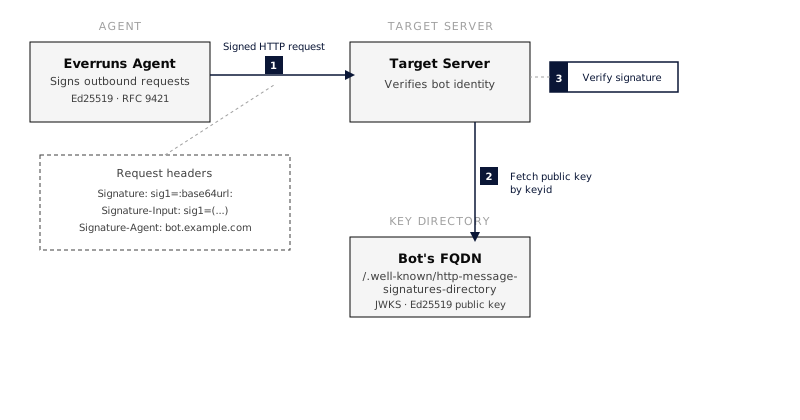
This is the abridged developer documentation for Everruns --- # Everruns Documentation > Tutorials, how-to guides, reference, and explanation for building and operating Everruns agents. Source: Everruns is a **durable agentic harness engine** built on Rust. It provides APIs for managing agents, sessions, and long-running tasks, with real-time SSE event streaming and PostgreSQL-backed durability. Build directly inside a Rust application with the [Everruns Framework](https://docs.everruns.com/framework/), or use the Platform and SDK documentation for a durable deployment and remote clients. To skip operating the Platform entirely, use the hosted edition at [Everruns Cloud](https://app.everruns.com). ## What kind of help do you need? The documentation is organised by what you’re trying to do. [Everruns Cloud](https://app.everruns.com) — Use the hosted Platform without running it yourself. Open in early access, free for now, bring your own model provider keys. [Framework](https://docs.everruns.com/framework/) — Build and run agents in a Rust process with the application-facing everruns crate. [Learn — Tutorials](https://docs.everruns.com/tutorials/run-an-agent/) — Step-by-step lessons that end with a running agent. Start here if you're new. [Do — How-to guides](https://docs.everruns.com/how-to/) — Task-oriented recipes for common problems. Use these when you know what you want to build. [Understand — Explanation](https://docs.everruns.com/explanation/) — Background and design rationale. Read these when reference docs aren't enough on their own. [Look up — Reference](https://docs.everruns.com/api/) — API endpoints, event types, capability catalog, CLI flags, environment variables. The dry stuff. ## Getting started fast 1. Choose [Everruns Cloud](https://app.everruns.com) for the hosted Platform, the [Framework](https://docs.everruns.com/framework/) for an in-process Rust application, or [Docker Compose](https://docs.everruns.com/getting-started/docker-compose/) to run the full Platform yourself. 2. Run the [Framework quickstart](https://docs.everruns.com/framework/quickstart/) or follow the [SDK tutorial](https://docs.everruns.com/tutorials/building-agents-using-sdk/). 3. Browse [How-to guides](https://docs.everruns.com/how-to/) to do something specific. ## Popular destinations [Core concepts](https://docs.everruns.com/explanation/concepts/) — Harness, agent, session, capability, event — what they are and how they compose. [Capabilities catalog](https://docs.everruns.com/capabilities/) — Every built-in capability with tools, parameters, and dependencies. [Event reference](https://docs.everruns.com/event-reference/) — Every event type in the Everruns event protocol, with payloads. [REST API reference](https://docs.everruns.com/api/) — OpenAPI-generated reference for every endpoint. [Everruns Framework](https://docs.everruns.com/framework/) — Application-facing Rust agents, models, tools, sessions, events, and extension points. [SDKs](https://docs.everruns.com/features/sdk/) — Official client libraries for Rust, Python, and TypeScript. [CLI](https://docs.everruns.com/features/cli/) — Command-line interface for managing agents, sessions, and conversations. [Architecture](https://docs.everruns.com/explanation/architecture/) — Control plane, workers, durable execution — and why. [Environment variables](https://docs.everruns.com/sre/environment-variables/) — Every configuration knob for the control plane and workers. ## More features [Agent triggers](https://docs.everruns.com/features/agent-triggers/) — Wake an agent on a recurring schedule and inspect its runs. [Session participants](https://docs.everruns.com/features/session-participants/) — Invite agents into a shared session and address one for a turn. [Agent and user memory](https://docs.everruns.com/features/memory-scopes/) — Learn the persistence, mount paths, and privacy rules for scoped memory. --- # Author an agent blueprint > Contribute a code-defined specialist agent from a capability, with a typed configuration contract the spawn path enforces Source: An **agent blueprint** is a code-defined specialist agent: a baked-in prompt, a set of private tools, a model-selection strategy, an iteration bound, and a narrow configuration surface. A host agent delegates to it through the ordinary [sub-agents](https://docs.everruns.com/capabilities/sub-agents/) tool without gaining access to its internals. Reach for a blueprint when work needs different tools, instructions, or model economics than the parent agent — repository scouting, catalog benchmarking, any job where the parent should get the answer without carrying the tools that produced it. Blueprints are not persisted user-created agents; they ship with a capability and are available wherever that capability is enabled. ## Contribute the blueprint A capability contributes blueprints by implementing `agent_blueprints()`. The returned `AgentBlueprint` carries everything the child runtime needs: ```rust fn agent_blueprints(&self) -> Vec { vec![AgentBlueprint { id: "repo_scout", name: "Repo Scout", description: "Search repositories for code, files, and issues. \ Read-only agent for codebase exploration.", model: BlueprintModel::Fixed("claude-haiku-4-5-20251001".to_string()), system_prompt: REPO_SCOUT_PROMPT, tools: vec![Box::new(SearchCodeTool), Box::new(ReadFileTool)], max_turns: Some(15), config_schema: Some(json_schema_for::()), }] } ``` The `description` is what a parent agent reads when deciding whether to delegate, so write it as a routing decision: what the blueprint is for, and when to pick it. `model` chooses one of three strategies. `Fixed` pins a model the host cannot override, which suits specialist work with a known cost/quality target. `Default` names a model the validated config may override. `Inherit` takes the parent’s model, for work that genuinely needs the parent’s characteristics. Tools listed here are **private**. They are instantiated only for the blueprint’s own child session and never appear in the host agent’s tool list. ## Define configuration as a type Derive the config schema from a Rust struct rather than writing JSON by hand. The struct is the single source of truth: field set, bounds, defaults, and descriptions all reach the spawning agent from one place. ```rust use everruns_capability::json_schema_for; use everruns_capability::schemars::JsonSchema; use serde::{Deserialize, Serialize}; /// The same ceiling the search tools apply to their own arguments. const MAX_REPOS: u32 = 50; /// Configuration for the repository scout. #[derive(Debug, Clone, Serialize, Deserialize, JsonSchema)] #[serde(deny_unknown_fields, default)] #[schemars(crate = "everruns_capability::schemars")] pub struct RepoScoutConfig { /// Maximum number of repositories to scan. #[schemars(range(min = 1, max = MAX_REPOS))] pub max_repos: u32, } impl Default for RepoScoutConfig { fn default() -> Self { Self { max_repos: 10 } } } ``` Three habits keep the contract honest: * **Express each bound once.** Write it as a constant shared by the schema attribute and the code that enforces it at runtime, so a schema edit cannot drift from the clamp it describes. * **Write doc comments for the caller.** They become the schema descriptions the spawning agent reads. Implementation notes belong in ordinary `//` comments. * **Close the object** with `deny_unknown_fields` unless the blueprint genuinely accepts open configuration. Requiring configuration is a matter of leaving a field without a default: fields serde cannot default become `required` in the derived schema, and the spawn path rejects a call that omits them. ## What the spawn path enforces Configuration is validated against the derived schema **before** a child session exists, so a declared bound constrains the host rather than merely advising the model. A spawn is rejected when: * a value violates the schema — out of range, wrong type, missing a required property; * the config carries a key the schema does not define (with `deny_unknown_fields`); * the blueprint declares no schema at all but config was supplied. The error returned to the calling agent names the violations and includes the schema, so a model can usually correct its own call and retry. Validation governs what a **host** may configure. It is not a substitute for a tool checking its own arguments: keep the runtime clamps in the blueprint’s tools, so a misbehaving child agent stays inside the same envelope. Configuration can only select behavior the blueprint intentionally exposes. It cannot replace the system prompt, inject tools, bypass model policy, or expand capability permissions. ## Delegation and lifetime A spawned blueprint session is a real durable session. It takes part in the same message, event, task, workspace, cancellation, and recovery infrastructure as any other sub-agent; the difference is only how its runtime is assembled. The session persists the blueprint identity and its validated config, so a worker can reconstruct the same runtime after a retry or handoff. The blueprint itself stays a stateless template. Follow-ups address the durable session, not the blueprint. ## Worked examples Two blueprints ship in-tree and are worth reading as references: * [`integrations/github/src/lib.rs`](https://github.com/everruns/everruns/blob/main/integrations/github/src/lib.rs) — the minimal case: one config field, a pattern constant shared with the runtime check that enforces it. * [`integrations/openrouter/src/model_scout.rs`](https://github.com/everruns/everruns/blob/main/integrations/openrouter/src/model_scout.rs) — the fuller case: numeric bounds tied to runtime constants, a nested config type, and a spend budget. ## Related * [Sub-agents](https://docs.everruns.com/capabilities/sub-agents/) — the delegation tool blueprints are invoked through * [GitHub Scout](https://docs.everruns.com/capabilities/github-scout/) — a shipped blueprint from the caller’s side --- # Budgets > Cap session spending in dollars, tokens, or custom credits, with soft pause thresholds and automatic enforcement. Source: Budgets let you cap how much a session (or agent, user, or organization) can spend. When a session hits its budget, Everruns stops scheduling further LLM calls. This prevents runaway costs from long-running or misbehaving agents. ![Budget Structure](https://docs.everruns.com/_astro/budget-structure.Co0JWPRZ_Z1X89MI.svg) ## How It Works After every LLM generation, Everruns computes the cost and debits it from any active budgets for that session. In subagent trees, session-scoped budgets are shared at the root session, so child and grandchild turns spend from the same pool. If the balance reaches zero, the session stops. 1. **LLM call completes**: Everruns extracts token counts (input + output). 2. **Compute debit**: Converts tokens to the budget’s currency: * `usd`, uses per-model pricing (cost per million tokens for input/output) * `tokens`, raw token count * `credits`, 1 credit = 1,000 tokens * Custom currencies fall back to token count 3. **Debit ledger**: Appends an immutable ledger entry and updates the balance. 4. **Evaluate rules**: Checks thresholds: * Balance at 20% of limit → warning event * Spending exceeds soft limit → session pauses * Balance reaches zero → session stops Enforcement is **post-hoc**: the check runs after each LLM call, not before. This avoids blocking the hot path. The last generation may slightly overshoot the limit, this is expected and by design. ## Currencies | Currency | Unit | How cost is calculated | | --------- | ----------------------- | ----------------------------------------------------------------------------- | | `usd` | US dollars | Per-model pricing from model profiles (input/output rates per million tokens) | | `tokens` | Raw tokens | Direct count of input + output tokens | | `credits` | 1 credit = 1,000 tokens | Token count divided by 1,000 | | Custom | Any string | Falls back to raw token count | USD budgets use real per-model pricing. A $10 budget on GPT-4o will last much longer than $10 on Claude Opus, because the per-token cost differs. ## Soft Limits and Pausing A **soft limit** pauses the session before hitting the hard stop. This is useful in interactive sessions where a human can decide to top up or stop. 1. Spending exceeds `soft_limit` → budget status becomes `paused` 2. The worker detects the pause between atoms → stops scheduling the next LLM call 3. Session transitions to `paused` state 4. User can resume by increasing the limit, topping up, or calling the resume endpoint For headless sessions (no human watching), the hard limit fires at balance zero and terminates the turn. ## Stacked Budgets Multiple budgets can apply to the same session. The **most restrictive** budget wins. This lets you combine different types of limits: * A **$10 USD session budget** caps dollar cost * A **2M token budget** caps total token usage regardless of model pricing Budget stacking is enforced across the session hierarchy: root session, app channel, app, agent, user, and organization. The most restrictive matching budget wins. ## CLI Usage Set a budget when creating a session: ```bash # $10 USD budget (currency defaults to usd) everruns sessions create --budget-limit 10 # Explicit currency everruns sessions create --budget-limit usd:10 # With soft limit — pauses at $8, hard stop at $10 everruns sessions create --budget-limit usd:10 --budget-soft-limit usd:8 # Token budget everruns sessions create --budget-limit tokens:2000000 # Stacked — both limits, whichever hits first everruns sessions create --budget-limit usd:10 --budget-limit tokens:2000000 ``` ## MCP Usage The `agent_run` MCP tool accepts budget parameters directly: ```json { "name": "agent_run", "arguments": { "message": "Analyze this codebase", "agent_id": "agent_abc123", "budget_limit": 10.00, "budget_currency": "usd", "budget_soft_limit": 8.00 } } ``` Budget operations are also available as catalog commands via the `execute` tool: ```bash # Create a budget for an existing session create_budget --subject_type session --subject_id ses_xxx \ --currency usd --limit 10 --soft_limit 8 # Check a session's budget status check_session_budgets --session_id ses_xxx # Top up an exhausted budget top_up_budget --budget_id bdg_xxx --amount 5 --description "Extra allowance" # List all budgets for a session list_session_budgets --session_id ses_xxx ``` ## API ### Budget CRUD ```plaintext POST /v1/budgets Create budget GET /v1/budgets List budgets (?subject_type=&subject_id=) GET /v1/budgets/{id} Get budget with current balance PATCH /v1/budgets/{id} Update limit / soft_limit / status DELETE /v1/budgets/{id} Soft-delete (sets status=disabled) ``` ### Budget operations ```plaintext POST /v1/budgets/{id}/top-up Add credits (negative ledger entry) GET /v1/budgets/{id}/ledger Paginated ledger entries (?limit=&offset=) GET /v1/budgets/{id}/check Check budget status ``` ### Session shortcuts ```plaintext GET /v1/sessions/{id}/budgets List budgets for this session GET /v1/sessions/{id}/budget-check Check all budgets (session + hierarchy) POST /v1/sessions/{id}/resume Resume paused budgets ``` ### Create a session budget ```bash curl -X POST https://your-instance/api/v1/budgets \ -H "Authorization: Bearer $API_KEY" \ -H "Content-Type: application/json" \ -d '{ "subject_type": "session", "subject_id": "ses_01abc...", "currency": "usd", "limit": 10.00, "soft_limit": 8.00 }' ``` ### Top up an exhausted budget ```bash curl -X POST https://your-instance/api/v1/budgets/{budget_id}/top-up \ -H "Authorization: Bearer $API_KEY" \ -H "Content-Type: application/json" \ -d '{ "amount": 5.00, "description": "Emergency top-up" }' ``` If the budget was `paused` or `exhausted` and now has positive balance, it automatically reactivates. ## Events Subscribe to budget events via SSE to react in real time: | Event | When | Key data | | ------------------ | ------------------------------- | ------------------------------------------- | | `budget.warning` | Balance at 20% of limit | `budget_id`, `balance`, `limit`, `currency` | | `budget.paused` | Spending exceeds soft limit | `budget_id`, `balance`, `soft_limit` | | `budget.exhausted` | Balance reaches zero | `budget_id`, `balance`, `limit` | | `budget.resumed` | User resumes after pause/top-up | `budget_id`, `balance`, `limit` | ## Agent Awareness The `budgeting` capability is included in the **Generic harness** by default. Any session using the Generic harness automatically gets budget-aware behavior: * The agent’s system prompt includes a “Budget Awareness” section with guidelines for efficient output when budget is constrained * The agent gets a `check_budget` tool to query remaining balance before expensive operations When budget is running low, a budget-aware agent will prioritize completing current tasks efficiently rather than exploring new directions. ## Budget Lifecycle ![Budget Lifecycle](https://docs.everruns.com/_astro/budget-lifecycle.CcFpzAwp_Z16kT5Q.svg) --- # Context Compaction > How Everruns manages LLM context windows through automatic compaction strategies, observation masking, summarization, and hierarchical memory tiers Source: Long-running agent sessions accumulate messages until they exceed the model’s context window. When that happens, the LLM rejects the request. **Context compaction** automatically reduces the conversation size so the agent can keep working without losing important information. Everruns provides multiple compaction strategies that can be combined. The default `auto` strategy cascades through all of them in order, from cheapest (free) to most expensive (LLM call), stopping as soon as the context fits. ![Context Window](https://docs.everruns.com/_astro/context-window.MRvRSZA5_Ws5VN.svg) ## How It Works Compaction operates at two points: 1. **Proactively**: before each LLM call, Everruns estimates the token count. If it exceeds a configurable budget threshold (default 85% of the model’s context window), compaction runs *before* the call is made. This avoids the latency of a failed request. 2. **Reactively**: if the LLM still returns a `RequestTooLarge` error (estimation can undercount), the compaction cascade runs and the request is retried automatically. In both cases, the same cascade of strategies executes: ![Compaction Cascade](https://docs.everruns.com/_astro/compaction-cascade.CHRb7Otd_Z2dF1WF.svg) The UI shows a divider between messages whenever compaction happens: > **Context compacted** · 142 → 38 messages · observation\_masking+summarization Click the divider to see the cascade details, which strategies ran, how many messages each step produced, and the time taken. ## Strategies ### Auto (default) Runs all strategies in order. Stops as soon as context fits. This is the recommended setting for most use cases. ### Observation Masking Replaces old tool outputs with compact summaries while keeping the message structure intact. This is free (no LLM call) and preserves tool call IDs for tracing. Two summary formats: | Format | Example | When to use | | -------------------- | ----------------------------------------------------------- | --------------------------------- | | `one_line` (default) | `[read_file → 47 lines, 2340 bytes]` | Most cases, minimal footprint | | `head_tail` | First 3 lines + `... (14 lines omitted) ...` + last 3 lines | When partial output context helps | The most recent N tool outputs are always kept verbatim (default: 5). ### Native Provider Compaction Delegates compaction to the LLM provider’s own endpoint. Currently supported by OpenAI’s Responses API (`/responses/compact`). When available, this can be more intelligent than generic strategies since the provider understands its own tokenization. Everruns sends either a stateful response handle or a standalone transcript to the compact endpoint, never both. The returned ordered context is encrypted at rest as a durable checkpoint and reused across later turns and process restarts. Each request combines the latest checkpoint for the exact provider/model with raw messages written after its source boundary; changing provider or model falls back to raw history. Compaction never deletes or rewrites session events. Public `context.compacted` events contain only counts, timing, strategy, and an optional checkpoint identifier. Provider-native encrypted context remains confined to the internal provider and storage paths. ### Summarization Uses an LLM to generate a structured summary of older messages. The summary replaces those messages in context and is wrapped in `[CONVERSATION_SUMMARY]` tags so subsequent compactions can re-summarize it. You can configure: * Which model to use (default: same as the agent) * What information to preserve (decisions, files modified, errors, etc.) * Custom instructions appended to the summarization prompt ### Aggressive Trim Last resort. Drops the oldest messages to fit within the token budget. The system prompt and the most recent messages are always preserved. This is lossy, dropped messages cannot be recovered unless Infinity Context is enabled. ## Generic Harness Defaults The built-in **Generic** harness enables both `compaction` and `infinity_context` by default. Together they keep long sessions unbounded without manual configuration. | Capability | Role | Default in Generic | | ---------------------- | ------------------------------------------------------------------------------------------------------------- | ----------------------------------------------------------- | | **Infinity Context** | Limits how many messages are loaded from the database into the prompt; provides `query_history` for retrieval | `context_budget_tokens: 100000`, `min_recent_messages: 10` | | **Context Compaction** | Reduces the size of messages that *are* in the prompt, masking tool outputs, summarizing, or trimming | `strategy: auto`, `proactive: true`, `budget_percent: 0.85` | The flow for a long-running Generic session: ![Compaction Session Flow](https://docs.everruns.com/_astro/compaction-session-flow.CE_nRiHo_1TFtua.svg) No configuration is needed, creating a session with the Generic harness gives you this behavior out of the box. To customize, override either capability’s config on the agent or session level. ## Configuration Compaction is a capability configured per agent or harness via `AgentCapabilityConfig`. ### Default (auto strategy, proactive) ```json { "capabilities": ["compaction"] } ``` ### Custom strategy and budget ```json { "capabilities": [ { "ref": "compaction", "config": { "strategy": "auto", "proactive": true, "budget_percent": 0.85 } } ] } ``` ### Observation masking only (no LLM calls) ```json { "capabilities": [ { "ref": "compaction", "config": { "strategy": "observation_masking", "observation_masking": { "keep_recent_tool_outputs": 10, "summary_format": "head_tail" } } } ] } ``` ### Summarization with a cheaper model ```json { "capabilities": [ { "ref": "compaction", "config": { "strategy": "summarization", "summarization": { "model": "claude-haiku-4-5-20251001", "preserve": ["decisions", "files_modified", "errors", "api_keys"], "instructions": "Focus on architecture decisions and API contract changes" } } } ] } ``` ### Full configuration with memory tiers ```json { "capabilities": [ { "ref": "compaction", "config": { "strategy": "auto", "proactive": true, "budget_percent": 0.80, "observation_masking": { "keep_recent_tool_outputs": 5, "summary_format": "one_line" }, "summarization": { "model": null, "preserve": ["decisions", "files_modified", "errors", "current_plan"], "instructions": null }, "memory_tiers": { "hot_messages": 20, "warm_messages": 100 } } } ] } ``` ## Configuration Reference ### Top-level | Field | Type | Default | Description | | ---------------- | ------- | -------- | -------------------------------------------------------------------------------- | | `strategy` | string | `"auto"` | Compaction strategy: `auto`, `native`, `observation_masking`, or `summarization` | | `proactive` | boolean | `true` | Compact before hitting context limits (recommended) | | `budget_percent` | float | `0.85` | Trigger proactive compaction at this fraction of the context window | For `auto` and `native`, proactive pressure invokes provider-native compaction when the driver supports it and stores the result as a durable checkpoint. The driver’s effective model context window takes precedence over the built-in profile, so external drivers can report their actual limit. Stateful `previous_response_id` requests skip local proactive pressure checks because their request body is only a delta over provider-held context; reactive too-large recovery remains available. A native result must materially reduce provider-reported tokens, or serialized bytes when token usage is unavailable: at least 5%, with a 32-unit floor for small measurements. Smaller results do not install or replace a checkpoint and do not emit `context.compacted`. A newly installed checkpoint is not proactively replaced again until a meaningful raw-message suffix has accumulated. Failed and no-op native attempts are also held behind a retry watermark until estimated input grows by both 4,096 tokens and 5%, avoiding repeated compact calls against the same source. Branch and rollback selection ignore watermarks from a different transcript lineage. When it is re-armed, the next native compact request preserves the prior opaque checkpoint items in order before appending that suffix, for both proactive and reactive compaction. ### Observation Masking | Field | Type | Default | Description | | -------------------------- | ------- | ------------ | ---------------------------------------------------------- | | `keep_recent_tool_outputs` | integer | `5` | Number of recent tool outputs to keep verbatim | | `summary_format` | string | `"one_line"` | How to summarize masked outputs: `one_line` or `head_tail` | ### Summarization | Field | Type | Default | Description | | -------------- | -------------- | ----------------------------------------------------------- | --------------------------------------------------------- | | `model` | string \| null | `null` | Model for summarization. Null = same as the agent’s model | | `preserve` | string\[] | `["decisions", "files_modified", "errors", "current_plan"]` | Information categories to preserve in summaries | | `instructions` | string \| null | `null` | Custom instructions appended to the summarization prompt | ### Memory Tiers | Field | Type | Default | Description | | --------------- | ------- | ------- | --------------------------------------------------------------- | | `hot_messages` | integer | `20` | Recent messages kept verbatim (full content) | | `warm_messages` | integer | `100` | Older messages with observation masking applied to tool outputs | Messages beyond hot + warm are in the **cold tier**: replaced with a conversation summary. If [Infinity Context](https://docs.everruns.com/capabilities/infinity-context/) is enabled, cold-tier messages remain queryable via `query_history`. ## Memory Tier Diagram ![Memory Tiers](https://docs.everruns.com/_astro/memory-tiers.DavDwkfC_Z16HEh7.svg) ## Combining with Infinity Context Compaction and [Infinity Context](https://docs.everruns.com/capabilities/infinity-context/) are complementary: * **Infinity Context** limits how many messages are loaded from the database into the prompt, and provides `query_history` for retrieval. * **Compaction** reduces the size of messages that *are* in the prompt, making tool outputs smaller, summarizing old turns, or trimming when nothing else works. For long-running sessions, enable both: ```json { "capabilities": [ "infinity_context", { "ref": "compaction", "config": { "strategy": "auto", "proactive": true } } ] } ``` With both active, the flow is: 1. Infinity Context limits messages loaded (e.g., last 100 messages) 2. Compaction masks old tool outputs in those messages 3. If still over budget, summarization or trim kicks in 4. Cold-tier messages remain accessible via `query_history` ## Events Compaction emits two SSE events: | Event | When | Key fields | | -------------------- | ------------------------------------- | ----------------------------------------------------------------------------------------------------------------------------------------------------- | | `context.compacting` | Semantic compaction starts | `reason` (proactive\_budget, request\_too\_large, manual), `strategy`, `messages_before`, optional `tokens_before` / `bytes_before` | | `context.compacted` | Material semantic reduction completes | `strategy_used`, `messages_before`, `messages_after`, optional before/after token or byte metrics, `duration_ms`, `steps[]`, optional `checkpoint_id` | Each step in the cascade is recorded with its strategy name, resulting message count, and duration. Provider-encrypted native compact content is never included in these public events. Observation masking alone remains an outbound model-view optimization and does not emit `context.compacted` because it installs no semantic checkpoint. ## Best Practices * **Start with defaults.** The `auto` strategy with `proactive: true` handles most cases well. * **Lower `budget_percent`** (e.g., 0.70) if your agents use large tool outputs frequently, this gives more headroom before the context fills. * **Increase `keep_recent_tool_outputs`** if your agent often references recent tool results across multiple turns. * **Use a cheaper model for summarization** (e.g., Haiku) to reduce cost and latency when the summarization step runs. * **Enable Infinity Context** alongside compaction for sessions that run for hours or days. * **Customize `preserve`** to match your agent’s domain, if your agent tracks database schemas or API contracts, add those to the preserve list. ## See Also * [Infinity Context](https://docs.everruns.com/capabilities/infinity-context/), Message history windowing and retrieval * [Capabilities Overview](https://docs.everruns.com/capabilities/), How capabilities are configured * [Harnesses](https://docs.everruns.com/features/harnesses/), Where capability configs are applied * [Events](https://docs.everruns.com/features/events/), SSE event streaming reference --- # Embedding Everruns > Choose between the application-facing Framework and low-level host composition. Source: For an application that runs agents in its own Rust process, start with the [Everruns Framework](https://docs.everruns.com/framework/) and the `everruns` crate. Its offline [quickstart](https://docs.everruns.com/framework/quickstart/) needs no server, worker, database, network, or credentials. Low-level embedding is for applications that are themselves execution hosts: servers, evaluation harnesses, research runtimes, or specialized systems that must replace backend stores, platform definitions, or orchestration phases. Those hosts compose `everruns` with `everruns-host` and the focused crates they need. The useful low-level boundary, security obligations, and crate-selection guidance now live in [Custom backends](https://docs.everruns.com/framework/custom-backends/). --- # ID Schema > How Everruns formats and validates public resource identifiers, Stripe-style prefixed IDs. Source: Every resource in the Everruns API, agents, sessions, skills, knowledge bases, and so on, is identified by a **prefixed public ID**. The prefix tells you at a glance what kind of resource you are looking at; the suffix is an opaque 32-character token. This pattern was popularized by Stripe (`cus_`, `sub_`, `pi_`). Treat the suffix as a meaningless string, do not parse it, sort by it, or infer information from it. The only guarantees the API makes about an ID are its format, its uniqueness within an organization, and its stability over the lifetime of the resource. ## Format All resource identifiers use the same shape: ```plaintext {prefix}_{32-hex-chars} ``` * `{prefix}` is a short lowercase token that identifies the resource type (for example `agent`, `session`, `skill`). * `_` separates the prefix from the suffix. * `{32-hex-chars}` is an opaque 32-character lowercase hexadecimal token. Example: ```plaintext agent_5c7f3a91b24e48d6a0e91f3b7c4d2e85 ``` Identifiers match a fixed pattern: the resource’s prefix, an underscore, then exactly 32 lowercase hexadecimal characters. For an `agent`, the literal regex is `^agent_[0-9a-f]{32}$`. The API rejects malformed values with `400 Bad Request`. ## Treat the suffix as opaque The suffix carries no public meaning. In particular: * **Do not sort by it.** Use `created_at` (or whatever timestamp field the resource exposes) for chronological ordering. * **Do not infer age, ordering, or shard placement from it.** The encoding may change without notice. * **Do not parse it as a UUID.** The hex format is a transport convenience; future resources may use different internal schemes while keeping the same wire format. This decoupling is intentional. The internal database key for a resource and its public ID are deliberately separate concepts, clients only ever see the public ID. ## Client-Supplied IDs For resources that accept client-supplied IDs on create, you can pass your own `id` as long as it matches the format above and uses the correct prefix for the resource type. If you omit `id`, the server assigns one. A subset of resources additionally expose `PUT /v1/{resource}/{id}` as an upsert: the same call creates the resource if it does not exist (`201 Created`) and updates it in place if it does (`200 OK`). Where supported, this makes idempotent provisioning straightforward, replay the same `PUT` and the end state is identical. The OpenAPI reference is the source of truth for which resources support this; not every resource has a `PUT` route. ## Serialization IDs are always serialized as JSON strings. The field name is `id` for the resource itself and `{resource}_id` when referenced from another resource: ```json { "id": "agent_5c7f3a91b24e48d6a0e91f3b7c4d2e85", "session_id": "session_2b8a4d12c673491fae058b7d9c1f6a40" } ``` ## Prefix Reference The prefix is part of the public contract for each resource. The most common ones are listed below; the canonical list lives in the OpenAPI specification. The prefix in the table below is the token that appears before the `_` separator, an `agent` resource has IDs that start with `agent_`. | Resource | Prefix | | -------------- | ---------- | | Agent | `agent` | | Agent version | `agentver` | | Session | `session` | | Skill | `skill` | | Knowledge base | `kb` | | Memory | `mem` | | MCP server | `mcp` | | Schedule | `sched` | | Image | `img` | | User | `user` | | Organization | `org` | ## Design Notes | Question | Answer | | ------------------------------------ | ----------------------------------------------------------------------------------------------------------------------------------------------------------------------------------------------------------------------------------- | | Why prefixed IDs? | They make IDs self-describing and prevent accidentally passing, say, an agent ID where a session ID is expected. | | Why opaque suffixes? | Decoupling the wire format from internal storage gives the platform room to evolve without breaking clients, and prevents callers from leaning on accidental properties (ordering, creation time) that aren’t part of the contract. | | Why lowercase hex? | Case-insensitive matching, URL-safe, easy to copy and paste. | | Are IDs unique across organizations? | Each ID is unique within its owning organization. The same `id` value could in principle appear in two different orgs, but you only ever see IDs scoped to orgs you belong to. | --- # Memory model > How Workspace and Memory relate, the two-tier model for what an agent can read and write. Source: Everruns separates **where the agent works** from **what the agent remembers across runs**. That split is the whole memory model: * **Workspace**: the active working area for a session. Per-run, singleton, ephemeral by default. Mounted at `/workspace`. * **Memory**: org-scoped, named stores. Durable, governed, mountable into Workspaces. RO by default. These two tiers are intentional. Workspace is where an agent does its current task; Memory is where the org persists state it wants reused across tasks. For the shipped organization, agent, and user ownership tiers, including the private `/memory/user` and automatic `/memory/agent` mounts, see [Agent and user memory](https://docs.everruns.com/features/memory-scopes/). ## The two-axis grid Scope × surface, with the same surfaces appearing on both sides: ```text SESSION ORG (Workspace — per run) (Memory — durable, shared) ┌────────────────────────┬────────────────────────┐ Files │ workdir, scratch │ shared docs, code │ ├────────────────────────┼────────────────────────┤ Tables │ session SQL db │ shared datasets (TBD) │ ├────────────────────────┼────────────────────────┤ KV │ run state, notes │ facts, prefs (TBD) │ ├────────────────────────┼────────────────────────┤ Secrets │ per-run creds │ org credentials (TBD) │ └────────────────────────┴────────────────────────┘ ``` Today only the **Files** surface exists on both sides; Tables exist on the Workspace side (session SQL DB). Tabular, KV, secrets, and structured surfaces on Memory are durable design intent, see `knowledge/runtime-resources/memory.md`. ## Org → Session: Mount A Memory does not enter a Workspace automatically. The `memory` capability declares which Memories are mounted, where, and with what access mode. ```text ORG MEMORIES (named, many) ┌──────────────┬──────────────┬──────────────┐ │ mem:crm │ mem:legal-kb │ mem:pricing │ ... └──────┬───────┴──────┬───────┴──────┬───────┘ │ │ │ per-mount RO | RW ▼ ▼ ▼ ┌─────────────────────────────────────────┐ │ SESSION WORKSPACE │ │ │ │ /workspace ← native files │ │ /workspace/mnt/... ← Memory mounts │ └─────────────────────────────────────────┘ ``` A Memory can be mounted into any number of sessions concurrently. The mount is snapshotted at session creation, so later archival or rename of the Memory does not destabilize a running session. ## Session-eye view What the running agent actually sees: ```text SESSION WORKSPACE (one run) ┌────────────────────────────────────────────────────────┐ │ │ │ NATIVE (lives and dies with the session) │ │ ┌──────────┬──────────┐ │ │ │ files │ tables │ │ │ │ /workspace session SQL db │ │ └──────────┴──────────┘ │ │ │ │ MOUNTED (projected from org Memories) │ │ ┌────────────────────────────────────────────────┐ │ │ │ /workspace/mnt/docs ← mem:design [ro] │ │ │ │ /workspace/mnt/orders ← mem:crm [rw] │ │ │ │ /workspace/mnt/legal ← mem:legal-kb [ro] │ │ │ └────────────────────────────────────────────────┘ │ └────────────────────────────────────────────────────────┘ ``` The same tools (`read_file`, `list_directory`, `grep_files`, `bashkit_shell`) traverse native and mounted paths uniformly. Writes to read-only mounts return clear errors; writes to read-write mounts write through to the underlying Memory and are audited. ## Why two tiers, not one A single “everything is Memory” abstraction was considered and rejected for two reasons: 1. **Lifecycle and governance differ.** Workspace files are intermediate, agents probe, edit, discard. Memory is durable shared state with audit, lifecycle (active/archived/deleted), and trust boundaries. Forcing one set of policies on both was wrong for both. 2. **Naming clarity.** “Memory” anthropomorphizes what the agent recalls across tasks. “Workspace” describes the desk it’s working on. Mixing the two names (“session memory” vs “org memory”) forced every sentence to carry a qualifier. External validation: Anthropic’s Claude Managed Agents settled on essentially the same split, workspace files (per-run) plus Memory Stores (`/mnt/memory/`, durable, named, RO/RW mountable). The terminology in this doc mirrors that convention deliberately. ## Invariants * **Scope.** Sessions cannot see other sessions. Memories are the only sharing point. * **Default access.** Memory mounts default to read-only. Read-write is explicit and audited. * **Snapshot mounts.** Mount config is captured at session creation. Archiving a Memory after that surfaces an error rather than disappearing files. * **Source-backed Memories are read-only.** Memories synced from GitHub/Git cannot be mounted read-write; their contents are replaced atomically on sync. * **Indexes are not surfaces.** Vector search or embeddings are an index *over* a surface, not a new surface. Surfaces are addressable storage. ## What is *not* Memory These exist in Everruns but live outside this model: * **Transcripts and events**: the conversation history is the session’s append-only log, not a memory surface. * **Sandboxes**: managed compute environments (`knowledge/runtime-resources/session-sandbox.md`) are a separate primitive from storage. * **Knowledge Bases** (`knowledge/runtime-resources/knowledge-bases.md`), curated entries with stable citation IDs, agent reads via `search_knowledge`. Likely folds into a future “structured” surface of Memory; today it stays separate. ## Mapping to other systems | Concept | Everruns | Claude Managed Agents | Letta / MemGPT | | ---------------------------- | ------------------------- | --------------------- | --------------- | | Per-run scratch | Workspace | Memory Tool | Working memory | | Durable named store | Memory | Memory Store | Archival memory | | Mount access control | RO / RW per mount | RO / RW per attach | n/a | | Background consolidation | , | Dreaming | Reflection | | Multi-surface (files/tables) | Files today; more planned | Files only | Text blocks | ## Further reading * [Agent and user memory](https://docs.everruns.com/features/memory-scopes/), scoped memory mounts, access, and privacy defaults * [`knowledge/runtime-resources/memory.md`](https://github.com/everruns/everruns/blob/main/knowledge/runtime-resources/memory.md), durable design intent for the Memory tier * [`knowledge/runtime-resources/workspace.md`](https://github.com/everruns/everruns/blob/main/knowledge/runtime-resources/workspace.md), Workspace specification (file surface, mount point, git VCS) * [`knowledge/runtime-resources/knowledge-bases.md`](https://github.com/everruns/everruns/blob/main/knowledge/runtime-resources/knowledge-bases.md), curated org knowledge, the curation-first sibling of Memory --- # Network Access Control > Control which hosts and URLs agents can reach using layered allowlists and blocklists on harnesses, agents, and sessions Source: By default, agents with the `web_fetch` capability can access any public URL. **Network access lists** let you restrict which hosts and URLs an agent can reach, giving you fine-grained control over outbound network access. Access lists are configured at three levels, harness, agent, and session, and each layer can only make access *more* restrictive, never less. ## Configuration A network access list has two fields: | Field | Purpose | Default | | --------- | ---------------------------------------------- | --------------------- | | `allowed` | If non-empty, only matching URLs are permitted | `[]` (no restriction) | | `blocked` | Always denied, even if matched by `allowed` | `[]` | ### Pattern Format Patterns support three formats: | Format | Example | Matches | | --------------- | ----------------------------- | ------------------------------ | | Exact domain | `api.example.com` | Any URL on that exact domain | | Wildcard domain | `*.example.com` | The domain and all subdomains | | URL prefix | `https://api.example.com/v1/` | URLs starting with that prefix | Domain matching is case-insensitive. Blocked patterns always take precedence over allowed patterns. ### API Examples Set a network access list when creating or updating an agent: ```json POST /v1/agents { "name": "Research Agent", "system_prompt": "You are a research assistant.", "network_access": { "allowed": ["*.github.com", "api.openai.com"], "blocked": ["evil.example.com"] } } ``` Restrict a specific session further: ```json POST /v1/sessions { "agent_id": "agent_...", "network_access": { "blocked": ["internal.corp"] } } ``` To clear a network access list on update, send an empty object: ```json PATCH /v1/agents/{id} { "network_access": {} } ``` ## Layer Merging Network access lists merge across three layers using restrictive semantics, each layer can only narrow what the parent allows: ```plaintext Harness (baseline) ∩ Agent (can only restrict further) ∩ Session (can only restrict further) ``` The merge rules: | Field | Rule | Rationale | | --------- | ------------------------------------------------------------------------ | ------------------------------------------------- | | `allowed` | **Intersection**: child entries kept only if covered by a parent pattern | Child cannot grant access the parent didn’t allow | | `blocked` | **Union**: all blocked patterns combined | Child cannot un-block a parent’s block | If a child layer doesn’t set `allowed`, it inherits the parent’s list unchanged. ### Example Given this configuration: ```plaintext Harness: allowed: ["*.github.com", "*.openai.com"] Agent: allowed: ["api.github.com"], blocked: ["evil.com"] Session: blocked: ["malware.github.com"] ``` The effective policy for the session is: * **Allowed**: `["api.github.com"]`, kept because it’s a subset of `*.github.com`; `*.openai.com` dropped because the agent didn’t include it * **Blocked**: `["evil.com", "malware.github.com"]`, union of all layers Only `api.github.com` is reachable, and both `evil.com` and `malware.github.com` are explicitly denied. ### Harness Inheritance If a harness inherits from a parent harness (via `parent_harness_id`), the network access list is merged through the inheritance chain before any agent or session layer is applied. The same intersection/union rules apply. ## Enforcement The merged network access list is checked in `web_fetch` before every HTTP request. If a URL doesn’t match the effective policy, the tool returns an error: ```plaintext URL blocked by network access policy: https://blocked-domain.com/path ``` Standard SSRF protections (blocking private IPs, loopback, cloud metadata endpoints) are always enforced regardless of the network access list. ## Capabilities Affected | Capability | Enforced | Notes | | --------------- | -------- | --------------------------------------------- | | `web_fetch` | Yes | Checked before every HTTP request | | `bashkit_shell` | N/A | No network builtins (curl/wget not available) | --- # Physical Architecture > The physical components that make up an Everruns deployment, control plane, workers, PostgreSQL, NATS JetStream, Valkey, and the reverse proxy, and how they fit together. Source: The [getting-started architecture](https://docs.everruns.com/getting-started/architecture/) page describes the *logical* shape of Everruns: a control plane, a worker tier, and a shared database. This page goes one level deeper and describes the *physical* components an operator actually deploys, what each one is for, when it is optional, and how data flows between them. ![Physical Architecture](https://docs.everruns.com/_astro/physical-architecture.imwAYMfQ_HhXX7.svg) ## Components at a glance | Component | Role | Required | Default port | | ---------------------- | -------------------------------------------------------------------------- | --------------------------- | ------------------------ | | Reverse proxy | TLS termination and route fan-out for `/api`, `/mcp`, `/.well-known/*`, UI | Yes (or equivalent ingress) | 443 | | Control plane (server) | REST API, SSE event streams, gRPC server for workers, owns all state | Yes | 9301 (HTTP), 9001 (gRPC) | | Worker pool | Stateless executors of the agentic loop (input → reason → act) | Yes | , (outbound only) | | PostgreSQL 17 | Durable storage for agents, sessions, events, durable task queue | Yes | 5432 | | NATS JetStream | Push-based ephemeral event delivery and task notifications | Optional | 4222 | | Valkey | Distributed sliding-window rate limiting across control-plane instances | Optional | 6379 | | Management UI | Operator interface for agent and provider configuration | Optional | , (served by proxy) | Workers never talk to PostgreSQL, NATS, or Valkey directly. Every read and write goes through the control plane’s gRPC service on port 9001. This is what lets workers run with no database credentials, no encryption keys, and no awareness of the data tier. ## PostgreSQL, the only required stateful component PostgreSQL is the single source of truth for everything Everruns persists. There is no in-memory cache that needs warming, no secondary store that needs syncing, and no analytics database to keep consistent. If you back up PostgreSQL, you back up the entire system. What lives in PostgreSQL: * Agents, sessions, messages, and durable events * The durable task queue used by the worker tier (claimed via `SKIP LOCKED`) * Encrypted LLM provider credentials, MCP server registrations, capability config * Per-session virtual filesystems, knowledge bases, and the event log used for SSE replay Operational requirements: * **PostgreSQL 17.** UUIDv7 is implemented via a custom SQL function; PG 18’s native `uuidv7()` will be adopted once it is widely available on managed services. * **Direct connection for `LISTEN/NOTIFY`.** Pooled or proxied endpoints (PgBouncer, Neon `-pooler`, RDS Proxy) interleave notification frames with query traffic. Set `DATABASE_URL` to the pooled endpoint for normal queries and `DATABASE_UNPOOLED_URL` to a direct session-scoped endpoint for listeners. Startup fails fast if the configured listener URL looks pooled. * **Pool sizing.** With `EXPECTED_INSTANCES=N` set, each instance sizes its pool so that `pool × instances` stays under 80% of `PG_MAX_CONNECTIONS`. * **Migrations.** Auto-applied on server startup via embedded sqlx migrations, protected by a PostgreSQL advisory lock so multiple control-plane instances can boot together without racing. See [`docs/sre/environment-variables.md`](https://docs.everruns.com/sre/environment-variables/) for the full list of database-related variables. ## NATS JetStream, optional push delivery NATS is not required, but turning it on materially reduces PostgreSQL write pressure and SSE tail latency for busy deployments. Without NATS, Everruns uses PostgreSQL for both storage *and* delivery: ephemeral events persist to PG and SSE clients poll PG with `LISTEN/NOTIFY` wakeups; workers are notified of new tasks the same way. This works, and it is the default. The cost is write amplification, every streaming-token delta lands in PG even though no client will ever re-read it. With `NATS_URL` set and JetStream enabled, Everruns rewires two hot paths: * **Ephemeral event delivery.** Delta events (`output.message.delta`, `reason.thinking.delta`, `tool.output.delta`, `llm.generation`) skip PostgreSQL entirely and flow only through NATS JetStream. SSE streams subscribe to per-session subjects with short-term retention. Durable events (`output.message.completed`, `turn.started`, `tool.completed`, etc.) still persist to PG so SSE reconnection via `since_id` continues to work, missed deltas are acceptable because the completed event carries the full content. * **Task notifications.** `task.available.{activity_type}` subjects replace PG NOTIFY for worker wakeup, dropping notification latency from \~30 ms to \~1 ms. NATS is fail-graceful: if the connection fails at startup, the control plane logs a warning and falls back to the PG-backed paths. Only the control plane connects to NATS, workers still talk to the server via gRPC. ## Valkey, optional distributed rate limiting Valkey is a Redis-compatible key-value store (a Linux Foundation fork of Redis). Everruns uses it for exactly one thing: sliding-window rate limiting that is coordinated across control-plane instances. When `VALKEY_URL` is not set, rate limiting falls back to an in-memory governor, accurate per-instance, but with N instances behind a load balancer a single IP can consume up to N× the intended budget. Set `VALKEY_URL` when you run more than one control-plane instance and need a shared budget. Connection details: * Accepts `redis://`, `rediss://` (TLS), `valkey://`, `valkeys://` (TLS) schemes * Uses atomic Lua scripts for sliding-window counters * **Fail-open:** if Valkey is unreachable, the rate limiter allows the request rather than rejecting traffic on a side-channel outage * Only the control plane connects to Valkey; workers do not need access ## Worker pool, no shared state Workers are the most operationally boring component in the deployment. They have: * No database connection * No encryption key * No NATS or Valkey access * No durable local state They claim a task from the control plane over gRPC, fetch the turn context in a single batched call, run the agentic loop (LLM calls, tool execution), and stream events back. If a worker crashes mid-task, the heartbeat stops, the control plane reclaims the task after 30 seconds, and another worker picks it up. Add workers for throughput; remove them to save cost. See [Worker authentication](https://docs.everruns.com/sre/runbooks/durable-mode-setup/) for the `WORKER_GRPC_AUTH_TOKEN` and optional mTLS setup that secures this internal channel. ## Reverse proxy contract A reverse proxy (or platform ingress that enforces the same routes) is mandatory in production: | Route | Destination | Notes | | ---------------- | ------------- | ----------------------------------- | | `/api/*` | Control plane | Disable proxy buffering for SSE | | `/mcp` | Control plane | Do **not** rewrite under `/api` | | `/.well-known/*` | Control plane | OAuth discovery; do **not** rewrite | | `/health` | Control plane | Health check target | | Everything else | UI | If UI is deployed; otherwise 404 | TLS terminates at the proxy. Worker gRPC traffic stays on the private network, never expose port 9001 publicly. See [`local/Caddyfile`](https://github.com/everruns/everruns/blob/main/local/Caddyfile) and [`examples/docker-compose-full.yaml`](https://github.com/everruns/everruns/blob/main/examples/docker-compose-full.yaml) for working configurations. ## Development modes The same binaries collapse into smaller deployments for local work: * **`DEV_MODE=true` (in-memory).** No PostgreSQL, no Docker. Execution runs in-process inside the server binary; the gRPC server is disabled. Data is lost on restart. Useful for UI iteration and API development. * **`just start-all` (full local).** Brings up PostgreSQL, Valkey, and NATS as local processes (no Docker required) and starts the server + worker against them. Mirrors production wiring on a single machine. * **Docker Compose.** The production-shaped topology in one machine; see [Docker Compose](https://docs.everruns.com/getting-started/docker-compose/). ## Multi-instance deployment Multiple control-plane instances can run behind a load balancer with no session affinity: | Concern | How it stays correct | | -------------------- | ----------------------------------------------------------------------------------------- | | Database connections | `EXPECTED_INSTANCES=N` divides the pool so `pool × instances ≤ 80% of PG_MAX_CONNECTIONS` | | SSE delivery | `LISTEN/NOTIFY` or NATS subjects fan out to every instance; reconnects are idempotent | | Task claiming | `SKIP LOCKED` on the durable task queue partitions work naturally | | Migrations | PostgreSQL advisory lock prevents concurrent runs | | Rate limits | Valkey-backed sliding-window counters are shared; in-memory falls back to per-instance | Workers do not require coordination, add as many as you need, in as many regions as you need, as long as they can reach the control-plane gRPC port. ## Further reading * [Architecture (Getting Started)](https://docs.everruns.com/getting-started/architecture/), the logical model * [Environment Variables](https://docs.everruns.com/sre/environment-variables/), every knob and its default * [Docker Compose](https://docs.everruns.com/getting-started/docker-compose/), a production-shaped local setup * [Custom backends](https://docs.everruns.com/framework/custom-backends/), low-level execution-host composition --- # Read Tools > Parameters, pagination, content-type defaults, and exec output retrieval for the read-category tools. Source: Agents spend most of their context window on tool results. A single `cat` of a large file can consume thousands of tokens that crowd out reasoning space. The read-category tools are built to return the part the agent asked for and nothing else. Three tools form the read category: | Tool | Purpose | | ---------------- | ---------------------------------------------------------------------------------- | | `read_file` | Read file content with offset/limit pagination and line numbers | | `grep_files` | Search file contents by regex — returns matching lines with paths and line numbers | | `list_directory` | List files and directories with metadata (size, type) | Together they implement a **search → locate → read** workflow: `grep_files` finds where something is, `read_file` reads the relevant section, and `list_directory` provides structural context. ## read\_file ### Parameters | Parameter | Type | Default | Description | | --------- | ------- | ------------ | --------------------------------------------------- | | `path` | string | *(required)* | Absolute file path (e.g., `/workspace/src/main.rs`) | | `offset` | integer | 0 | Starting line number (0-indexed) | | `limit` | integer | 2000 | Maximum lines to return | ### Response ```json { "path": "/workspace/src/main.rs", "content": "1|use std::io;\n2|use serde::Serialize;\n3|\n4|fn main() {\n...", "total_lines": 450, "lines_shown": { "start": 1, "end": 450 }, "truncated": false, "content_type": "source", "read_mode": "offset", "size_bytes": 12480, "content_hash": "sha256:a1b2c3..." } ``` Key response fields: * **`content`** — Line-numbered output in compact `N|content` format. The `N|` prefix uses minimal bytes while giving agents precise line references for edits. * **`total_lines`** — Total lines in the file. Use this to know if more content exists beyond the current window. * **`lines_shown`** — 1-based start/end of the returned window. * **`truncated`** — `true` if more content exists beyond the returned window. * **`content_type`** — Detected content type (e.g., `log`, `csv`, `minified`, `source`). Reflects the heuristic applied. * **`read_mode`** — `tail` when reading log files from the end; `offset` otherwise. * **`content_hash`** — SHA-256 hash of the file content, used by `edit_file` for compare-and-set safety. ### Content-Type Defaults When the agent doesn’t specify `offset` or `limit`, `read_file` adjusts defaults based on file extension: | Content Type | Extensions | Default Limit | Read Mode | Rationale | | ------------ | --------------------------------- | ------------- | ------------------- | ------------------------------------------------------ | | Source code | `.rs`, `.ts`, `.js`, `.py`, etc. | 2000 lines | From offset | Standard — agent usually needs context around a region | | Log files | `.log`, `.out` | 500 lines | **From end (tail)** | Errors cluster at the end — recent output matters most | | CSV/TSV data | `.csv`, `.tsv` | 100 lines | From offset | Schema + sample rows; header always included | | Config | `.json`, `.yaml`, `.yml`, `.toml` | 2000 lines | From offset | Usually need full structure | | Minified | `.min.js`, `.min.css` | 20 lines | From offset | Single-line files would blow token budgets | | Text | `.md`, `.txt`, `.rst` | 2000 lines | From offset | Standard | **Explicit parameters override only the defaults they control.** An explicit `limit` overrides the content-type default limit. An explicit `offset` does **not** change the default limit by itself; it only controls where reading starts, and for log files it disables the default tail-biased read mode in favor of reading from that offset. If both `offset` and `limit` are provided, both behaviors are explicitly controlled. For CSV files, the header row (line 1) is always included in the response, even when reading with an offset. This ensures the agent always has column names for context. ### Image and Binary Handling * **Images** (`.png`, `.jpg`, `.gif`, `.webp`) are returned as **native image content blocks**, not text. The agent sees the image directly. * **Binary files** (base64-encoded) are returned with `"encoding": "base64"` and no line formatting. * A **hard byte cap** (50 KB) acts as a safety net for pathological files like minified bundles. ## Pagination For files larger than the default window, page through with `offset` and `limit`: ```json // First read — gets lines 1-2000 { "path": "/workspace/big_file.rs" } // Response shows total_lines: 5000, truncated: true // Continue reading: { "path": "/workspace/big_file.rs", "offset": 2000, "limit": 2000 } // Gets lines 2001-4000. Continue until truncated: false. ``` The 2000-line default covers most source files entirely in a single read. For the rare cases where files are larger, the `total_lines` field tells the agent exactly how much remains. ## Keeping read results small The system prompt guides agents toward efficient reading patterns: 1. **Search before read** — Use `grep_files` to find relevant lines, then `read_file` with a targeted `offset` around the match. This avoids reading thousands of irrelevant lines. 2. **Don’t re-read** — Files already in conversation context don’t need to be read again. The agent should reference prior reads. 3. **Check `total_lines`** — When a read is truncated, the agent knows how much remains and can decide whether to continue or search within the unread portion. 4. **Use offset to continue** — After a truncated read, use `offset` to pick up where the previous read left off. ## Exec Output as Readable Files When sandbox tools (`bash`, `daytona_exec`, `e2b_exec`, etc.) produce output, the inline result is truncated based on the `output` verbosity parameter (default: `concise` \~2 KiB). But the **full output is always persisted** to the session filesystem. ### How It Works The `tool_output_persistence` capability (included in the Generic harness) writes full output before truncation: * **stdout** → `/.outputs/{tool_call_id}.stdout` * **stderr** → `/.outputs/{tool_call_id}.stderr` The truncated inline result includes metadata pointing to the persisted files: ```json { "stdout": "[truncated to 2 KiB — full output saved]", "stderr": "", "exit_code": 0, "success": true, "full_output": "/.outputs/call_abc123.stdout", "total_lines": 8450, "output_files": [ "/.outputs/call_abc123.stdout", "/.outputs/call_abc123.stderr" ] } ``` The agent can then `read_file` the persisted output selectively: ```json // Read last 100 lines of build output { "path": "/.outputs/call_abc123.stdout", "offset": 8350, "limit": 100 } ``` ### Priority-Aware Truncation When output is truncated, the system preserves error-relevant content. Lines matching error patterns (`error`, `Error`, `FAILED`, `panicked`, stack traces) are prioritized over noise like `Compiling...` or `Downloading...`. This means the inline 2 KiB concise output is more likely to contain the diagnostically useful parts. ### Output Verbosity Modes All exec tools accept an `output` parameter: | Mode | Budget | Use case | | --------- | --------- | ---------------------------------- | | `silent` | \~200 B | Fire-and-forget commands | | `concise` | \~2 KiB | Builds, installs (**default**) | | `normal` | \~8 KiB | General debugging | | `verbose` | \~16 KiB | Test failures, error investigation | | `full` | unlimited | When the agent needs every line | ## Content Hash and Edit Safety Every `read_file` response includes a `content_hash` (SHA-256). The `edit_file` tool requires this hash via its `expected_hash` parameter — if the file has changed since the read, the edit is rejected. This **compare-and-set** mechanism prevents stale edits in long conversations where the agent may have read a file many turns ago and the file has since been modified (by another tool call or external process). ```json // read_file returns content_hash { "content_hash": "sha256:a1b2c3..." } // edit_file uses it as expected_hash — rejected if file changed { "path": "/workspace/src/main.rs", "expected_hash": "sha256:a1b2c3...", "old_text": "fn main() {", "new_text": "fn main() -> Result<()> {" } ``` If an edit is rejected due to a stale hash, the agent should re-read the file to get the current content and hash, then retry the edit. ## Structural Outlines When `read_file` returns a truncated result, the response includes a **structural outline** of the unread portions — function/class/method signatures without bodies. The agent can orient itself in any file with a single partial read. ```plaintext 1|use std::collections::HashMap; 2|use serde::Serialize; ... (lines read normally) ... 100| let result = process(&input); --- Outline of lines 101-500 (not shown) --- // L105: fn process(input: &Input) -> Result { ... } // L180: fn validate(output: &Output) -> bool { ... } // L220: struct Config { ... } // L235: impl Config { ... } // L236: fn load(path: &str) -> Result { ... } // L270: fn merge(&mut self, other: &Config) { ... } // L310: #[cfg(test)] mod tests { ... } ``` ### Supported Languages | Language | Extensions | | ---------- | ----------------------------- | | Rust | `.rs` | | TypeScript | `.ts`, `.tsx`, `.mts` | | JavaScript | `.js`, `.jsx`, `.mjs`, `.cjs` | | Python | `.py` | ### What Gets Outlined * **Functions/methods** — name, parameters, return type * **Structs/classes/enums** — name * **Impl blocks / trait implementations** — with nested methods * **Modules** — including `#[cfg(test)]` detection * **Interfaces and type aliases** (TypeScript) For unsupported languages, no outline is generated — the response still works, just without structural context for unread portions. --- # Request Signing > How Everruns signs outbound HTTP requests with Ed25519 signatures per RFC 9421, enabling target servers to verify bot identity Source: When an AI agent fetches web content, the receiving server has no way to distinguish it from an anonymous scraper. **Request signing** solves this by attaching a cryptographic signature to every outbound HTTP request, letting target servers verify who is making the request and choose to grant or deny access based on that identity. Everruns implements the [Web Bot Authentication Architecture](https://datatracker.ietf.org/doc/html/draft-meunier-web-bot-auth-architecture) (draft-meunier) using Ed25519 signatures over [RFC 9421 HTTP Message Signatures](https://www.rfc-editor.org/rfc/rfc9421). ## Background ### The Problem Traditional bot identification relies on `User-Agent` strings, which are trivially spoofed. IP-based allow lists are brittle and don’t scale. There is no standard way for a web bot to prove its identity to a server. ### HTTP Message Signatures (RFC 9421) RFC 9421 defines a general mechanism for signing HTTP messages. A sender selects components of the request (method, authority, specific headers) and signs them with a private key. The signature and a description of what was signed are transmitted as structured headers: ```plaintext Signature: sig=:base64url-encoded-signature: Signature-Input: sig=("@authority");created=1735689600;expires=1735689900; keyid="JWK-thumbprint";alg="ed25519";nonce="random"; tag="web-bot-auth" ``` The receiving server reconstructs the same signature base from the request, fetches the sender’s public key, and verifies the signature. Replay attacks are prevented by the `created`/`expires` window and random `nonce`. ### Web Bot Authentication Architecture The [draft-meunier-web-bot-auth-architecture](https://datatracker.ietf.org/doc/html/draft-meunier-web-bot-auth-architecture) builds on RFC 9421 specifically for bot identification: * **Algorithm**: Ed25519 (fast, small keys, no parameter choices) * **Covered components**: `@authority` (the target domain) at minimum * **Key identity**: [JWK Thumbprint](https://www.rfc-editor.org/rfc/rfc7638) (SHA-256 hash of the canonical public key representation) * **Signature tag**: `"web-bot-auth"`, distinguishes bot-auth signatures from other uses of RFC 9421 * **Discovery**: optional `Signature-Agent` header points to a FQDN where the bot’s public keys can be found ### Key Discovery The companion [draft-meunier-http-message-signatures-directory](https://datatracker.ietf.org/doc/html/draft-meunier-http-message-signatures-directory) defines how target servers find a bot’s public keys: ```plaintext GET https:///.well-known/http-message-signatures-directory ``` This returns a [JSON Web Key Set (JWKS)](https://www.rfc-editor.org/rfc/rfc7517#section-5) containing the bot’s Ed25519 public keys. The target server uses the `kid` field to match the key against the `keyid` in the incoming signature. ![Request Signing Flow](https://docs.everruns.com/_astro/request-signing-flow.CTmPi6LM_WOQ84.svg) ## How It Works in Everruns Request signing is implemented as a server-wide feature. When enabled, **every outbound HTTP request** made by the `web_fetch` tool is signed. ### Signing (outbound) The signing pipeline is handled by [fetchkit](https://github.com/everruns/fetchkit), the library powering the `web_fetch` capability: 1. Agent calls `web_fetch` with a URL 2. fetchkit builds the HTTP request 3. If bot-auth is configured, fetchkit signs the request: * Covers `@authority` and optionally `signature-agent` * Generates a random nonce * Sets `created` and `expires` timestamps * Signs with Ed25519, attaches `Signature` and `Signature-Input` headers 4. If signing fails (clock error, etc.), the request proceeds unsigned with a warning logged, signing never blocks requests 5. The request is sent to the target server ### Key directory (inbound) Everruns serves the public key at `/.well-known/http-message-signatures-directory`. This endpoint: * Is **public** (no authentication required) * Returns a JWKS containing the server’s Ed25519 public key * Derives the key at startup from the same seed used for signing Example response: ```json { "keys": [ { "kty": "OKP", "crv": "Ed25519", "x": "base64url-encoded-public-key", "kid": "JWK-thumbprint-matching-keyid-in-signatures" } ] } ``` ### What target servers see A signed request arrives with three additional headers: | Header | Purpose | | ----------------- | --------------------------------------------------------------------------- | | `Signature` | The Ed25519 signature over the covered components | | `Signature-Input` | Describes what was signed: components, timestamps, key ID, algorithm, nonce | | `Signature-Agent` | FQDN where the bot’s public keys can be discovered (optional) | Target servers that support web-bot-auth can: 1. Extract the `keyid` from `Signature-Input` 2. Fetch the public key from the `Signature-Agent` FQDN’s well-known endpoint 3. Verify the signature 4. Apply access policies based on the verified identity Servers that don’t support it simply ignore the extra headers. ## Verifying Signatures (Server Side) If you operate a server that receives requests from Everruns agents, here’s how to verify them. ### Verification steps 1. **Check the tag**: parse `Signature-Input` and confirm `tag="web-bot-auth"`. Ignore signatures with other tags. 2. **Check timestamps**: reject if `created` is in the future or `expires` is in the past. A 5-minute clock skew tolerance is reasonable. 3. **Fetch the public key**: extract the `Signature-Agent` FQDN and fetch `https:///.well-known/http-message-signatures-directory`. Find the key matching the `keyid` from `Signature-Input`. Cache the JWKS (keys rotate infrequently). 4. **Reconstruct the signature base**: build the canonical representation per [RFC 9421 Section 2.5](https://www.rfc-editor.org/rfc/rfc9421#section-2.5) using the covered components listed in `Signature-Input`. 5. **Verify**: use Ed25519 to verify the signature against the reconstructed base and the fetched public key. ### Python example ```python import base64 import hashlib import time import httpx from cryptography.hazmat.primitives.asymmetric.ed25519 import Ed25519PublicKey def verify_bot_auth(request) -> bool: """Verify a web-bot-auth signature on an incoming request.""" # 1. Parse Signature-Input header sig_input = request.headers.get("signature-input", "") if 'tag="web-bot-auth"' not in sig_input: return False # not a bot-auth signature # Extract parameters from sig_input # sig=("@authority" "signature-agent");created=...;expires=...;keyid="...";... params = parse_signature_params(sig_input) # 2. Check timestamps now = int(time.time()) if params["created"] > now + 300 or params["expires"] < now: return False # expired or future-dated # 3. Fetch public key from Signature-Agent FQDN agent_fqdn = request.headers.get("signature-agent", "") jwks_url = f"https://{agent_fqdn}/.well-known/http-message-signatures-directory" jwks = httpx.get(jwks_url).json() key_data = next(k for k in jwks["keys"] if k.get("kid") == params["keyid"]) public_key_bytes = base64.urlsafe_b64decode(key_data["x"] + "==") public_key = Ed25519PublicKey.from_public_bytes(public_key_bytes) # 4. Reconstruct signature base (RFC 9421 Section 2.5) # Covered components are listed in parentheses in Signature-Input sig_base = build_signature_base(request, params) # 5. Verify signature = base64.b64decode( request.headers["signature"].split(":")[1] # sig=:base64: ) try: public_key.verify(signature, sig_base.encode()) return True except Exception: return False ``` ### Node.js example ```javascript import { createPublicKey, verify } from "node:crypto"; async function verifyBotAuth(request) { const sigInput = request.headers["signature-input"] || ""; if (!sigInput.includes('tag="web-bot-auth"')) return false; const params = parseSignatureParams(sigInput); // Check timestamps (5-minute tolerance) const now = Math.floor(Date.now() / 1000); if (params.created > now + 300 || params.expires < now) return false; // Fetch public key const fqdn = request.headers["signature-agent"]; const res = await fetch( `https://${fqdn}/.well-known/http-message-signatures-directory` ); const jwks = await res.json(); const jwk = jwks.keys.find((k) => k.kid === params.keyid); const key = createPublicKey({ key: jwk, format: "jwk" }); // Reconstruct signature base and verify const sigBase = buildSignatureBase(request, params); const signature = Buffer.from( request.headers["signature"].split(":")[1], "base64" ); return verify(null, Buffer.from(sigBase), key, signature); } ``` > **Note:** The `parseSignatureParams` and `buildSignatureBase` helpers follow the structured fields parsing rules from [RFC 8941](https://www.rfc-editor.org/rfc/rfc8941) and the signature base construction from [RFC 9421 Section 2.5](https://www.rfc-editor.org/rfc/rfc9421#section-2.5). Libraries like [httpbis-message-signatures](https://pypi.org/project/httpbis-message-signatures/) (Python) and [@httpbis/message-signatures](https://www.npmjs.com/package/@httpbis/message-signatures) (Node.js) handle both. ## Configuration Request signing is configured via environment variables. Set them before starting the server. ### Environment variables | Variable | Required | Default | Description | | --------------------------- | -------- | ------- | -------------------------------------- | | `BOT_AUTH_SIGNING_KEY_SEED` | yes | , | Base64url-encoded 32-byte Ed25519 seed | | `BOT_AUTH_AGENT_FQDN` | no | , | FQDN for the `Signature-Agent` header | | `BOT_AUTH_VALIDITY_SECS` | no | `300` | Signature validity window in seconds | When `BOT_AUTH_SIGNING_KEY_SEED` is not set, signing is disabled and no crypto code runs at request time. ### Generate a signing key ```bash python3 -c "import os, base64; print(base64.urlsafe_b64encode(os.urandom(32)).rstrip(b'=').decode())" ``` ### Enable signing ```bash export BOT_AUTH_SIGNING_KEY_SEED="your-base64url-seed-here" export BOT_AUTH_AGENT_FQDN="bot.yourcompany.com" ``` Then start the server. All `web_fetch` requests will be signed, and the public key will be available at `https://bot.yourcompany.com/.well-known/http-message-signatures-directory`. ### Verify it’s working ```bash # Check the key directory endpoint curl -s http://localhost:9301/.well-known/http-message-signatures-directory | jq . ``` ## Standards | Standard | Role | | ---------------------------------------------------------------------------------------------------------------------------------------- | --------------------------------------------------------------------- | | [RFC 9421, HTTP Message Signatures](https://www.rfc-editor.org/rfc/rfc9421) | Core signing mechanism, how to sign and verify HTTP requests | | [RFC 8941, Structured Field Values](https://www.rfc-editor.org/rfc/rfc8941) | Encoding format for `Signature` and `Signature-Input` headers | | [RFC 7638, JWK Thumbprint](https://www.rfc-editor.org/rfc/rfc7638) | How the `keyid` is computed from the public key | | [RFC 7517, JSON Web Key (JWK)](https://www.rfc-editor.org/rfc/rfc7517) | Format of the keys in the JWKS response | | [RFC 8037, Ed25519 in JOSE](https://www.rfc-editor.org/rfc/rfc8037) | Ed25519 key representation in JWK format | | [draft-meunier-web-bot-auth-architecture](https://datatracker.ietf.org/doc/html/draft-meunier-web-bot-auth-architecture) | Bot-specific profile of RFC 9421 (algorithm, tag, covered components) | | [draft-meunier-http-message-signatures-directory](https://datatracker.ietf.org/doc/html/draft-meunier-http-message-signatures-directory) | Well-known endpoint for public key discovery | ## See Also * [fetchkit](https://github.com/everruns/fetchkit), The library implementing the signing client --- # Tool Output Pipeline > How Everruns processes tool results from execution to the model, verbosity budgets, distillation, persistence, hard limits, and where the full output lives Source: Agents generate most of their context from **tool output**: shell commands, file reads, web fetches, SQL queries, and MCP tool calls. Left unmanaged, a single verbose command (`git diff`, a 10,000-row query, an installer log) can blow past the model’s context window, drive up cost, and bury the signal the agent actually needs. Everruns runs every tool result through a **multi-stage pipeline** that shrinks what the model sees while keeping the full original recoverable. This page explains each stage, the order they run in, and, crucially, *where the full output goes* so the agent can get it back. ## The big picture ```plaintext tool runs │ ▼ raw output ──────────────────────────────────────────────┐ │ │ (full, lossless) ▼ │ 1. Verbosity budget (exec/sandbox tools only) │ │ auto/concise/normal/verbose/full │ ▼ │ 2. Capability hooks │ │ • Tool Output Distillation (non-exec tools) │ ▼ ▼ 3. Final infrastructure hooks /outputs/ │ • Persist Output (exec tools → VFS) {tool_call_id}.stdout │ • Output Hard Limit (64 KiB ceiling) {tool_call_id}.stderr ▼ ▲ inline result → stored in the session, │ shown to the model next turn ──────────────────────┘ (read_file recovers the full original) ``` Two ideas run through the whole pipeline: 1. **Storage stays lossless.** Whatever the model sees inline, the full output is written to the session filesystem (the *destination*). The inline view always carries a pointer back to it. 2. **Each stage shrinks, none deletes.** Truncation, distillation, and masking only change the *view*. The agent can always `read_file` the persisted original. ## Stage 1, Verbosity budget (exec tools) Exec and sandbox tools (`bash`, `*_exec`, sandboxed shells) clean their output (strip ANSI, collapse carriage returns) and apply a **verbosity budget** before returning. The mode is configurable per call; the default is `auto`: * **Success (`exit_code == 0`)** → collapse to a compact summary (\~512 bytes), because the full log is persisted (Stage 3) and the agent rarely needs it inline. * **Failure (non-zero exit)** → keep a larger diagnostic window (\~8 KiB) so the error stays debuggable in-loop. The full pre-truncation output is stashed on the result as `raw_output` for the persistence hook to consume. Non-exec tools (MCP, web fetch, client tools) do **not** have a verbosity budget, that gap is what Stage 2 exists for. ## Stage 2, Tool Output Distillation (non-exec tools) [Tool Output Distillation](https://docs.everruns.com/capabilities/) targets the tools Stage 1 doesn’t: **MCP tools and `web_fetch`**, whose results otherwise enter history verbatim. It runs as a capability hook, so it executes *before* the final hooks. For a large non-exec result, distillation produces a compact, **content-aware** inline view: | Output shape | What you get inline | | ---------------- | ---------------------------------------------------------------------------- | | Large JSON array | Schema-preserving sample: the first few rows + `[… N more items elided …]` | | Long string | Head + tail window (both ends preserved), with a byte-elision marker | | Unified diff | A diffstat-style summary: file + hunk headers and `+added / -removed` counts | | Nested object | Each oversized field distilled; small fields untouched | Before it replaces anything, distillation **persists the full original** to the session filesystem (same destination as Stage 3) and injects a recovery pointer. If persistence fails, or the session has no filesystem, it restores the verbatim output rather than leave a lossy result the agent can’t recover. **Reversibility is never sacrificed.** Distillation is on by default in the **generic harness**. Every transform is deterministic, so identical output distills identically and the model provider’s prompt cache keeps hitting across turns. ## Stage 3, Persistence and the hard limit Two infrastructure hooks always run last, in order: 1. **Persist Output**: for tools that declare the `persist_output` hint (exec/sandbox), writes the full `raw_output` to the session VFS. When content is absent from the inline result, it adds a recovery pointer; complete inline results keep the retained file internal and do not invite a redundant read. It **skips** if a result already carries `output_files` (e.g. distillation already persisted it), so the two never double-write. 2. **Output Hard Limit**: a final, unremovable 64 KiB ceiling. By the time it runs, the result has usually already been budgeted or distilled, so it rarely fires; it’s a backstop against pathological cases. ## The destination, where full output lives Everything the pipeline elides is recoverable from the **session filesystem**: ```plaintext /outputs/{tool_call_id}.stdout ← full standard output /outputs/{tool_call_id}.stderr ← full standard error (when present) ``` When the inline result omits persisted content, it carries the recovery pointer in `output_files` and `full_output`, plus a human-readable note telling the model to use `read_file` (with `offset`/`limit`) for the missing detail. Complete inline output has no model-facing pointer. Persisted streams are capped at 1 MiB each. Deleting the session cascades and removes them. This is the key to aggressive shrinking: because the original is one `read_file` away, the inline view can be small without the agent losing the ability to drill in. ## How this relates to compaction The pipeline above operates on **individual tool results at capture time**. [Context Compaction](https://docs.everruns.com/advanced/compaction/) operates **later**, across the whole conversation, when it approaches the context window, masking or summarizing older messages at serialization time. They compose cleanly: * The pipeline keeps each result lean as it’s produced. * Compaction further masks older results when the *accumulated* history grows too large. * [Infinity Context](https://docs.everruns.com/capabilities/) adds a `query_history` tool to retrieve older *messages* that scrolled out of the window. Together: the pipeline controls per-result size, compaction controls total-history size, and both keep the full record recoverable. ## Summary | Stage | Applies to | Effect | Destination of full output | | ----------------- | -------------------------- | -------------------------------------------------------- | --------------------------------------------- | | Verbosity budget | exec/sandbox | Compact summary on success, diagnostic window on failure | `raw_output` → persisted in Stage 3 | | Distillation | MCP / web fetch / non-exec | Content-aware compact view | `/outputs/{id}.stdout` | | Persist Output | `persist_output` tools | Lossless write + pointer | `/outputs/{id}.{stdout,stderr}` | | Output Hard Limit | all | 64 KiB ceiling backstop | (already persisted) | The agent always sees a lean view and can always recover the full original with `read_file`. --- # Built-ins Overview > Built-in harness types and capabilities that ship with Everruns. Harnesses define session environments; capabilities add tools and behaviors. Source: Everruns ships with built-in **harness types** and **capabilities** that provide the foundation for agent sessions. ## Harnesses A harness defines the base environment for sessions, system prompt, default model, and bundled capabilities. Every session is assigned a harness. | Harness | Description | Capabilities | | ----------------------------------------------------------------------------- | ---------------------------------------- | -------------------------------------------------------------- | | [Base](https://docs.everruns.com/built-ins/harnesses/base/) | Empty harness, full control | None | | [Generic](https://docs.everruns.com/built-ins/harnesses/generic/) | Recommended default with core tools | 16 configured, including 14 user-facing defaults | | [Data Analyst](https://docs.everruns.com/built-ins/harnesses/data-analyst/) | SQL databases, charts, persistent memory | Generic + 5 data capabilities; available as a built-in example | | [Platform Chat](https://docs.everruns.com/built-ins/harnesses/platform-chat/) | Focused global operator chat | Platform + runtime safeguards | See the [Harnesses feature guide](https://docs.everruns.com/features/harnesses/) for harness selection, API management, and the prompt stack model. ## Harness Examples Harness examples are adoptable templates. Import them when you want a preconfigured starting point, then customize the resulting org-owned harness. | Example | Import Name | Description | | ------------------ | ------------------ | ----------------------------------------------------------------------------------------------------- | | Coding (Daytona) | `coding-daytona` | Generic + Daytona sandbox execution + GitHub Scout subagents for repository exploration | | Coding (Container) | `coding-container` | Generic + self-hosted container sandbox execution + GitHub Scout subagents for repository exploration | | Data Analyst | `data-analyst` | Generic + SQL databases, charts, persistent memory, and curated data knowledge | ## Capabilities Capabilities are modular units that extend what an agent can do. Each can contribute tools, system prompt additions, and UI features. Browse the full [Capabilities reference](https://docs.everruns.com/capabilities/) for the complete list organized by category. --- # Base Harness > A harness with no capabilities, leaving all session configuration to the agent or session. Source: The **Base** harness is a blank-slate starting point with no bundled capabilities. ## When to Use * Full control over which tools and behaviors are available * Testing individual capabilities in isolation * Minimal-overhead sessions where no default tools are needed ## Configuration | Property | Value | | ----------------- | ------------------------------------------ | | **Type** | `base` | | **Capabilities** | None | | **System Prompt** | ”You are a helpful assistant.” | | **Default Model** | None (inherits from agent or organization) | ## Usage Assign the Base harness when creating an agent or session: ```bash curl -X POST http://localhost:9300/api/v1/agents \ -H "Content-Type: application/json" \ -d '{ "name": "Minimal Agent", "harness_id": "", "capabilities": ["web_fetch"] }' ``` The agent’s own capabilities are added on top of the empty harness. In this example, only `web_fetch` would be available. ## See Also * [Generic Harness](https://docs.everruns.com/built-ins/harnesses/generic/), recommended default with core capabilities * [Harnesses feature guide](https://docs.everruns.com/features/harnesses/), harness selection and API management --- # Data Analyst Harness > Data analysis harness with SQL databases, persistent memory, interactive charts, and a structured analysis pipeline inspired by OpenAI's Dash. Source: The **Data Analyst** harness extends the [Generic harness](https://docs.everruns.com/built-ins/harnesses/generic/) with capabilities for data analysis: SQL databases, persistent cross-session memory, rich visualization via OpenUI, and a curated knowledge scaffold. Its system prompt implements a structured 6-step analysis pipeline inspired by [OpenAI’s Kepler data agent](https://openai.com/index/inside-our-in-house-data-agent/) and the open-source [Dash](https://github.com/agno-agi/dash) project. ## When to Use * Natural-language data analysis (ask questions, get SQL + charts) * Interactive data exploration with visualization * Agents that learn from corrections and remember them across sessions * Analytics workflows grounded in curated knowledge bases (table docs, business rules, validated SQL) ## Configuration | Property | Value | | ----------------- | ------------------------------------------ | | **Type** | `data-analyst` | | **System Prompt** | Structured 6-step analysis pipeline | | **Default Model** | None (inherits from agent or organization) | ## Analysis Pipeline The system prompt guides the agent through six steps on every data question: 1. **Recall**: Search persistent memory for corrections, column mappings, and business definitions from earlier sessions 2. **Inspect**: Use `sql_schema` to verify table structure before writing SQL 3. **Plan**: State the query plan: tables, joins, filters, expected grain, and potential pitfalls 4. **Execute & Validate**: Run the query, then validate (zero rows? duplicates? NULL aggregations?). Self-correct if results look wrong 5. **Visualize**: Summarize findings in plain language, then render charts and tables via OpenUI 6. **Learn**: Use `remember` to save corrections and patterns for future sessions This mirrors the six-layer context pattern described in [OpenAI’s data agent blog post](https://openai.com/index/inside-our-in-house-data-agent/) and implemented by [Dash](https://github.com/agno-agi/dash). ## Bundled Capabilities All [Generic harness capabilities](https://docs.everruns.com/built-ins/harnesses/generic/#bundled-capabilities) plus: | Capability | What it provides | | -------------------- | ------------------------------------------------------------------------------------------------------------ | | Session SQL Database | `sql_execute`, `sql_query`, `sql_schema`, session-scoped SQLite databases that auto-create on first write | | Persistent Memory | `remember`, `recall`, `forget`, cross-session memory with passive recall (8 memories auto-injected per turn) | | OpenUI | Rich interactive charts, tables, dashboards, and KPI cards rendered inline in chat | | Todo List | `write_todos`, track multi-step analysis tasks | | Data Knowledge | Mounts `/knowledge/` scaffold with directories for table docs, business rules, and validated SQL patterns | ## Knowledge Files The harness mounts a `/knowledge/` directory scaffold in every session: ```plaintext /knowledge/ tables/README.md # Add one .md per table: columns, types, gotchas business/README.md # Add metric definitions, business rules, domain terms queries/README.md # Add validated .sql files as reusable templates ``` These files are read-only scaffolds. Populate them with your organization’s curated knowledge to ground the agent’s SQL generation in reality. The agent reads these files before writing any SQL query. Combined with persistent memory (which accumulates corrections automatically), this implements the layered context pattern: | Layer | Source | | ----------------------- | ---------------------------------------- | | Table usage & schema | `sql_schema` tool + `/knowledge/tables/` | | Business annotations | `/knowledge/business/` + AGENTS.md | | Validated queries | `/knowledge/queries/` | | Institutional knowledge | MCP servers (Slack, Notion, Confluence) | | Learning memory | `remember` / `recall` tools | | Runtime context | `sql_query` / `sql_execute` | ## Example Session ```plaintext User: Load this CSV and tell me which product category has the highest revenue Agent: [recalls relevant memories] [inspects any existing schema] [creates table, imports data] [runs SELECT category, SUM(revenue) ... GROUP BY category] [validates: 5 categories, no NULLs, totals match] [renders bar chart via OpenUI] [remembers: "revenue column is net of refunds"] ``` ## See Also * [Generic Harness](https://docs.everruns.com/built-ins/harnesses/generic/), the parent harness this extends * [Capabilities overview](https://docs.everruns.com/features/capabilities/), full capability catalog including memory and OpenUI * [Harnesses feature guide](https://docs.everruns.com/features/harnesses/), harness selection and API management --- # Generic Harness > The default harness, bundling core capabilities for general-purpose agent sessions. Source: The **Generic** harness is the recommended default for most use cases. It configures 16 capabilities: 14 user-facing defaults plus cross-cutting helpers for tool narration and side questions. Together they cover file operations, command execution, web access, memory, budgeting, context management, and durable tool output. ## When to Use * General-purpose assistants * Coding and scripting tasks * Research workflows * Any session where you want a solid set of defaults ## Configuration | Property | Value | | ----------------- | ------------------------------------------ | | **Type** | `generic` | | **System Prompt** | ”You are a helpful assistant.” | | **Default Model** | None (inherits from agent or organization) | ## Bundled Capabilities | Capability | What it provides | | -------------------------------------------------------------------------------- | ---------------------------------------------------------------------------------------------------- | | [File System](https://docs.everruns.com/capabilities/file-system/) | Read, write, list, grep, and delete files in the session workspace (`/workspace`) | | [Bashkit Shell](https://docs.everruns.com/capabilities/bashkit-shell/) | Sandboxed bash shell for running commands, scripts, and text processing | | [Web Fetch](https://docs.everruns.com/capabilities/web-fetch/) | Fetch web content with file download support | | [Storage](https://docs.everruns.com/capabilities/session-storage/) | Key/value store for general data and encrypted secret storage | | [Session](https://docs.everruns.com/capabilities/session/) | Access session metadata and manage session title | | [Session Schedules](https://docs.everruns.com/capabilities/session-schedules/) | Create and manage cron-style schedules that wake the session | | [AGENTS.md](https://docs.everruns.com/capabilities/agent-instructions/) | Reads AGENTS.md from workspace and injects project-level instructions | | [Agent Skills](https://docs.everruns.com/capabilities/agent-skills/) | Discover and activate skills from `/.agents/skills/` | | [Infinity Context](https://docs.everruns.com/capabilities/infinity-context/) | Trims older messages from the live prompt while exposing earlier history via `query_history` | | [OpenAI Tool Search](https://docs.everruns.com/capabilities/openai-tool-search/) | Defers tool schema loading on supported models to reduce prompt size | | [Context Compaction](https://docs.everruns.com/advanced/compaction/) | Auto-compacts context at 85% budget via cascading strategies | | [Budgeting](https://docs.everruns.com/capabilities/budgeting/) | Token budget enforcement with configurable meters and rules | | [Self-Budget](https://docs.everruns.com/capabilities/self-budget/) | Prompt-only guidance for reasoning about a user-requested indicative budget using session usage data | | [Ask User](https://docs.everruns.com/capabilities/ask-user/) | Ask the user 1–4 structured questions, or collect a credential, and wait for the answer | | Soft Approval | Prompt-level gate asking permission before a destructive, irreversible, or outward-facing action | | Tool Output Persistence | Persists full tool output to `/.outputs/` before truncation for lossless retrieval | Infinity Context and Context Compaction work together to keep long sessions unbounded. See [Context Compaction](https://docs.everruns.com/advanced/compaction/#generic-harness-defaults) for details. ## See Also * [Base Harness](https://docs.everruns.com/built-ins/harnesses/base/), empty harness for full control * [Platform Chat Harness](https://docs.everruns.com/built-ins/harnesses/platform-chat/), focused operator chat built on Base * [Harnesses feature guide](https://docs.everruns.com/features/harnesses/), harness selection and API management --- # Platform Chat Harness > Catalog-backed platform tools for the global chat interface. Source: The **Platform Chat** harness is a focused operator environment built on the empty [Base harness](https://docs.everruns.com/built-ins/harnesses/base/). It powers the global chat interface where users manage Everruns through the authoritative platform catalog. ## When to Use * Global chat interface sessions * Agents that need to manage platform resources (agents, harnesses, providers) * Administrative assistants that interact with the Everruns API ## Configuration | Property | Value | | ----------------- | ----------------------------------------------------- | | **Type** | `platform-chat` | | **System Prompt** | Extended prompt with platform management instructions | | **Default Model** | None (inherits from agent or organization) | ## Bundled Capabilities | Capability | What it provides | | ------------------------------------------------------------ | ----------------------------------------------------------------------------------------------------- | | [Platform](https://docs.everruns.com/capabilities/platform/) | `discover`, read-only `query`, and mutating `execute` over the authoritative Everruns command catalog | | [Ask User](https://docs.everruns.com/capabilities/ask-user/) | Ask the operator 1–4 structured questions, or collect a credential, and wait for the answer | | Soft Approval | Prompt-level gate asking permission before a destructive, irreversible, or outward-facing action | | Loop detection | Stops repeated command/discovery cycles | | Error disclosure | Returns actionable command failures to the operator | | Compaction | Bounds long management conversations | Platform Chat discovers current command names and schemas before acting. It uses `query` for inspection, `execute` only for requested mutations, and then queries the final state. For recurring autonomous work it creates an Agent Trigger rather than scheduling the Platform Chat session. Generic-purpose tools such as Bash, web fetch, session secrets, and session schedules are intentionally absent. This keeps command selection focused and prevents credentials or schedules from being written into the management session when they belong to the created worker Agent. When a tool needs a credential, Platform Chat attaches the capability and creates a value-free Agent credential setup requirement. It links to the Agent’s **Credentials** tab, where the user enters the value in a write-only form. Platform Chat never asks for or reuses plaintext from the conversation. ## See Also * [Base Harness](https://docs.everruns.com/built-ins/harnesses/base/), the minimal parent this harness extends * [Platform capability](https://docs.everruns.com/capabilities/platform/), the additional capability * [Harnesses feature guide](https://docs.everruns.com/features/harnesses/), harness selection and API management --- # Capabilities Overview > Capabilities give an agent tools, system prompt fragments, and execution features. Index of every built-in capability. Source: Capabilities are modular units that extend what an agent can do. Each capability can contribute: * **Tools**: callable functions the agent can invoke during conversations * **System prompt additions**: context and instructions prepended to the agent’s prompt * **Features**: UI elements unlocked when the capability is active (e.g., Workspace tab) Agents compose capabilities, enable only what you need. ## Capability Reference ### Core Fundamental capabilities for file operations, command execution, web access, session management, time awareness, task tracking, scheduling, and agent coordination. | Capability | ID | Tools | | ---------------------------------------------------------------------------------------------------- | --------------------------- | ----- | | [File System](https://docs.everruns.com/capabilities/file-system/) | `session_file_system` | 6 | | [Bashkit Shell](https://docs.everruns.com/capabilities/bashkit-shell/) | `bashkit_shell` | 1 | | [Host Shell](https://docs.everruns.com/capabilities/host-shell/) | `host_shell` | 1 | | [Session](https://docs.everruns.com/capabilities/session/) | `session` | 2 | | [Storage](https://docs.everruns.com/capabilities/session-storage/) | `session_storage` | 2 | | [Web Fetch](https://docs.everruns.com/capabilities/web-fetch/) | `web_fetch` | 1 | | [Current Time](https://docs.everruns.com/capabilities/current-time/) | `current_time` | 1 | | [Message Metadata](https://docs.everruns.com/capabilities/message-metadata/) | `message_metadata` | 0 | | [Ask User](https://docs.everruns.com/capabilities/ask-user/) | `ask_user` | 1 | | [Task Management](https://docs.everruns.com/capabilities/task-management/) | `stateless_todo_list` | 1 | | [Schedules](https://docs.everruns.com/capabilities/session-schedules/) | `session_schedule` | 3 | | [Auto-Continue After Usage Limit](https://docs.everruns.com/capabilities/usage-limit-auto-continue/) | `usage_limit_auto_continue` | 0 | | [Sub Agents](https://docs.everruns.com/capabilities/sub-agents/) | `subagents` | 3 | | [AGENTS.md](https://docs.everruns.com/capabilities/agent-instructions/) | `agent_instructions` | 0 | | [Agent Skills](https://docs.everruns.com/capabilities/agent-skills/) | `skills` | 2 | ### Sandboxes Cloud and container sandbox environments for isolated code execution. | Capability | ID | Tools | | ------------------------------------------------------------------ | ------------------ | ----- | | [Daytona](https://docs.everruns.com/capabilities/daytona/) | `daytona` | 10 | | [E2B](https://docs.everruns.com/capabilities/e2b/) | `e2b` | 6 | | [Docker Container](https://docs.everruns.com/capabilities/docker/) | `docker_container` | 5 | ### Browser Browser automation and web interaction capabilities. | Capability | ID | Tools | | ------------------------------------------------------------------ | ------------- | ----- | | [Browserless](https://docs.everruns.com/capabilities/browserless/) | `browserless` | 7 | ### Data Structured data and knowledge capabilities. | Capability | ID | Tools | | -------------------------------------------------------------------------------------- | ----------------------- | ----- | | [SQL Database](https://docs.everruns.com/capabilities/sql-database/) | `session_sql_database` | 3 | | [Retrieval Citations](https://docs.everruns.com/capabilities/citation-retrieval/) | `citation_retrieval` | 0 | | [Citation Verification](https://docs.everruns.com/capabilities/citation-verification/) | `citation_verification` | 0 | ### Media Image generation and editing workflows. | Capability | ID | Tools | | ------------------------------------------------------------------------------------------ | --------------- | ----- | | [OpenAI Image Generation](https://docs.everruns.com/capabilities/openai-image-generation/) | `gpt_image_gen` | 2 | ### Tools Provider-executed and built-in tool capabilities. | Capability | ID | Tools | | ------------------------------------------------------------------------------------------ | ------------------------- | ----- | | [OpenRouter Server Tools](https://docs.everruns.com/capabilities/openrouter-server-tools/) | `openrouter_server_tools` | 0 | ### Integrations External-service capabilities and blueprint-backed workflows. | Capability | ID | Tools | | -------------------------------------------------------------------- | -------------- | ----- | | [GitHub Scout](https://docs.everruns.com/capabilities/github-scout/) | `github_scout` | 0 | | [Slack](https://docs.everruns.com/capabilities/slack/) | `slack` | 4 | ### Platform Agent self-management and platform control. | Capability | ID | Tools | | ------------------------------------------------------------ | ---------- | ----- | | [Platform](https://docs.everruns.com/capabilities/platform/) | `platform` | 3 | ### Optimization Performance and cost optimization for LLM interactions. | Capability | ID | Tools | | ---------------------------------------------------------------------------------- | --------------------- | ----- | | [Infinity Context](https://docs.everruns.com/capabilities/infinity-context/) | `infinity_context` | 1 | | [Auto Tool Search](https://docs.everruns.com/capabilities/auto-tool-search/) | `auto_tool_search` | 1 | | [OpenAI Tool Search](https://docs.everruns.com/capabilities/openai-tool-search/) | `openai_tool_search` | 0 | | [Claude Tool Search](https://docs.everruns.com/capabilities/claude-tool-search/) | `claude_tool_search` | 0 | | [Tool Search](https://docs.everruns.com/capabilities/tool-search/) | `tool_search` | 1 | | [Budgeting](https://docs.everruns.com/capabilities/budgeting/) | `budgeting` | 1 | | [Self-Budget](https://docs.everruns.com/capabilities/self-budget/) | `self_budget` | 0 | | [Parallel Tool Calls](https://docs.everruns.com/capabilities/parallel-tool-calls/) | `parallel_tool_calls` | 0 | ### Safety Streaming-output guardrails and runtime safety nets. | Capability | ID | Tools | | ------------------------------------------------------------------------------------------ | ------------------------- | ----- | | [Prompt Canary Guardrail](https://docs.everruns.com/capabilities/prompt-canary-guardrail/) | `prompt_canary_guardrail` | 0 | | [Tool Call Repair](https://docs.everruns.com/capabilities/tool-call-repair/) | `tool_call_repair` | 0 | | [Guardrails](https://docs.everruns.com/capabilities/guardrails/) | `guardrails` | 0 | The [`guardrails`](https://docs.everruns.com/capabilities/guardrails/) capability runs config-driven checks over model output and tool activity, blocking or logging per check. Checks can be deterministic (regex, blocklist, tool-call patterns) or model-backed, an `llm_judge` policy or a `moderation` decisions, plus delegation to an external guardrail over scoped MCP. Each check binds a rule to a stage (`output`, `tool_use`, `tool_output`) with an `on_fail` of `block` or `log`; model-backed and MCP checks send a bounded excerpt off the sync path and fail open. Use advisory mode and the `POST /v1/capabilities/guardrails/dry-run` endpoint to tune against false positives before enforcing. For ready-made starting points, list the gallery at `GET /v1/capabilities/guardrails/examples`, each preset carries a `data_egress` signal (`none` vs. `utility_llm`), and drop a preset’s `config` into the agent’s `guardrails` capability config. ### Automation Run shell commands at lifecycle and tool events. Block, mutate, or audit agent actions from outside the model. | Capability | ID | Tools | | ---------------------------------------------------------------- | ------------ | ----- | | [User Hooks](https://docs.everruns.com/capabilities/user-hooks/) | `user_hooks` | 0 | ### Demo Pre-built domain simulations for testing and demonstrations. | Capability | ID | Tools | | ------------------------------------------------------------------------ | ---------------- | ----- | | [Fake Warehouse](https://docs.everruns.com/capabilities/fake-warehouse/) | `fake_warehouse` | 10 | | [Fake AWS](https://docs.everruns.com/capabilities/fake-aws/) | `fake_aws` | 11 | | [Fake CRM](https://docs.everruns.com/capabilities/fake-crm/) | `fake_crm` | 8 | ## Quick Start ### Enable via API ```bash curl -X POST http://localhost:9300/api/v1/agents \ -H "Content-Type: application/json" \ -d '{ "name": "My Agent", "system_prompt": "You are a helpful assistant.", "capabilities": ["session_file_system", "bashkit_shell", "web_fetch"] }' ``` ### Enable via UI 1. Navigate to the Agent detail page 2. Open the **Capabilities** section 3. Toggle capabilities on/off 4. Reorder with drag handles (order affects system prompt priority) 5. Save ### List available capabilities ```bash curl http://localhost:9300/api/v1/capabilities ``` ### Create a declarative capability Declarative capabilities are persisted capability definitions made from data: system prompt text, scoped MCP servers, text file mounts, and skill packages. They use a public resource ID like `cap_...` and a stable capability reference like `declarative:research_pack`. ```bash curl -X POST http://localhost:9300/api/v1/capabilities \ -H "Content-Type: application/json" \ -d '{ "definition": { "name": "research_pack", "display_name": "Research Pack", "description": "Default research behavior and resources.", "system_prompt": "Prefer primary sources and cite them clearly.", "risk_level": "low" } }' ``` Agents and harnesses can use the canonical reference: ```json { "ref": "declarative:research_pack" } ``` For convenience, agent and harness write APIs also accept the plain unique name when it matches a declarative capability: ```json { "ref": "research_pack" } ``` ## Key Concepts ### Dependencies Some capabilities depend on others. Dependencies are resolved automatically at runtime, you don’t need to manually add them. | Capability | Depends On | | ---------------------------------------------------------------------- | ------------------------------------------------------------------ | | [Bashkit Shell](https://docs.everruns.com/capabilities/bashkit-shell/) | [File System](https://docs.everruns.com/capabilities/file-system/) | | [Host Shell](https://docs.everruns.com/capabilities/host-shell/) | [File System](https://docs.everruns.com/capabilities/file-system/) | | [Agent Skills](https://docs.everruns.com/capabilities/agent-skills/) | [File System](https://docs.everruns.com/capabilities/file-system/) | | [GitHub Scout](https://docs.everruns.com/capabilities/github-scout/) | [Sub Agents](https://docs.everruns.com/capabilities/sub-agents/) | | [E2B](https://docs.everruns.com/capabilities/e2b/) | [Storage](https://docs.everruns.com/capabilities/session-storage/) | ### Features Capabilities declare UI features they contribute. The session aggregates features from all active capabilities to decide which UI tabs to render. | Feature | UI Element | Contributed By | | -------------- | ------------------------------------- | ------------------------------------------------------------------------------------------------------------------------------------------------------------------------------------------------------------ | | `file_system` | Workspace tab | [File System](https://docs.everruns.com/capabilities/file-system/), [Bashkit Shell](https://docs.everruns.com/capabilities/bashkit-shell/), [Host Shell](https://docs.everruns.com/capabilities/host-shell/) | | `secrets` | Storage tab | [Storage](https://docs.everruns.com/capabilities/session-storage/) | | `key_value` | Storage tab | [Storage](https://docs.everruns.com/capabilities/session-storage/) | | `schedules` | Schedules tab | [Schedules](https://docs.everruns.com/capabilities/session-schedules/) | | `sql_database` | Database tab | [SQL Database](https://docs.everruns.com/capabilities/sql-database/) | | `subagents` | Subagents tab | [Sub Agents](https://docs.everruns.com/capabilities/sub-agents/) | | `citations` | Inline citation chips + Sources strip | [Retrieval Citations](https://docs.everruns.com/capabilities/citation-retrieval/), [Citation Verification](https://docs.everruns.com/capabilities/citation-verification/) | ### Ordering Capabilities are applied in the order configured on the agent. Earlier capabilities’ system prompt additions appear first. Place the most important context-setting capabilities first. ## See Also * [Concepts](https://docs.everruns.com/getting-started/concepts/), how capabilities fit into the Harness → Agent → Session model * [API Reference](https://docs.everruns.com/api/), full API documentation * [MCP Servers](https://docs.everruns.com/features/mcp/), external tool servers as virtual capabilities --- # AGENTS.md > Project instructions loaded from configured files in the session workspace and injected into every turn. Source: | | | | ---------------- | -------------------- | | **ID** | `agent_instructions` | | **Category** | Core | | **Features** | None | | **Dependencies** | None | Reads project instruction files hierarchically from the session workspace and injects them as the leading user message on every turn. By default it reads `AGENTS.md`. Configure `files` when an agent should also resolve another file such as `CLAUDE.md` at every hierarchy level. ## Tools None, this capability only contributes conversation context (never system prompt). ## How It Works 1. Agent sends a message 2. Before processing, the system resolves configured filenames from the filesystem root down to the working directory 3. Each file is wrapped in `` XML tags, broadest scope first, behind a trust framing header 4. Injected as the leading user-role message — model-visible, re-resolved every turn, below system instructions in precedence ## Config ```json { "files": ["AGENTS.md", "CLAUDE.md"] } ``` `files` is optional. When omitted, Everruns reads only `/workspace/AGENTS.md`. ## Notes * Default file name: `AGENTS.md` (plain Markdown, max 32 KiB per file, 128 KiB total per turn) * Hierarchy: root to working directory; deeper files win, siblings out of scope * Re-resolved every turn, edits take effect immediately * Missing configured files are ignored (no error) * Works with [File System](https://docs.everruns.com/capabilities/file-system/) tools to update instructions dynamically ## See Also * [AGENTS.md feature guide](https://docs.everruns.com/features/agent-instructions/), detailed documentation * [File System](https://docs.everruns.com/capabilities/file-system/), manage the AGENTS.md file * [Agent Skills](https://docs.everruns.com/capabilities/agent-skills/), another way to inject specialized instructions * [Capabilities Overview](https://docs.everruns.com/capabilities/) --- # Agent Skills > Discover and activate portable skill packages from the session workspace at runtime. Source: | | | | ---------------- | ---------------------------------------------------------------------------- | | **ID** | `skills` | | **Category** | Core | | **Features** | None | | **Dependencies** | [`session_file_system`](https://docs.everruns.com/capabilities/file-system/) | Discover and activate skills from `/.agents/skills/` in the session filesystem. Skills are portable instruction packages following the [Agent Skills](https://agentskills.io/) open specification. ## Tools ### `list_skills` Scan `/.agents/skills/` for available skills. Returns names and descriptions only (\~100 tokens per skill). ### `activate_skill` Load a skill’s full instructions by name. | Parameter | Type | Required | Description | | --------- | ------ | -------- | ---------------------------------------------------- | | `name` | string | yes | Skill name (directory name under `/.agents/skills/`) | Returns: full SKILL.md content and list of bundled files. ## How It Works Skills use progressive disclosure to keep context efficient: 1. **Discovery** (\~100 tokens), `list_skills` returns only names and descriptions 2. **Activation** (<5000 tokens), `activate_skill` loads the full SKILL.md instructions 3. **Resources** (on-demand), bundled files accessible via [File System](https://docs.everruns.com/capabilities/file-system/) tools ## Workspace layout ```plaintext /.agents/skills/ deploy/ SKILL.md templates/ k8s-deploy.yaml code-review/ SKILL.md ``` ## Notes * Skills are per-session (uploaded to session filesystem) * Path traversal protection on skill names * Invalid SKILL.md files are reported but don’t block discovery of other skills * For organization-wide skills, see the [Skills Registry](https://docs.everruns.com/features/skills-registry/) ## See Also * [Agent Skills feature guide](https://docs.everruns.com/features/skills/), detailed skills documentation * [Skills Registry](https://docs.everruns.com/features/skills-registry/), API-managed skills * [AGENTS.md](https://docs.everruns.com/capabilities/agent-instructions/), simpler alternative for project context * [File System](https://docs.everruns.com/capabilities/file-system/), upload skill files * [Capabilities Overview](https://docs.everruns.com/capabilities/) --- # Ask User > Let an agent ask the user a small batch of structured questions, and wait for the answer, instead of guessing or ending the turn in prose. Source: | | | | ---------------- | ---------- | | **ID** | `ask_user` | | **Category** | Core | | **Features** | None | | **Dependencies** | None | Gives the agent one tool for collecting decisions it cannot make on its own. Instead of guessing, or ending the turn with a paragraph of questions and hoping the user answers all of them, it asks 1–4 structured questions and waits. The user sees a card with the questions, their options, and a short description of each option’s trade-off. Answering resumes the turn. Enabled by default on the [Generic](https://docs.everruns.com/built-ins/harnesses/generic/) and [Platform Chat](https://docs.everruns.com/built-ins/harnesses/platform-chat/) harnesses. Not on [Base](https://docs.everruns.com/built-ins/harnesses/base/), which has no interactive surface. ## When to enable it Enable it for agents that work *with* a person: anything where the agent’s first guess about intent, scope, or preference is likely to be wrong and expensive to undo. Leave it off for agents that run unattended on a schedule or a trigger. It will not hang them — a client that cannot render a question gets the model’s declared defaults immediately, in the same turn — but an agent nobody is watching should be built to decide, not to ask. ## Not a consent gate This is the boundary worth being clear about before enabling both: | | `ask_user` | `request_approval` | | --------- | ------------------------- | --------------------------- | | For | Decisions and preferences | Permission to act | | Example | ”Which environment?" | "May I delete this bucket?” | | No answer | Resolves to a default | Stays unresolved | `ask_user` **auto-resolves**. A question nobody answers falls back to the option the model marked as recommended. That is correct for a preference and wrong for permission, so a destructive, irreversible, or outward-facing action must go through `request_approval` (the `soft_approval` capability), whose wait does not auto-resolve. Both are enabled together on the interactive harnesses for exactly this reason: the agent needs somewhere to put a preference so it stops putting permission questions there. The system prompt states the rule, but the capability pairing is what makes it followable. ## Question kinds **Choice** — 2 to 6 options, single- or multi-select, optionally with a free-text “Something else” path. Options are ordered most-applicable-first, because that is the order a fallback follows. **Secret** — collects a credential. The value is stored encrypted in [session storage](https://docs.everruns.com/capabilities/session-storage/) and the agent receives a reference (`session:MY_TOKEN`), never the value itself, so it cannot reach the conversation history or the agent’s context. Tools resolve the reference by name. A secret question never auto-resolves: there is no such thing as a default credential, so an unanswered one is declined and proceeding without it becomes the agent’s explicit decision. Use the secret kind rather than asking for a key in chat. A key typed into an ordinary message stays in the session history in plain text. ## Tools | Tool | Description | | ---------- | --------------------------------------------------------------------------------- | | `ask_user` | Ask 1–4 structured questions, or collect one credential, and wait for the answer. | ## Configuration None. Limits are fixed by the contract: | Limit | Value | | -------------------- | ------------------------------------------------------- | | Questions per call | 1–4 (a secret question must be alone) | | Options per question | 2–6 | | Timeout | 300 seconds, which the agent may shorten but not extend | ## What the agent is told The result says what was chosen **and who chose it** — a person, a timeout, or an unattended fallback. An agent that reads a fallback as a considered answer will act with more confidence than the answer deserves, so provenance travels with it. A declined question is a finished decision. The agent must not ask it again. ## See Also * [Session Storage](https://docs.everruns.com/capabilities/session-storage/), where a collected secret is kept * [Implementing a responder](https://docs.everruns.com/framework/ask-user/), for embedding applications * [Capabilities Overview](https://docs.everruns.com/capabilities/) --- # Auto Tool Search > Deferred tool loading that uses the provider's hosted tool search where available (OpenAI or Claude) and a client-side fallback everywhere else. Source: | | | | ---------------- | ------------------ | | **ID** | `auto_tool_search` | | **Category** | Optimization | | **Features** | None | | **Dependencies** | None | Enables deferred tool loading and automatically picks the best mechanism for the agent’s model. On agents with many tools, full parameter schemas are not sent upfront, only names and descriptions, and schemas are loaded on demand. This reduces prompt token usage for agents with 15+ tools, regardless of provider. This is the recommended default for harnesses that may run on different models. It is what the [Generic](https://docs.everruns.com/built-ins/harnesses/generic/) harness uses. ## How It Works `auto_tool_search` resolves to one of three underlying mechanisms based on the model: * **Models with native OpenAI tool search** (GPT-5.4 and newer) → the hosted mechanism described in [OpenAI Tool Search](https://docs.everruns.com/capabilities/openai-tool-search/): namespaces + `defer_loading` + a `{"type": "tool_search"}` activator. No extra tool is added; the provider handles search server-side. * **Models with native Claude tool search** (Opus 4, Sonnet 4.5, Haiku 4.5, and Fable 5 and newer) → the hosted mechanism described in [Claude Tool Search](https://docs.everruns.com/capabilities/claude-tool-search/): per-tool `defer_loading` + a `tool_search_tool_bm25_20251119` server tool. No extra tool is added; the provider handles search server-side. * **All other models** (Gemini, OpenAI Completions, Claude/GPT reached via a gateway that doesn’t implement the hosted format, …) → the client-side mechanism described in [Tool Search](https://docs.everruns.com/capabilities/tool-search/): schemas are stripped to stubs and a `tool_search` tool loads them back on demand. The choice is made when the agent’s capabilities are assembled, once the model is known. You don’t have to know in advance which provider an agent will use. The dispatch looks at the **model id** (matched against the first-party OpenAI/Anthropic profiles), not the transport. In practice that handles the common gateway cases: a Claude model served via Amazon Bedrock or OpenRouter carries a distinct id (`anthropic.claude-…`, `anthropic/claude-…`) that doesn’t match the bare first-party profile, so `auto_tool_search` resolves to the client-side mechanism there. > **Edge case:** if a masked transport presents a *bare* first-party id that does resolve (e.g. a `gpt-5.4` served through an OpenAI-compatible gateway), `auto_tool_search` picks the hosted capability, but the driver then suppresses the hosted wire format for that transport, so full schemas are sent with **no** client-side fallback (a missed optimization, not a failure). If you run a first-party model id through such a gateway, add the [Tool Search](https://docs.everruns.com/capabilities/tool-search/) capability explicitly to force client-side deferral. ## Tools One, the client-side `tool_search` tool, used only on models without native support. On models with native tool search, no client-side tool is added and the provider’s hosted search is used instead. ## Configuration ### Default (threshold: 15) ```json { "capabilities": ["auto_tool_search"] } ``` ### Custom threshold ```json { "capabilities": [ { "capability_ref": "auto_tool_search", "config": { "threshold": 10 } } ] } ``` The threshold (minimum tool count before deferral activates) applies to both mechanisms. Set to `1` to always activate when the capability is present. ## When to Use a Specific Capability Instead Prefer the single-mechanism capabilities when you know the model and want explicit behavior: * [OpenAI Tool Search](https://docs.everruns.com/capabilities/openai-tool-search/) (`openai_tool_search`), hosted, OpenAI only; silently disabled on unsupported models (full schemas sent, no fallback). * [Claude Tool Search](https://docs.everruns.com/capabilities/claude-tool-search/) (`claude_tool_search`), hosted, Claude only; silently disabled on unsupported models (full schemas sent, no fallback). * [Tool Search](https://docs.everruns.com/capabilities/tool-search/) (`tool_search`), client-side only; works on any model including OpenAI and Claude. Do not combine `auto_tool_search` with any of the above on the same agent, it already provides all three paths. ## See Also * [OpenAI Tool Search](https://docs.everruns.com/capabilities/openai-tool-search/), the hosted mechanism for OpenAI * [Claude Tool Search](https://docs.everruns.com/capabilities/claude-tool-search/), the hosted mechanism for Claude * [Tool Search](https://docs.everruns.com/capabilities/tool-search/), the client-side mechanism * [Capabilities Overview](https://docs.everruns.com/capabilities/) --- # Bashkit Shell > Run Bash commands in a sandboxed interpreter with process isolation, resource limits, streaming output, and workspace-only filesystem access. Source: | | | | ---------------- | ---------------------------------------------------------------------------- | | **ID** | `bashkit_shell` (legacy alias: `virtual_bash`) | | **Category** | Execution | | **Risk** | High, assignment requires an org **Admin** | | **Features** | `file_system` (enables the Workspace tab) | | **Dependencies** | [`session_file_system`](https://docs.everruns.com/capabilities/file-system/) | Execute bash commands in a sandboxed environment with no access to the host system. The session filesystem is mounted at `/workspace`, so commands read and write the same files as the [File System](https://docs.everruns.com/capabilities/file-system/) tools. ## Powered by Bashkit This capability runs on [**bashkit**](https://bashkit.sh), an embeddable bash interpreter that executes shell scripts in-process inside a WASM-like sandbox, with no real shell, no subprocess spawning, and no host access. Learn more at [bashkit.sh](https://bashkit.sh) or browse the source on [GitHub](https://github.com/everruns/bashkit). Because the interpreter is sandboxed by construction, bash here is **not** a shell-out to the host: there is no `/bin/bash` process, no direct network stack, and no filesystem beyond the session workspace. Outbound HTTP for `curl`/`wget` is off by default and can be enabled per agent (see **Outbound HTTP** below). ## Tools ### `bash` Execute a shell command (or a multi-line script). | Parameter | Type | Required | Description | | ------------- | ------- | -------- | -------------------------------------------------------- | | `commands` | string | yes | Shell command(s) to execute | | `working_dir` | string | no | Working directory (default: `/workspace`) | | `timeout_ms` | integer | no | Timeout in milliseconds (default: `30000`, max: `60000`) | | `output` | string | no | Output verbosity (`auto`, `normal`, …; default: `auto`) | Returns `stdout`, `stderr`, `exit_code`, and a `success` flag. Output streams live to the UI and CLI via `tool.output.delta` events while the command runs. On timeout, any partial output captured so far is returned alongside the error. This tool also supports background execution, long scripts can run detached and report progress without blocking the agent loop. ## Filesystem The interpreter exposes a single mount: * **`/workspace`** maps to the session file store. Reads and writes are live, files created by bash are immediately visible to the File System tools and vice versa. * Paths outside `/workspace` (for example `/etc`, `/home/agent`, `/tmp`) do not exist and cannot be written. * Symlinks are unsupported; `chmod` is a no-op (the session filesystem does not track Unix permissions, and files are executable by default). Default environment: `HOME=/home/agent`, `SHELL=/bin/bash`, `PATH=/usr/local/bin:/usr/bin:/bin`, `WORKSPACE=/workspace`, user and host `everruns`. ## Resource limits Every invocation runs under fixed limits to prevent runaway scripts: | Limit | Value | | -------------------- | ------------------------------------- | | Max commands per run | 1,000 | | Max loop iterations | 10,000 | | Max function depth | 100 | | Max script size | 1 MB | | Max memory | 10 MB | | Parser timeout | 5 s | | Wall-clock timeout | `timeout_ms` (default 30 s, max 60 s) | ## Outbound HTTP (optional) Set the capability config `{"enable_http": true}` to let scripts use `curl` and `wget`. Every request, including each redirect hop, is routed through the platform egress boundary, where the agent/session network access list and the deployment-wide system allowlist are enforced. Policy denials surface as curl’s native `access denied` failure (exit code 7). Without the flag, the interpreter has no network path at all. ## Security * **Sandboxed**: no direct network access (outbound HTTP is opt-in and egress-routed), no host filesystem, no subprocess spawning. * **High risk**: because it exposes arbitrary scripted code execution, assigning `bashkit_shell` to an agent requires an org **Admin**. Existing agents that already had it keep working; the gate applies to new assignments only. * Built-in observability hooks emit structured `tracing` events per builtin and on interpreter errors (tagged with the session ID) without logging argument values or command output. ## Notes * Commands operate on the same `/workspace` as [File System](https://docs.everruns.com/capabilities/file-system/) tools. * Built-in commands support ` --help`, and many also support ` --version`. * Common builtins: `cd`, `ls`, `cat`, `echo`, `grep`, `head`, `tail`, `sed`, `find`, plus shell features like pipes, redirections, and command substitution. `grep` is backed by the session’s indexed search. ## See Also * [Bashkit project](https://bashkit.sh), the interpreter powering this capability * [File System](https://docs.everruns.com/capabilities/file-system/), file operations on the same workspace * [Sub Agents](https://docs.everruns.com/capabilities/sub-agents/), background and parallel execution * [Capabilities Overview](https://docs.everruns.com/capabilities/) --- # Browserless > Headless browser automation through Browserless for screenshots, DOM reading, scraping, and page interaction. Source: | | | | ---------------- | --------------------------------------------------------------- | | **ID** | `browserless` | | **Category** | Browser | | **Features** | None | | **Dependencies** | None (session\_storage used opportunistically for CDP sessions) | Cloud browser automation powered by Browserless. Take screenshots, read DOM content, scrape structured data, and interact with web pages using click, type, keyboard, mouse, and touch events. ## Tools ### `browserless_open_browser` Open a persistent browser session via CDP. The browser stays alive between tool calls. | Parameter | Type | Required | Description | | ------------ | ------- | -------- | --------------------------------------------------------------- | | `url` | string | no | Initial URL to navigate to | | `timeout_ms` | integer | no | How long the browser stays alive between calls (default: 60000) | ### `browserless_close_browser` Close the persistent browser session and release resources. No parameters. ### `browserless_navigate` Navigate to a URL and return page metadata (title, links, headings, meta tags). | Parameter | Type | Required | Description | | ------------------- | ------- | -------- | ------------------------------------------- | | `url` | string | yes | The URL to navigate to | | `wait_for_selector` | string | no | Wait for this CSS selector to appear | | `wait_for_timeout` | integer | no | Wait this many milliseconds after page load | ### `browserless_screenshot` Take a PNG screenshot of a page. Returns base64-encoded image data. | Parameter | Type | Required | Description | | ------------------- | ------- | -------- | ---------------------------------------------------- | | `url` | string | yes | The URL to screenshot | | `full_page` | boolean | no | Capture the full scrollable page (default: true) | | `selector` | string | no | CSS selector to screenshot a specific element | | `wait_for_selector` | string | no | Wait for this CSS selector before taking screenshot | | `wait_for_timeout` | integer | no | Wait this many milliseconds before taking screenshot | ### `browserless_content` Get the fully rendered HTML content (DOM) of a page, including JavaScript-rendered content. | Parameter | Type | Required | Description | | ------------------- | ------- | -------- | -------------------------------------------------------------- | | `url` | string | yes | The URL to read | | `wait_for_selector` | string | no | Wait for this CSS selector before reading content | | `wait_for_timeout` | integer | no | Wait this many milliseconds before reading content | | `best_attempt` | boolean | no | Continue even if async events fail or timeout (default: false) | ### `browserless_scrape` Extract structured data from a page using CSS selectors. Returns JSON with matched elements. | Parameter | Type | Required | Description | | ------------------- | ------- | -------- | ------------------------------------------- | | `url` | string | yes | The URL to scrape | | `elements` | array | yes | Array of `{selector}` objects to extract | | `wait_for_selector` | string | no | Wait for this CSS selector before scraping | | `wait_for_timeout` | integer | no | Wait this many milliseconds before scraping | ### `browserless_interact` Multi-step browser interactions. Navigate to a URL, then perform a sequence of actions. | Parameter | Type | Required | Description | | ------------------- | ------- | -------- | ------------------------------------------------------------ | | `url` | string | yes | The initial URL to navigate to | | `steps` | array | yes | Ordered list of interaction steps | | `return_screenshot` | boolean | no | Return screenshot after steps (default: false = DOM content) | **Supported step actions:** | Action | Key Parameters | Description | | ------------------- | --------------------- | -------------------------------------- | | `click` | `selector` or `x`,`y` | Click element or coordinates | | `type` | `selector`, `value` | Type text into input field | | `keyboard` | `key` | Press a key (Enter, Tab, Escape, etc.) | | `mouse_move` | `x`, `y` | Move mouse to coordinates | | `touch` | `selector` | Tap element (mobile touch simulation) | | `scroll` | `value` | Scroll page by pixel amount | | `wait` | `wait_ms` | Wait for milliseconds | | `wait_for_selector` | `selector`, `wait_ms` | Wait for element to appear | | `navigate` | `value` | Navigate to a different URL | ## Authentication Browserless API token is resolved automatically from **Settings > Connections > Browserless**. ## Notes * Stateless mode: each tool call uses a fresh browser (no cleanup needed) * CDP mode: browser persists across calls (close when done) * Large DOM responses are truncated to 100KB * Session-aware: tools automatically use CDP session when active, REST otherwise * `browserless_scrape` always uses REST API (no CDP equivalent) ## See Also * [Browserless integration guide](https://docs.everruns.com/integrations/browserless/), setup and configuration * [Capabilities Overview](https://docs.everruns.com/capabilities/) --- # Budgeting > Expose active budgets to the agent so it can check the remaining balance and adjust its own spending. Source: | | | | ---------------- | ------------------------- | | **ID** | `budgeting` | | **Category** | Cost Control | | **Features** | `budgeting` | | **Included in** | Generic harness (default) | | **Dependencies** | None | Makes an agent aware of its budget constraints. The agent receives budget information in its system prompt and can proactively check remaining balance before expensive operations. ## Tools ### `check_budget` Query the budget status for the current session. > **Note:** The current implementation returns a placeholder response indicating whether budgets are configured. Full budget data (balance, limit, status per budget) requires worker-side tool interception, which is planned for a future iteration. In the meantime, use the REST API (`GET /v1/sessions/{id}/budget-check`) for detailed budget status. | Parameter | Type | Required | Description | | --------- | ---- | -------- | ---------------------- | | *(none)* | | | No parameters required | ## Behavior When the `budgeting` capability is enabled: 1. **System prompt injection**: The agent’s system prompt includes a “Budget Awareness” section with the current budget status and guidelines for efficient output. 2. **Self-regulation**: When budget is running low, the agent prioritizes completing current tasks efficiently rather than exploring new directions or generating verbose output. 3. **Proactive checking**: The agent can call `check_budget` before starting expensive operations (large code generation, multi-step tool chains) to decide whether to proceed or ask the user. ## Related * [Budgets](https://docs.everruns.com/advanced/budgets/), full budgeting system documentation (limits, currencies, API, CLI) --- # Retrieval Citations > Attach claim-level citations to an agent's answer from its knowledge retrieval results, so each grounded sentence links back to the source that supports it. Source: | | | | ---------------- | -------------------- | | **ID** | `citation_retrieval` | | **Category** | Knowledge | | **Features** | `citations` | | **Dependencies** | None | Turn the sources an agent retrieves into **claim-level provenance** on its answer. When the agent grounds a reply in a knowledge search, `citation_retrieval` links each grounded sentence to the passage that backs it, and the UI renders those links as inline numbered chips with a hover preview and a deduped **Sources** strip. It contributes **no tools** and **no system prompt**, and it never rewrites the model’s answer. After the agent responds, it inspects the turn’s retrieval results, aligns each retrieved passage to the sentence it best supports, and attaches a citation there. Alignment is deterministic token overlap, no extra model call, so it is model- and provider-agnostic. ## How it looks Grounded sentences get an inline numbered chip. Hovering a chip previews the source (title, snippet, and link); a deduped **Sources** strip sits below the message. When [Citation Verification](https://docs.everruns.com/capabilities/citation-verification/) is also enabled, each source carries a faithfulness badge. ![An assistant message with inline numbered citation chips on grounded sentences, a hover popover previewing the cited source's title, snippet, and URL, and a "Sources" strip below the message listing three deduped sources with verified / unsupported / unverified badges.](https://docs.everruns.com/_astro/citations-ui.BjQwCryu_DiP90.webp) ## Feed Reads the results of the agent’s knowledge retrieval tools: | Tool | Source shape | | ------------------ | ---------------------------------------------------------------------------------------- | | `search_index` | Knowledge-index chunks (`kchk_…`), `source_uri`, `document_title`, `snippet`, `location` | | `search_knowledge` | Knowledge-base entries (`kbe_…`), `resource`, `title`, `snippet` | Both shapes are normalized into the shared citation envelope. A retrieval result with no usable snippet is skipped, there is nothing to align a claim to. > **This capability is a no-op on its own.** It cites what the agent retrieves, so it only produces citations when the agent also has a retrieval capability (a knowledge index or knowledge base) that surfaces `search_index` / `search_knowledge` results. With no retrieval feed, there is nothing to cite and the answer is unchanged. ## Configuration | Field | Type | Default | Description | | ------------- | ------------ | ------- | -------------------------------------------------------------------------------------------------------------------------------------------------------------------------------------------------------------- | | `min_overlap` | number (0–1) | `0.5` | Minimum token-overlap ratio for a retrieved passage to attach to a sentence. Overlap is `shared tokens / passage tokens`, so `0.5` means at least half the passage’s distinctive words appear in the sentence. | Raise `min_overlap` for stricter, higher-precision attachment (fewer chips, each more defensible); lower it for broader coverage when the model paraphrases retrieved text. ## Notes * **No answer rewrite**: the streamed answer is never changed; annotations attach to sentence spans after generation. * **Alignment is lexical**: a sentence that paraphrases a source heavily enough to fall below `min_overlap` will not be cited. This favors precision over recall. * **Enabled by default**: `citation_retrieval` is part of the generic (default) harness, so any agent with a retrieval feed gets citations automatically. * **Persistence**: annotations ride the message in the event log, so they survive reload, forking, and session export, no separate store. * **Org scoping**: sources are derived only from already-authorized retrieval results, so a citation can never reference a document the requesting org cannot read. ## See Also * [Citation Verification](https://docs.everruns.com/capabilities/citation-verification/), stamp a faithfulness verdict on each citation * [Capabilities Overview](https://docs.everruns.com/capabilities/) --- # Citation Verification > Verify that each cited source actually supports the claim it is attached to, stamping a faithfulness verdict on every citation produced by any feed. Source: | | | | ---------------- | ----------------------- | | **ID** | `citation_verification` | | **Category** | Knowledge | | **Features** | `citations` | | **Guardrail** | Yes | | **Dependencies** | None | Check that each citation is **faithful**: that the source it points to actually supports the sentence it is attached to, and stamp a verdict on it. It is a guardrail capability, decoupled from the feeds: it consumes the citations collected during a turn (from [Retrieval Citations](https://docs.everruns.com/capabilities/citation-retrieval/) or any future feed) and verifies them uniformly, so any feed can be paired with any verifier. It contributes **no tools** and **no system prompt**. The verdict renders in the UI as a badge on each source. ## Verdicts Each citation gets one of three verdicts, shown as a badge on the chip preview and in the **Sources** strip: | Verdict | Meaning | | ------------- | ---------------------------------------------------------------------------------- | | `entailed` | The source supports the claim. Rendered as a green **verified** badge. | | `unsupported` | The source does not support the claim. Rendered as an amber **unsupported** badge. | | `uncertain` | Support could not be established. Rendered as an **unverified** badge. | ![An assistant message whose Sources strip shows three cited sources with verdict badges: source 1 "verified" (green), source 2 "unsupported" (amber), and source 3 "unverified", produced by citation\_verification over the retrieval feed's citations.](https://docs.everruns.com/_astro/citations-ui.BjQwCryu_DiP90.webp) ## Modes | Mode | Cost | Behavior | | --------------------- | ----------------------------------- | -------------------------------------------------------------------------------------------------------------------------------------------------------------------------- | | `heuristic` (default) | Free | Deterministic lexical entailment, token overlap between the claim span and the source snippet. No model call. A weak but honest baseline, strongest on verbatim citations. | | `llm` | One utility-model call per citation | A utility-model judgement per claim/source pair (claim = hypothesis, snippet = premise). More accurate; falls back to the heuristic when no utility model is configured. | ## Configuration | Field | Type | Default | Description | | ----------- | ------------------------ | ------------- | -------------------------------------------------------------------------------------------------------------------------------------- | | `mode` | `"heuristic"` \| `"llm"` | `"heuristic"` | Verification strategy (see above). | | `threshold` | number (0–1) | `0.5` | Entailment threshold for the heuristic verdict, the fraction of the claim’s distinctive tokens the source must cover to be `entailed`. | ## Notes * **Feed-agnostic**: verifies citations from any feed via the shared render contract, so evals can hold the feed fixed and vary only the verifier. * **Enabled by default**: `citation_verification` is part of the generic (default) harness in `heuristic` mode, so citations are verified out of the box with no model cost. * **`llm` mode needs a utility model**: with none configured it degrades gracefully to the heuristic rather than failing. * **No new data egress**: the verifier reasons only over text the feed already retrieved. ## See Also * [Retrieval Citations](https://docs.everruns.com/capabilities/citation-retrieval/), the feed that produces the citations this verifies * [Capabilities Overview](https://docs.everruns.com/capabilities/) --- # Claude Tool Search > Deferred tool loading on supported Claude models. Tools are loaded on demand through Anthropic's hosted tool search. Source: | | | | ---------------- | -------------------- | | **ID** | `claude_tool_search` | | **Category** | Optimization | | **Features** | None | | **Dependencies** | None | Enables [Anthropic’s hosted tool search](https://platform.claude.com/docs/en/agents-and-tools/tool-use/tool-search-tool) for agents with many tools. Instead of sending full parameter schemas for every tool upfront, only tool names and descriptions reach the model initially. The model discovers and loads full schemas on demand by searching the catalog. This reduces prompt token usage significantly for agents with 15+ tools, without changing how tools are called or how results are returned. It is the Claude counterpart to [OpenAI Tool Search](https://docs.everruns.com/capabilities/openai-tool-search/); for a model-adaptive default that picks the right mechanism automatically, use [Auto Tool Search](https://docs.everruns.com/capabilities/auto-tool-search/). ## Tools None, this capability configures the LLM driver, it does not provide tools. ## How It Works 1. **Threshold check**: tool search only activates when the total tool count meets or exceeds the threshold (default: 15). Below the threshold, full schemas are sent as usual. 2. **Deferred schemas**: every deferrable tool gets `defer_loading: true`, so only its name and description reach the model upfront. Anthropic defers each tool individually (there is no namespace grouping). 3. **Hosted search tool**: a `tool_search_tool_bm25_20251119` server tool is added to the request. The model issues a natural-language query against the catalog (tool names, descriptions, argument names, and argument descriptions) and Anthropic returns the 3–5 most relevant tools, expanding them into full definitions inline. 4. **Transparent execution**: the model then calls a discovered tool with a normal `tool_use`; tool calls and results work identically. The only difference is how tools are presented to the model. Because the hosted search tool is itself never deferred, Anthropic’s requirement that *at least one tool be non-deferred* is always satisfied, even when every function tool is deferrable. ### DeferrablePolicy Each tool has a `deferrable` policy that controls whether its schema can be deferred: | Policy | Behavior | | ----------- | ------------------------------------------------------------------------- | | `never` | Full schema always sent (use for high-frequency tools like `write_todos`) | | `automatic` | Deferred when tool search is active and above threshold (default) | | `always` | Always deferred when tool search is active, regardless of threshold | Keeping the 3–5 most frequently used tools non-deferred (via `never`) avoids a search round-trip before the agent’s first hot-path call. ### Model Support Tool search requires model-level support. Per Anthropic, it is available on: | Model family | Supported | | ----------------------------------------------------------- | ----------------------------------- | | Opus 5.5 / 5 (`claude-opus-5-5`, `claude-opus-5`) | Yes | | Opus 4.x (`claude-opus-4*`) | Yes | | Sonnet 5 (`claude-sonnet-5`) | Yes | | Sonnet 4.5 / 4.6 (`claude-sonnet-4-5`, `claude-sonnet-4-6`) | Yes | | Haiku 4.5 (`claude-haiku-4-5`) | Yes | | Fable 5.1 / 5 (`claude-fable-5-1`, `claude-fable-5`) | Yes | | Retired pre-4 Claude models | No (capability is silently ignored) | When the capability is enabled but the model doesn’t support tool search, the feature is **silently skipped, full tool schemas are sent as usual**. This standalone capability does *not* add a client-side fallback: on an unsupported model it simply does nothing (no error, no behavior change). For automatic fallback to client-side deferral, use [Auto Tool Search](https://docs.everruns.com/capabilities/auto-tool-search/) (or add the [Tool Search](https://docs.everruns.com/capabilities/tool-search/) capability explicitly). Claude models reached through a non–first-party transport don’t get hosted tool search either, because those transports don’t implement the hosted format: * **Amazon Bedrock**: this integration uses the ConverseStream API; Anthropic’s server-side tool search on Bedrock is only available via the InvokeModel API. * **OpenRouter**: its stateless OpenAI-compatible endpoint accepts but does not implement Anthropic’s hosted tool search. With `claude_tool_search` alone, those transports also send full schemas; pair with [Auto Tool Search](https://docs.everruns.com/capabilities/auto-tool-search/) to get client-side deferral there instead. ## Configuration ### Default (threshold: 15) ```json { "capabilities": ["claude_tool_search"] } ``` ### Custom threshold ```json { "capabilities": [ { "capability_ref": "claude_tool_search", "config": { "threshold": 10 } } ] } ``` Lower thresholds activate tool search with fewer tools. Set to `1` to always activate when the capability is present. ## Limitations * **Claude-only**: this is an Anthropic Messages API feature; other providers (OpenAI, Gemini) ignore this capability. Use [Auto Tool Search](https://docs.everruns.com/capabilities/auto-tool-search/) for cross-provider agents. * **Supported Claude models only**: pre-4 Claude models don’t support hosted tool search. * **First-party transport only**: Claude models reached via Bedrock (ConverseStream) or OpenRouter don’t get hosted tool search; with this capability alone they send full schemas. Use [Auto Tool Search](https://docs.everruns.com/capabilities/auto-tool-search/) for client-side deferral there. * **No standalone fallback**: on an unsupported model/transport this capability is a no-op (full schemas), not a switch to client-side deferral. Combine with `auto_tool_search`, or add `tool_search`, if you want a fallback. ## See Also * [Anthropic Tool search tool documentation](https://platform.claude.com/docs/en/agents-and-tools/tool-use/tool-search-tool), official Anthropic guide * [Auto Tool Search](https://docs.everruns.com/capabilities/auto-tool-search/), model-adaptive default (recommended for multi-provider harnesses) * [OpenAI Tool Search](https://docs.everruns.com/capabilities/openai-tool-search/), the equivalent for OpenAI models * [Tool Search](https://docs.everruns.com/capabilities/tool-search/), the provider-agnostic client-side fallback * [Capabilities Overview](https://docs.everruns.com/capabilities/) --- # Current Time > Read the current date and time in a chosen format and timezone. Source: | | | | ---------------- | -------------- | | **ID** | `current_time` | | **Category** | Core | | **Features** | None | | **Dependencies** | None | Provides a tool to get the current date and time. Supports multiple formats and timezones. ## Tools ### `get_current_time` Get the current date and time. | Parameter | Type | Required | Description | | ---------- | ------ | -------- | --------------------------------------------------------- | | `timezone` | string | no | IANA timezone (e.g., `America/New_York`, `Europe/London`) | | `format` | string | no | Output format: `iso8601`, `unix`, `human` | ## See Also * [Schedules](https://docs.everruns.com/capabilities/session-schedules/), schedule future tasks * [Capabilities Overview](https://docs.everruns.com/capabilities/) --- # Daytona > Run agent code in Daytona cloud sandboxes with command execution, file access, workspace downloads, and session-scoped lifecycle controls. Source: | | | | ---------------- | ---------------------------------------------------------------------------- | | **ID** | `daytona` | | **Category** | Sandboxes | | **Features** | None | | **Dependencies** | [`session_storage`](https://docs.everruns.com/capabilities/session-storage/) | Run code in cloud-based sandboxes powered by Daytona. Create multiple isolated Linux environments per session, execute commands, manage files, and download results. ## Tools ### `daytona_create_sandbox` Create and start a new sandbox. | Parameter | Type | Required | Description | | -------------- | ------ | -------- | ------------------------------ | | `title` | string | no | Sandbox name | | `image` | string | no | Container image | | `upload_files` | array | no | Files to upload after creation | ### `daytona_exec` Run a shell command in a sandbox (synchronous). | Parameter | Type | Required | Description | | ------------ | ------- | -------- | ------------------------ | | `sandbox_id` | string | yes | Target sandbox | | `command` | string | yes | Shell command to execute | | `cwd` | string | no | Working directory | | `timeout_ms` | integer | no | Timeout in milliseconds | ### `daytona_read_file` Read a file from a sandbox. | Parameter | Type | Required | Description | | ------------ | ------ | -------- | -------------- | | `sandbox_id` | string | yes | Target sandbox | | `path` | string | yes | File path | ### `daytona_write_file` Write a file to a sandbox. | Parameter | Type | Required | Description | | ------------ | ------ | -------- | -------------- | | `sandbox_id` | string | yes | Target sandbox | | `path` | string | yes | File path | | `content` | string | yes | File content | ### `daytona_download_workspace` Download sandbox workspace to session storage. | Parameter | Type | Required | Description | | ------------ | ------ | -------- | -------------- | | `sandbox_id` | string | yes | Target sandbox | ### `daytona_list_sandboxes` List all sandboxes for the current session. ### `daytona_manage_sandbox` Stop or delete a sandbox. | Parameter | Type | Required | Description | | ------------ | ------ | -------- | ------------------ | | `sandbox_id` | string | yes | Target sandbox | | `action` | string | yes | `stop` or `delete` | ### `daytona_git_clone` Clone a git repository into a sandbox. Automatically uses connected GitHub credentials for private repos. | Parameter | Type | Required | Description | | ------------ | ------ | -------- | --------------------------------------- | | `sandbox_id` | string | yes | Target sandbox | | `url` | string | yes | Repository URL or `user/repo` shorthand | | `branch` | string | no | Branch to clone | ### `daytona_git_credentials` Configure git credentials for push/pull/fetch. | Parameter | Type | Required | Description | | ------------ | ------ | -------- | -------------- | | `sandbox_id` | string | yes | Target sandbox | ## Authentication Daytona API key is resolved automatically from **Settings > Connections > Daytona**. ## Notes * Each sandbox is a full isolated Linux environment with network access * Sandboxes auto-stop after 5 minutes of inactivity * Always delete sandboxes when done to free resources * All tools except `daytona_create_sandbox` and `daytona_list_sandboxes` require a `sandbox_id` ## See Also * [Storage](https://docs.everruns.com/capabilities/session-storage/), API key and state persistence * [Daytona integration guide](https://docs.everruns.com/integrations/daytona/), setup and configuration * [Capabilities Overview](https://docs.everruns.com/capabilities/) --- # Docker Container Sandbox > Run agent commands and manage files in a Docker container tied to the session. Self-hosted alternative to cloud sandbox providers. Source: | | | | ---------------- | ------------------ | | **ID** | `docker_container` | | **Category** | Sandboxes | | **Features** | None | | **Dependencies** | None | Run commands and manage files in a Docker container tied to the session. The container is lazily started on first use and persists for the session duration. A self-hosted alternative to cloud sandbox providers like Daytona or E2B. > **Experimental:** This capability may change significantly in future releases. ## Tools ### `docker_exec` Execute a command inside the Docker container. | Parameter | Type | Required | Description | | ------------ | ------- | -------- | ----------------------- | | `command` | string | yes | Shell command to run | | `cwd` | string | no | Working directory | | `timeout_ms` | integer | no | Timeout in milliseconds | Returns stdout, stderr, and exit code. Container is started automatically if not already running. ### `docker_read_file` Read a text file from the container filesystem. | Parameter | Type | Required | Description | | --------- | ------- | -------- | --------------------------------- | | `path` | string | yes | File path | | `offset` | integer | no | Line offset to start reading from | | `limit` | integer | no | Maximum number of lines to return | ### `docker_write_file` Write a text file into the container filesystem. | Parameter | Type | Required | Description | | --------- | ------ | -------- | ------------ | | `path` | string | yes | File path | | `content` | string | yes | File content | ### `docker_logs` Retrieve recent logs from the Docker container. | Parameter | Type | Required | Description | | --------- | ------- | -------- | ----------------------------- | | `tail` | integer | no | Number of log lines to return | ### `docker_stop` Stop the Docker container for this session. ## Configuration Configure the Docker container via the capability settings: | Setting | Description | | ------- | ----------------------------------------- | | `image` | Docker image to use (e.g. `ubuntu:24.04`) | | `env` | Environment variables to inject | | `binds` | Host path mounts | ## Notes * Only one container runs per session * The container is stopped when the session ends or `docker_stop` is called * Docker Engine must be accessible from the server running Everruns ## See Also * [Container Sandbox integration guide](https://docs.everruns.com/integrations/container-sandbox/), setup and configuration * [Capabilities Overview](https://docs.everruns.com/capabilities/) --- # E2B Sandboxes > Run agent code in isolated E2B cloud sandboxes with command execution, file access, and session-scoped lifecycle management. Source: | | | | ---------------- | ---------------------------------------------------------------------------- | | **ID** | `e2b` | | **Category** | Sandboxes | | **Features** | None | | **Dependencies** | [`session_storage`](https://docs.everruns.com/capabilities/session-storage/) | Run code in cloud sandboxes powered by E2B. Create isolated Linux environments, execute commands, and manage sandbox files. Sandboxes are scoped to the session and cleaned up automatically. ## Tools ### `e2b_create_sandbox` Create a new E2B sandbox. | Parameter | Type | Required | Description | | ------------ | ------- | -------- | --------------------------- | | `template` | string | no | Sandbox template name or ID | | `timeout_ms` | integer | no | Timeout in milliseconds | Returns `sandbox_id` and connection details. ### `e2b_exec` Execute a shell command in a sandbox. | Parameter | Type | Required | Description | | ------------ | ------ | -------- | -------------------- | | `sandbox_id` | string | yes | Target sandbox | | `command` | string | yes | Shell command to run | | `cwd` | string | no | Working directory | ### `e2b_read_file` Read a text file from a sandbox filesystem. | Parameter | Type | Required | Description | | ------------ | ------- | -------- | --------------------------------- | | `sandbox_id` | string | yes | Target sandbox | | `path` | string | yes | File path | | `offset` | integer | no | Line offset to start reading from | | `limit` | integer | no | Maximum number of lines to return | ### `e2b_write_file` Write a text file into a sandbox filesystem. | Parameter | Type | Required | Description | | ------------ | ------ | -------- | -------------- | | `sandbox_id` | string | yes | Target sandbox | | `path` | string | yes | File path | | `content` | string | yes | File content | ### `e2b_list_sandboxes` List all E2B sandboxes created in the current session. ### `e2b_manage_sandbox` Pause or kill an E2B sandbox. | Parameter | Type | Required | Description | | ------------ | ------ | -------- | ----------------- | | `sandbox_id` | string | yes | Target sandbox | | `action` | string | yes | `pause` or `kill` | ## Authentication E2B API key is resolved automatically from **Settings > Connections > E2B**. ## Notes * Each sandbox is an isolated Linux environment with internet access * Sandboxes are tracked per session; use `e2b_manage_sandbox` to kill when done * File operations target the sandbox filesystem, not the session workspace ## See Also * [Storage](https://docs.everruns.com/capabilities/session-storage/), API key and state persistence * [Capabilities Overview](https://docs.everruns.com/capabilities/) --- # File System > Read, write, search, and manage files in an isolated per-session workspace, with glob, grep, and directory operations. Source: | | | | ---------------- | ------------------------------------- | | **ID** | `session_file_system` | | **Category** | File Operations | | **Features** | `file_system` (enables Workspace tab) | | **Dependencies** | None | Provides tools to access and manipulate files in the session workspace. Each session has an isolated filesystem rooted at `/workspace`. Files persist for the session duration. `read_file` and `write_file` return a `content_hash` (`sha256:...`) so agents can make freshness-checked `edit_file` calls. ## Tools ### `read_file` Read the contents of a file. Successful responses include `content_hash`. | Parameter | Type | Required | Description | | --------- | ------ | -------- | ---------------------------------------------- | | `path` | string | yes | Absolute path (e.g., `/workspace/src/main.py`) | ### `write_file` Create or overwrite a file. Parent directories are created automatically. Successful responses include `content_hash`. | Parameter | Type | Required | Description | | --------- | ------ | -------- | ------------- | | `path` | string | yes | Absolute path | | `content` | string | yes | File content | ### `edit_file` Apply one or more exact text replacements to an existing text file. This tool is text-only, requires the current `content_hash` from `read_file` or `write_file`, and uses compare-and-set semantics so concurrent writes fail cleanly instead of clobbering newer content. | Parameter | Type | Required | Description | | --------------- | ------ | -------- | ------------------------------------------------------------------------------------------------------------------------------------ | | `path` | string | yes | Absolute path to an existing text file | | `expected_hash` | string | yes | Current `content_hash` (`sha256:...`) | | `edits` | array | yes | One or more `{ old_text, new_text }` replacements matched against the original file. Use a single-element array for one replacement. | Legacy top-level `old_text`/`new_text` are still accepted for backward compatibility, they are folded into `edits[]`, but new callers should always use `edits[]`. ### `list_directory` List files and directories at a given path. | Parameter | Type | Required | Description | | --------- | ------ | -------- | -------------- | | `path` | string | yes | Directory path | ### `grep_files` Search file contents with regex patterns. | Parameter | Type | Required | Description | | --------- | ------ | -------- | ------------------------------------------- | | `pattern` | string | yes | Regex pattern | | `path` | string | no | Directory to search (default: `/workspace`) | ### `delete_file` Delete a file or directory. | Parameter | Type | Required | Description | | --------- | ------ | -------- | -------------- | | `path` | string | yes | Path to delete | ### `stat_file` Get file metadata (size, type, timestamps). | Parameter | Type | Required | Description | | --------- | ------ | -------- | ------------ | | `path` | string | yes | Path to stat | ## `edit_file` request example ```json { "path": "/workspace/app.py", "expected_hash": "sha256:1c4d...", "edits": [ { "old_text": "return 'Hello, World!'", "new_text": "return 'Hello from Everruns!'" } ] } ``` ## Notes * All paths must be under `/workspace` * Files are session-scoped, no cross-session access * Parent directories are auto-created on write * `edit_file` only works on text files and rejects binary/base64 content * `edit_file` applies all replacements against the original file content and rejects ambiguous or overlapping matches * `edit_file` preserves the file’s existing BOM and newline style (`LF`, `CRLF`, or `CR`) * `edit_file` returns a unified diff capped to a bounded size; oversized diffs are truncated and marked as such * Shared filesystem with [Bashkit Shell](https://docs.everruns.com/capabilities/bashkit-shell/) (same `/workspace`) ## See Also * [Bashkit Shell](https://docs.everruns.com/capabilities/bashkit-shell/), execute commands against these files * [Storage](https://docs.everruns.com/capabilities/session-storage/), key/value and secret storage * [Capabilities Overview](https://docs.everruns.com/capabilities/) --- # GitHub Scout > Blueprint-only GitHub repository exploration capability that spawns read-only scout subagents. Source: | | | | ---------------- | ----------------------------------------------------------------- | | **ID** | `github_scout` | | **Category** | Integrations | | **Features** | None | | **Dependencies** | [`subagents`](https://docs.everruns.com/capabilities/sub-agents/) | GitHub Scout lets an agent spawn a specialist subagent for read-only GitHub repository exploration. The host agent receives `spawn_agent` with `target.type: "subagent"` through the dependency on `subagents`; monitoring and steering are handled by the generic `session_tasks` tools (`list_tasks`, `get_task`, `message_task`, `cancel_task`). The GitHub API tools stay private inside the spawned `github_scout` blueprint session. ## How to Use Enable the `github_scout` capability on an agent or harness. Then spawn the blueprint: ```json { "name": "spawn_agent", "arguments": { "name": "Scout", "instructions": "Find where authentication middleware is implemented.", "target": { "type": "subagent" }, "blueprint": "github_scout", "config": { "repos": ["fastify/fastify"] } } } ``` The optional `repos` config scopes GitHub searches to `owner/repo` repositories. Config is validated against the blueprint’s schema before the child session is created: entries that are not `owner/repo` and unrecognized config keys are rejected with a schema error instead of being silently ignored. ## Private Blueprint Tools These tools are available only inside the GitHub Scout child session: | Tool | Description | | ---------------------- | ----------------------------------------------------------------------------------------------------------------------- | | `search_github_code` | Search code with GitHub code search qualifiers such as `repo:`, `path:`, `language:`, `symbol:`, and `filename:` | | `read_github_file` | Read a UTF-8 file from a repository by `repo`, `path`, and optional `ref` | | `search_github_issues` | Search issues and pull requests with qualifiers such as `repo:`, `is:issue`, `is:pr`, `state:`, `author:`, and `label:` | ## Authentication GitHub Scout uses the existing GitHub user connection. In local and compatibility flows, tools can also use a `GITHUB_TOKEN` session secret. Missing credentials return a connection prompt instead of asking for tokens in chat. ## Included Examples The adoptable **Coding (Daytona)** and **Coding (Container)** harness examples include `github_scout`, so coding agents based on those examples can delegate GitHub repository lookup work to Scout. ## See Also * [Sub Agents](https://docs.everruns.com/capabilities/sub-agents/), lifecycle tools used to spawn and manage Scout * [Author an agent blueprint](https://docs.everruns.com/advanced/agent-blueprints/), how Scout and blueprints like it are built * [Capabilities Overview](https://docs.everruns.com/capabilities/), full capability catalog --- # Guardrails > Config-driven checks that constrain agent behavior, inspecting model output and tool activity, then blocking or logging when content matches a rule. Source: # Guardrails | | | | ---------------- | ------------------------------------------ | | **ID** | `guardrails` | | **Category** | Safety | | **Tools** | None | | **Dependencies** | Utility LLM (only for model-backed checks) | | **Risk** | Low | Guardrails are checks that constrain what an agent does. Where most [capabilities](https://docs.everruns.com/capabilities/) *grant* an ability, a guardrail *restricts* one: it inspects model output and tool activity, then **blocks** or **logs** when content matches a rule. Guardrails are opt-in. An agent with no guardrails is a fully supported configuration, there is no org-mandated enforcement layer. A [harness](https://docs.everruns.com/features/harnesses/) can attach guardrail capabilities as soft defaults that flow to every agent built on it, and an author can still remove them. This is the platform stance: guardrails are a default posture, not a cage. The `guardrails` capability holds no rules of its own. Its per-agent config is a declarative list of checks plus a mode; the capability compiles that config and contributes the matching runtime hooks. An empty config (or the capability being absent) contributes nothing, with zero added latency. ## Concepts A **check** binds a **rule** to a **stage** with an **on-fail action**. ### Stages | Stage | What it sees | | ------------- | ---------------------------------------------------------------------- | | `output` | Streamed assistant text | | `tool_use` | A tool call before it executes, the tool name and serialized arguments | | `tool_output` | A tool result before it enters model context | `tool_output` is the trust boundary for untrusted external content (web pages, MCP responses); indirect-injection and secret-leakage checks belong there. ### Rules | Rule (`type`) | What it matches | Valid stages | Execution | | -------------- | -------------------------------------------------------------------- | ------------------------- | ------------------- | | `regex` | Any of the patterns matches the stage text | all | in-process, sync | | `blocklist` | Any word/phrase appears as a substring (case-insensitive by default) | all | in-process, sync | | `tool_pattern` | The tool name matches a `*`-wildcard glob | `tool_use` only | in-process, sync | | `llm_judge` | A natural-language policy, evaluated by a system model | `tool_use`, `tool_output` | async, model-backed | | `mcp` | Decision delegated to an external guardrail served over scoped MCP | `tool_use`, `tool_output` | async, off-platform | | `moderation` | The finalized message scored against content categories | `output` only | async, model-backed | Deterministic rules (`regex`, `blocklist`, `tool_pattern`) run in the streaming and per-tool-call hot path, linear-time, no I/O, with hard limits on check count, entries, and lengths so an authored pattern can never wedge a worker. Model-backed and MCP rules run only in the async hook path (and, for `output`, on a post-generation end-of-message boundary), never on the sync hot path. ### Engines The two model-backed types, `llm_judge` and `moderation`, choose which system model answers them with `engine`: * **`utility_llm`** (the default) prompts your org’s utility model for a verdict — `allow`/`block` for a judge, 0-100 scores per category for moderation. One request per check. * **`jev`** asks [Jev](https://docs.everruns.com/integrations/typesafe/), TypeSafe’s System One model, a typed question and gets a calibrated probability back. The `threshold` you configure (a percentage, default 50) decides the verdict, and every jev check on a stage is answered in a **single** request. It needs `UTILITY_TYPESAFE_API_KEY` on the deployment. ```json { "stage": "tool_use", "type": "llm_judge", "engine": "jev", "threshold": 70, "prompt": "Block any tool call that deletes customer records." } ``` Two reasons to prefer `jev` once your deployment has a key configured. It is cheaper on latency: four judge checks on a tool call cost one round trip instead of four. And the verdict is yours — the model reports how likely a violation is, your threshold decides what to do about it, and there is no written verdict to misparse. For moderation it also reads the *tail* of the distribution rather than a score: content that is probably fine but 30% likely to be a clear violation trips a 30% threshold, where an averaged score would hide it. `utility_llm` stays the default, so existing configs are unchanged. Both engines fail open, honor `on_fail` and advisory mode identically, and send the same bounded excerpt. A check set to `jev` in a deployment with no decisions configured is skipped with a warning. ### On-fail * `block`, suppresses the matched content: an `output`/`tool_output` block replaces the content with a notice; a `tool_use` block refuses the call and feeds the reason back to the model, which can self-correct. The model’s original tokens are never persisted. * `log`, records the hit and continues. An optional per-check `replacement` customizes the block notice or user-facing refusal message. ### Mode: active vs. advisory A config-level `mode` is `active` (default) or `advisory`. **Advisory downgrades every hit to `log`**: checks run and are recorded, but nothing is blocked. Advisory is how you tune a guardrail against false positives before enforcing it. Mode is per attachment, so the same catalog entry can be advisory on one agent and active on another. ## Config shape Config is a `GuardrailsConfig` stored under the `guardrails` capability in the agent’s config. Field names are `snake_case`; each check names its rule with a `type` tag alongside the shared `stage` / `on_fail` / `replacement` fields: ```json { "mode": "active", "checks": [ { "id": "no-secrets-in-output", "stage": "output", "on_fail": "block", "replacement": "[Response withheld: appears to contain a credential.]", "type": "regex", "patterns": ["AKIA[0-9A-Z]{16}", "ghp_[A-Za-z0-9]{36}"] }, { "id": "no-shell", "stage": "tool_use", "on_fail": "block", "type": "tool_pattern", "tools": ["bash*", "*exec*"] } ] } ``` The `id` is optional but recommended, it is surfaced in reason codes and logs. ## Data egress and failure behavior * **Deterministic checks** (`regex`, `blocklist`, `tool_pattern`) run entirely in-process; no data leaves the platform. * **`llm_judge` and `moderation`** send a bounded content excerpt to a system model: with `engine: "utility_llm"`, your org’s *own* configured utility LLM, the same provider the agent already uses; with `engine: "jev"`, the deployment’s decisions. Either way it is an operator-configured destination, not a per-agent one. * **`mcp`** sends a bounded content excerpt to an external, operator-configured MCP guardrail endpoint. Tenant scoping is enforced by the host’s per-session scoped-MCP resolver, so a config can only reach servers scoped to its own session/org. Every async check is bounded (10 s timeout; at most 4 utility-LLM calls per invocation, and one batched request for the decisions) and **fails open**: a timeout, error, or unparseable verdict defaults to `allow`. A guardrail outage, or a hostile MCP endpoint, can only ever *allow*, never make execution more permissive than the no-guardrail baseline in a way that blocks a healthy turn. Model-backed checks flow through utility-LLM accounting, not the session model budget. ## Tuning: dry-run and advisory Two surfaces let you tune checks before enforcing them: * **`POST /v1/capabilities/guardrails/dry-run`** evaluates a config against sample text for a given stage, with no session and nothing persisted. It returns the triggered checks (id, rule type, effective action, reason code, matched excerpt) and whether the content would be blocked. It runs only deterministic checks, it never makes a network call, so it is the fast false-positive tuning loop for `regex`/`blocklist`/`tool_pattern`. * **Advisory mode** runs the full set (including model-backed checks) against real traffic in `log`-only form, so you can review what *would* have been blocked before switching to `active`. ## The gallery: ready-made presets Rather than authoring checks from scratch, list the **guardrail gallery**: a read-only catalogue of adoptable presets: ```plaintext GET /v1/capabilities/guardrails/examples ``` Each listing carries a full `config` plus trust metadata so a picker can show what a preset does before adoption: | Field | Meaning | | ------------- | ------------------------------------------------------------------------------------------- | | `check_types` | The rule-type composition (e.g. `["regex"]`, `["llm_judge"]`) | | `stages` | Which stages the preset’s checks run in | | `data_egress` | `none` for deterministic presets; `utility_llm` when a preset contains a model-backed check | `data_egress` is **derived from the check types**, not hand-authored, so it stays correct as presets mix deterministic and model-backed checks. Adoption is client-side config composition: drop a preset’s `config` into the agent’s `guardrails` capability config (merging or replacing checks). There is no new persisted resource and no import endpoint. Noisy presets (PII, prompt-injection heuristics) ship `log`-only so they are safe to adopt active and tune before switching individual checks to `block`. Shipped presets include secret detection, a model-backed secret-leak judge, PII detection, a profanity starter, dangerous-shell blocking, shell-access blocking, and prompt-injection heuristics. ### Worked example: deterministic vs. model-backed secret guardrails Two presets guard the same risk, a secret reaching output or leaving through a tool, by complementary means. **`secret-detection`** matches known credential *formats* by pattern. It is in-process and reports no egress: ```json { "name": "secret-detection", "check_types": ["regex"], "stages": ["output", "tool_output"], "data_egress": "none" } ``` It blocks well-known formats (AWS, GitHub, Slack, Google keys, PEM private keys) in model output and in tool results before they reach context. High-precision, safe to run active. **`secret-leak-judge`** catches secrets by *intent*, including an opaque value whose form is unknown at config time (e.g. one freshly read from a secrets manager), which a regex structurally cannot see: ```json { "name": "secret-leak-judge", "check_types": ["llm_judge"], "stages": ["tool_use", "tool_output"], "data_egress": "utility_llm" } ``` Its `llm_judge` policy blocks a tool call (or result) that would print, echo, log, or transmit secret material in cleartext, while allowing comparisons that reveal only a hash, fingerprint, or redacted form. Because it sits on `tool_use` with `on_fail: block`, a blocked call is **recoverable**: the refusal reason is fed back and the model self-corrects to a safe form (comparing a hash instead of printing the secret). It is model-backed, so `data_egress` is `utility_llm`, adopters are correctly warned that a bounded excerpt leaves the generating path for evaluation. Run it advisory first to tune false positives. The two are meant to be layered: pattern-matching for known formats, the judge for everything else. ## Reason codes Every block or log carries a stable `guardrail.` code (e.g. `guardrail.regex`, `guardrail.llm_judge`, `guardrail.moderation`). Clients localize copy from the code rather than the human-readable text. (The separate [Prompt Canary Guardrail](https://docs.everruns.com/capabilities/prompt-canary-guardrail/) capability uses its own `system_prompt_leak` code.) ## Endpoints | Method | Path | Description | | ------ | -------------------------------------- | -------------------------------------------------------- | | `GET` | `/v1/capabilities/guardrails/examples` | List adoptable gallery presets with trust metadata | | `POST` | `/v1/capabilities/guardrails/dry-run` | Evaluate a config against sample text; nothing persisted | Both are gated by the same `capability.view` policy as other capability reads. ## Related * [Prompt Canary Guardrail](https://docs.everruns.com/capabilities/prompt-canary-guardrail/), a narrow streaming-output guardrail for naive system-prompt leakage. * [Agent Checks](https://docs.everruns.com/features/agent-checks/), advisory, config-*time* review of an agent’s setup. Distinct from guardrails, which enforce at *runtime*. --- # Host Shell > Run bash commands on the machine hosting the agent, bounded by a kernel policy (Landlock and seccomp on Linux, Seatbelt on macOS). Source: | | | | ---------------- | -------------------------------------------------------------------------------------------------------- | | **ID** | `host_shell` | | **Category** | Execution | | **Risk** | High | | **Features** | `file_system` (enables the Workspace tab) | | **Dependencies** | [`session_file_system`](https://docs.everruns.com/capabilities/file-system/), backed by a real directory | Run bash commands as real child processes on the machine the agent is running on. Unlike [Bashkit Shell](https://docs.everruns.com/capabilities/bashkit-shell/), the toolchain is real: compilers, package managers and test runners work. A kernel policy bounds what those processes may write and whether they may reach the network. ## When to use this instead of Bashkit Both capabilities contribute a tool named `bash` over the session workspace, so enable one or the other, not both. | | Bashkit Shell | Host Shell | | ------------------ | ------------------------------------ | ------------------------------------ | | Where commands run | In-process interpreter | This machine, as child processes | | Native binaries | No | Yes | | Workspace | Session filesystem (virtual or real) | Must be a real directory | | Boundary | The interpreter, by construction | Landlock + seccomp, or Seatbelt | | Network | Off, or egress-routed HTTP | Denied unless containment is removed | Given a virtual session filesystem, `host_shell` refuses and says so rather than inventing a host path. ## Tools ### `bash` Execute a shell command or a multi-line script. | Parameter | Type | Required | Description | | --------------------- | ------ | -------- | ------------------------------------------------------- | | `command` | string | yes | Shell command(s) to execute | | `working_dir` | string | no | Directory to run in (default: the workspace root) | | `sandbox_permissions` | string | no | `use_default` or `require_escalated` | | `justification` | string | no | User-facing reason for `require_escalated` | | `output` | string | no | Output verbosity (`auto`, `normal`, …; default: `auto`) | `commands` is accepted as an alias for `command`, so an agent written against Bashkit Shell keeps working when the backend is swapped. Returns `stdout`, `stderr`, `exit_code`, `success`, and the `containment` that was in force. A failure that the containment would explain is flagged with `containment_denial: "likely"`. Output streams live to the UI and CLI while the command runs, and long scripts can run detached. Every call is a fresh non-interactive `bash -lc` (PowerShell on Windows) rooted at the workspace, so no working directory, variable or export survives between calls. ## Containment Configured per agent, never by the model. | Mode | Reads | Writes | Network | | --------------------------- | ---------- | ------------------------------------------------- | ------- | | `read-only` | the host | private temp only | denied | | `workspace-write` (default) | the host | workspace, `/tmp`, private temp, configured roots | denied | | `danger-full-access` | everything | everything | allowed | Host **reads** are allowed in every contained mode, for toolchain compatibility. The policy stops writes and network exfiltration; it does not stop a command reading unrelated files on the machine. That is the threat model, stated rather than implied. The environment a command inherits is an allowlist: `PATH`, locale, and toolchain variables survive; `HOME` and `TMPDIR` are replaced with a private per-process directory, and everything else, including every API key and agent socket path, is dropped. Two platform differences are deliberate: * `.git` below the workspace is read-only on macOS. Landlock path rules are additive and cannot subtract it, so Linux permits Git metadata writes inside the workspace. * Windows has no containment implementation. Every mode there runs uncontained, and the capability says so. On macOS and Linux, containment fails closed: if the OS primitive is unavailable, the command returns a setup error and is not retried on the host. ## Configuration ```json { "containment": "workspace-write", "approval": "never", "writable_roots": ["/var/cache/agent"], "foreground_timeout_secs": 120, "background_timeout_secs": 86400, "max_output_bytes": 1048576 } ``` An unknown `containment` or `approval` name is rejected rather than defaulted, so a misspelled boundary cannot resolve to a wider one. `writable_roots` adds directories a build needs to write beyond the workspace, a package cache for example. It is ignored at `read-only`. ## Approvals | Policy | When a person is asked | | ----------------- | --------------------------------------------------------------------------------- | | `never` (default) | never; a request to escalate is refused | | `on-failure` | when a command fails in a way the containment would explain | | `on-request` | when the model sets `sandbox_permissions: require_escalated` with a justification | | `untrusted` | for anything outside a small read-only command set | Every policy except `never` needs the host to supply an approval gate. Without one, a policy that would ask refuses instead: an unattended worker has nobody to ask, and a refusal is more honest than a silent escalation. Regardless of policy, a command that visibly signals the agent’s own process is refused before it is spawned. ## Deployment This is an embedder capability, not a hosted-product one. It ships in `everruns-host` behind the `host-shell` feature (also reachable as `host-shell` on the `everruns` facade) and is deliberately absent from the hosted catalog: handing agents arbitrary host processes is something a CLI host, a CI runner, or an operator’s own box opts into, not something a shared multi-tenant worker should offer. On Linux the kernel policy is applied by a helper process, selected with the `launcher` config key: | `launcher` | Meaning | | ---------------------------- | -------------------------------------------------------------- | | `"discover"` (default) | find `everruns-sandbox-exec` beside the binary, then on `PATH` | | `{"helper": ""}` | run that binary | | `{"reexec_self": [""]}` | re-exec this binary with those leading arguments | `everruns-host` ships `everruns-sandbox-exec` under the same feature, but cargo does not build a dependency’s binaries, so a single-binary host will not find one beside it. Such a host routes the arguments into `everruns_host::containment::worker::run_from_args` from its own `main` and selects `reexec_self`. See `examples/host-shell-agent`. ## See Also * [Bashkit Shell](https://docs.everruns.com/capabilities/bashkit-shell/), the sandboxed interpreter * [File System](https://docs.everruns.com/capabilities/file-system/), file operations on the same workspace * [Daytona](https://docs.everruns.com/capabilities/daytona/) and [E2B](https://docs.everruns.com/capabilities/e2b/), real binaries on someone else’s machine * [Capabilities Overview](https://docs.everruns.com/capabilities/) --- # Infinity Context > Trim live prompt history and query older messages on demand, so conversation length is not bounded by the context window. Source: | | | | ---------------- | ------------------ | | **ID** | `infinity_context` | | **Category** | Optimization | | **Features** | None | | **Dependencies** | None | Limits the live prompt to recent conversation history while keeping older messages accessible through `query_history`. This is useful for long-running sessions where the agent should stay responsive without losing access to earlier decisions, identifiers, or requirements. ## Tools | Tool | Purpose | | --------------- | ------------------------------------------------------------ | | `query_history` | Search or retrieve earlier messages from the current session | ## How It Works 1. A message filter caps the number of recent messages sent to the model. 2. If older messages are excluded, the model sees a system notice telling it to use `query_history`. 3. The `query_history` tool can keyword-search history or fetch a specific absolute message range. ## Configuration Default configuration: ```json { "capabilities": ["infinity_context"] } ``` Custom budget: ```json { "capabilities": [ { "ref": "infinity_context", "config": { "context_budget_tokens": 80000, "min_recent_messages": 12 } } ] } ``` | Field | Type | Default | Description | | ----------------------- | ------- | -------- | ------------------------------------------------------------- | | `context_budget_tokens` | integer | `100000` | Approximate token budget reserved for message history | | `min_recent_messages` | integer | `10` | Minimum recent messages to keep even when the budget is tight | ## Limitations * Search is keyword-based, not semantic * The tool reads full session history; it does not currently restrict itself to only the trimmed portion * Budgeting uses a heuristic message-count estimate, not model-specific tokenization ## See Also * [Context Compaction](https://docs.everruns.com/advanced/compaction/), Complementary capability that reduces the size of messages in the prompt; see [Generic Harness Defaults](https://docs.everruns.com/advanced/compaction/#generic-harness-defaults) for how they work together * [Capabilities Overview](https://docs.everruns.com/capabilities/) * [Harnesses](https://docs.everruns.com/features/harnesses/) --- # Message Metadata > Annotate user and agent messages with metadata such as their timestamp when they are sent to the LLM, so agents can reason about timing and gaps between messages. Source: | | | | ---------------- | ------------------ | | **ID** | `message_metadata` | | **Category** | Core | | **Features** | None | | **Dependencies** | None | Annotates user and agent messages with metadata, currently each message’s timestamp (UTC), when building the LLM request. The model sees each message prefixed with an annotation like: ```plaintext [time 2026-06-11T09:15:42Z] What changed since yesterday? ``` For user messages the timestamp is when the message was received; for agent messages, when the reply was generated. This lets agents reason about timing: how long ago something was said, gaps between messages, and whether earlier statements are stale. Enabled by default on the Generic (default) harness. Annotations are applied only to the prompt-facing view of the conversation. Stored messages are never modified, and timestamps are stable across turns so prompt caching is unaffected. A short system prompt addition explains the annotation format to the model and instructs it not to emit annotations in its replies. ## Tools None. ## Configuration | Field | Type | Default | Description | | -------- | ----- | --------------- | ----------------------------------------------------------------------------------------------------------------------------------------------------------- | | `fields` | array | `["timestamp"]` | Metadata fields to render, in order. Supported: `timestamp`. An empty array disables annotations. More fields (e.g. the LLM model) will be added over time. | User and agent messages are always annotated; system and tool-result messages never are. ## See Also * [Current Time](https://docs.everruns.com/capabilities/current-time/), tool to get the current wall-clock time * [Capabilities Overview](https://docs.everruns.com/capabilities/) --- # OpenAI Image Generation > Generate and edit raster images with OpenAI's GPT Image API, persist artifacts, and save outputs into the session workspace. Source: | | | | ---------------- | ---------------------------------------------------------------------------- | | **ID** | `gpt_image_gen` | | **Category** | Media | | **Features** | None | | **Dependencies** | [`session_file_system`](https://docs.everruns.com/capabilities/file-system/) | Generate new raster images and edit existing ones with OpenAI’s ChatGPT Images 2.0 API model, `gpt-image-2`, by default. The capability also supports Meta’s Muse image model (`muse-image-1.0`) through Meta or OpenRouter providers. Capability config supports both model selection and a default quality used when the tool call does not specify one: ```json { "model": "gpt-image-2", "default_quality": "medium", "partial_images": 1, "fallback": "auto" } ``` If you need the previous generation model for compatibility, set `"model": "gpt-image-1"`. To use the Muse image model instead, set `"model": "muse-image-1.0"` and configure a Meta provider (served as `muse-image-1.0`) or an OpenRouter provider (served as `meta/muse-image`). When no OpenAI or Azure OpenAI credentials are configured but a Meta or OpenRouter provider is available, the capability falls back to the Muse image model if `fallback` is `"auto"` (the default). Set `fallback` to `"off"` to require OpenAI or Azure OpenAI credentials for GPT image models instead. The default quality is `medium`. That keeps latency and reliability reasonable for `gpt-image-2` while still producing polished outputs. The default `partial_images` value is `1`. For single-image requests, the capability emits `tool.progress` status updates while waiting for the final image. Set it to `0` to disable progress updates, or up to `3` for more feedback at higher token cost. This capability resolves credentials server-side, persists durable image artifacts, and can also write generated outputs into the session filesystem under `/workspace/.outputs/images/`. ## Credential Resolution The capability never reads provider credentials from session secrets or environment variables. Resolution order: 1. Default OpenAI provider credentials from the control plane 2. Default Azure OpenAI provider credentials from the control plane 3. Default Meta or OpenRouter provider credentials from the control plane (Muse image model) ## Tools ### `generate_image` Generate one or more images from a prompt. | Parameter | Type | Required | Description | | -------------------- | ------- | -------- | ----------------------------------------------------------------------------------------------------- | | `prompt` | string | yes | Image generation prompt | | `size` | enum | no | `1024x1024`, `1536x1024`, `1024x1536`, `auto` | | `quality` | enum | no | `low`, `medium`, `high`, `auto`. Defaults to capability `default_quality`, which defaults to `medium` | | `background` | enum | no | `transparent`, `opaque`, `auto` | | `format` | enum | no | `png`, `jpeg`, `webp` | | `count` | integer | no | Number of images to generate (1-10) | | `save_to_session_fs` | boolean | no | Save images into the session filesystem | | `output_dir` | string | no | Filesystem output directory (default `/workspace/.outputs/images`) | | `filename_prefix` | string | no | Prefix for artifact and file names | | `persist_artifact` | boolean | no | Persist into durable image storage (default `true`) | ### `edit_image` Edit one or more existing images using a prompt. | Parameter | Type | Required | Description | | -------------------- | ------- | ----------- | ----------------------------------------------------------------------------------------------------- | | `prompt` | string | yes | Editing prompt | | `image_id` | string | conditional | Durable image artifact ID to use as an edit source | | `path` | string | conditional | Session filesystem path to use as an edit source | | `size` | enum | no | `1024x1024`, `1536x1024`, `1024x1536`, `auto` | | `quality` | enum | no | `low`, `medium`, `high`, `auto`. Defaults to capability `default_quality`, which defaults to `medium` | | `background` | enum | no | `transparent`, `opaque`, `auto` | | `format` | enum | no | `png`, `jpeg`, `webp` | | `count` | integer | no | Number of images to produce (1-10) | | `save_to_session_fs` | boolean | no | Save outputs into the session filesystem | | `output_dir` | string | no | Filesystem output directory (default `/workspace/.outputs/images`) | | `filename_prefix` | string | no | Prefix for artifact and file names | | `persist_artifact` | boolean | no | Persist into durable image storage (default `true`) | At least one of `image_id` or `path` is required. When both are present, both source images are sent to the edit request. ## Result Shape Both tools return: * Native image blocks for direct model consumption * Structured JSON with: * `artifact_id` when durable storage is enabled * `session_file` when workspace save is enabled * `media_type`, `filename`, `size_bytes` * `revised_prompt` when OpenAI returns one ## Notes * Transparent background requires `png` or `webp` output * High quality can take substantially longer than medium or low on `gpt-image-2` * Single-image requests emit progress updates by default; multi-image batches still wait for the final response * Each additional streamed update adds extra image output tokens on the OpenAI side, so higher `partial_images` values trade cost for better perceived latency * `generate_image` and `edit_image` stay fully exposed even when OpenAI `tool_search` is enabled, so large tool lists do not defer their schemas * Session file edits must be `png`, `jpg`, `jpeg`, or `webp` * Edit sources larger than 50 MB are rejected before the API call * Saved workspace files are written as base64-encoded binary files ## See Also * [File System](https://docs.everruns.com/capabilities/file-system/), read and reuse workspace images * [Storage](https://docs.everruns.com/capabilities/session-storage/), store per-session OpenAI overrides * [Capabilities Overview](https://docs.everruns.com/capabilities/) --- # OpenAI Tool Search > Deferred tool loading on supported OpenAI models. Tools are loaded on demand through semantic search. Source: | | | | ---------------- | -------------------- | | **ID** | `openai_tool_search` | | **Category** | Optimization | | **Features** | None | | **Dependencies** | None | Enables [OpenAI’s tool\_search](https://platform.openai.com/docs/guides/tool-search) for agents with many tools. Instead of sending full parameter schemas for every tool upfront, only tool names and descriptions are sent initially. The model loads full schemas on-demand when it decides to call a tool. This reduces prompt token usage significantly for agents with 15+ tools, without changing how tools are called or how results are returned. ## Tools None, this capability configures the LLM driver, it does not provide tools. ## How It Works 1. **Threshold check**: tool\_search only activates when the total tool count meets or exceeds the threshold (default: 15) 2. **Namespace grouping**: tools are grouped by their capability’s category into [namespace](https://platform.openai.com/docs/api-reference/responses/create#responses-create-tools) entries, giving the model semantic structure for discovery 3. **Deferred schemas**: tools marked as deferrable have `defer_loading: true` set, meaning only name + description are sent upfront 4. **`tool_search` entry**: a `{"type": "tool_search"}` activator is appended to the tools array, enabling the model’s built-in tool search index 5. **Transparent execution**: tool calls and results work identically; the only difference is how tools are presented to the model ### DeferrablePolicy Each tool has a `deferrable` policy that controls whether its schema can be deferred: | Policy | Behavior | | ----------- | ------------------------------------------------------------------------- | | `never` | Full schema always sent (use for high-frequency tools like `write_todos`) | | `automatic` | Deferred when tool\_search is active and above threshold (default) | | `always` | Always deferred when tool\_search is active, regardless of threshold | ### Model Support Tool search requires model-level support. Currently supported: | Model family | Supported | | ---------------- | ----------------------------------- | | `gpt-5.4*` | Yes | | `gpt-5.5*` | Yes | | All other models | No (capability is silently ignored) | When the capability is enabled but the model doesn’t support tool\_search, the feature is silently skipped, no errors, no behavior change. ## Configuration ### Default (threshold: 15) ```json { "capabilities": ["openai_tool_search"] } ``` ### Custom threshold ```json { "capabilities": [ { "capability_ref": "openai_tool_search", "config": { "threshold": 10 } } ] } ``` Lower thresholds activate tool\_search with fewer tools. Set to `1` to always activate when the capability is present. ## Limitations * **OpenAI-only**: tool\_search here is an OpenAI Responses API feature; other providers ignore this capability. For Claude, use [Claude Tool Search](https://docs.everruns.com/capabilities/claude-tool-search/); for a provider-adaptive default, use [Auto Tool Search](https://docs.everruns.com/capabilities/auto-tool-search/). * **Supported OpenAI reasoning models only**: earlier OpenAI models don’t support tool\_search * **No client-side tools**: currently only applies to built-in (server-executed) tools ## See Also * [OpenAI Tool Search documentation](https://platform.openai.com/docs/guides/tool-search), official OpenAI guide * [OpenAI Responses API: tools parameter](https://platform.openai.com/docs/api-reference/responses/create#responses-create-tools), API reference for namespace and tool\_search types * [Claude Tool Search](https://docs.everruns.com/capabilities/claude-tool-search/), the equivalent for Claude models * [Auto Tool Search](https://docs.everruns.com/capabilities/auto-tool-search/), model-adaptive default * [Capabilities Overview](https://docs.everruns.com/capabilities/) --- # OpenRouter Server Tools > Enable OpenRouter's provider-executed server tools, web search, web fetch, datetime, image generation, and more. OpenRouter runs them server-side and returns the final answer; non-OpenRouter providers ignore the setting. Source: | | | | ---------------- | ----------------------------------------- | | **ID** | `openrouter_server_tools` | | **Category** | Tools | | **Features** | None | | **Dependencies** | None | | **Risk** | High (grants provider-executed web reach) | Enables [OpenRouter’s provider-executed “server tools”](https://openrouter.ai/docs/guides/features/server-tools) (beta). Unlike normal [function tools](https://docs.everruns.com/features/capabilities/), these run **server-side by OpenRouter**: it loops internally and returns the final answer, so the agent loop never dispatches them. This capability contributes *request intent*, not executable tools, the selected tools are compiled into the OpenRouter request’s `tools` array as provider-executed entries. The concrete implementation lives in the focused `everruns-integrations-openrouter` crate; core carries only the provider-neutral routing contract. This is the OpenRouter counterpart to client-executed web access like [Web Fetch](https://docs.everruns.com/capabilities/web-fetch/): the difference is *who runs the tool*. With server tools, OpenRouter performs the search or fetch and folds the results into the same generation, no extra round-trip through Everruns. Use it when your agents run on the [OpenRouter provider](https://docs.everruns.com/providers/openrouter/) and you want built-in web reach without wiring up a separate search [integration](https://docs.everruns.com/integrations/). ## Tools None, this capability configures the OpenRouter request, it does not provide client-side tools. The model invokes server tools during the generation and OpenRouter executes them; the only client-visible artifact is the final answer. ## Available server tools OpenRouter exposes these server tools. Enable any subset: | Tool | Name | What it does | | ---------------- | ------------------ | ------------------------------------------------------------------------------------------ | | Web Search | `web_search` | Searches the web and grounds the answer in results. Accepts an optional `max_results` cap. | | Web Fetch | `web_fetch` | Fetches and reads a URL the model chooses. | | Date & Time | `datetime` | Gives the model the current date and time. | | Image Generation | `image_generation` | Generates images inline. | | Apply Patch | `apply_patch` | Applies code patches. | | Fusion | `fusion` | OpenRouter’s Fusion tool. | | Advisor | `advisor` | OpenRouter’s Advisor tool. | | Subagent | `subagent` | Delegates to an OpenRouter-run subagent. | `web_search` is the only server tool that takes parameters today (`web_search_max_results`). Availability of each tool depends on the upstream model and OpenRouter’s beta rollout, see [OpenRouter’s server-tools docs](https://openrouter.ai/docs/guides/features/server-tools) for the current list. ## How it works 1. **Capability config → request intent**: the tools you enable are compiled into the OpenRouter routing config and serialized by the OpenRouter driver into the request’s `tools` array as `{"type":"openrouter:…"}` entries. 2. **OpenRouter executes server-side**: when the model decides to call a server tool, OpenRouter runs it, loops internally, and returns the final answer. The agent loop never sees an intermediate tool call. 3. **No-op off OpenRouter**: non-OpenRouter providers ignore the routing config entirely. Enabling this capability on a non-OpenRouter agent is a harmless no-op, so it is safe to leave on for agents that may switch providers. ## Configuration ### Enable web search ```json { "capabilities": [ { "capability_ref": "openrouter_server_tools", "config": { "tools": ["web_search"] } } ] } ``` ### Enable several tools and cap web-search results ```json { "capabilities": [ { "capability_ref": "openrouter_server_tools", "config": { "tools": ["web_search", "web_fetch", "datetime"], "web_search_max_results": 5 } } ] } ``` Config rules: * `tools`, array of server-tool names from the table above. Unknown names are rejected on write. Duplicates are de-duplicated. * `web_search_max_results`, positive integer; only decorates `web_search`. It is ignored for every other tool and rejected when `< 1`. ## Security Enabling server tools grants the model **provider-executed web reach** (`web_search` / `web_fetch`). OpenRouter performs these requests, so Everruns’ own egress controls do not apply, the same data-exfiltration class as client-side [Web Fetch](https://docs.everruns.com/capabilities/web-fetch/). The capability is therefore rated **High risk** and gated behind the same admin-only trust check as other outbound-web capabilities. Grant it only to agents you trust with outbound web access. ## Limitations * **OpenRouter only**: this is an OpenRouter request extension. Other providers ignore it (no error, no behavior change). * **Beta**: server tools are an OpenRouter beta; tool availability varies by upstream model and may change. * **Provider-side execution**: because OpenRouter runs the tools, their activity does not appear as Everruns tool calls. Inspect them in OpenRouter’s [dashboard logs](https://docs.everruns.com/providers/openrouter/#logs-traces-and-observability) instead. ## See Also * [OpenRouter provider](https://docs.everruns.com/providers/openrouter/), configure the provider these tools run on, plus OAuth, actual-cost reporting, and logs * [OpenRouter server-tools docs](https://openrouter.ai/docs/guides/features/server-tools), official OpenRouter guide * [Web Fetch](https://docs.everruns.com/capabilities/web-fetch/), the client-executed equivalent * [Integrations overview](https://docs.everruns.com/integrations/), search and web integrations as an alternative * [Capabilities Overview](https://docs.everruns.com/capabilities/) --- # Parallel Tool Calls > Controls whether the agent requests multiple tool calls per turn and runs them concurrently, prefer parallel, avoid (serialize), or leave the provider default. Source: | | | | ---------------- | --------------------- | | **ID** | `parallel_tool_calls` | | **Category** | Optimization | | **Features** | None | | **Dependencies** | None | | **Risk** | Low | Controls the agent’s request-level preference for parallel (multiple per turn) tool calls, and whether the local tool scheduler runs a batch concurrently. Most providers emit several tool calls in a single turn by default, and Everruns runs independent tool calls concurrently. This capability makes that behavior explicit and configurable: turn it up to actively request batching of independent reads and searches, or turn it down to force strictly one tool call at a time. ## Tools None, this capability only configures the outbound LLM request and the local tool scheduler. ## How It Works The capability resolves a `mode` into a request-level preference that threads through two places: 1. **The LLM request.** On providers that expose a wire control, the preference is sent on the request: * **OpenAI** (Chat Completions and Responses), and the OpenAI-compatible **MAI** and **Fireworks** providers, the top-level `parallel_tool_calls` boolean. * **OpenRouter**: forwarded on the Responses body; ignored by routed providers that do not support it. * **Anthropic**: `tool_choice.disable_parallel_tool_use` (sent only when the request carries tools). * **Gemini** and **Bedrock** have no equivalent request control, so nothing is sent. The local scheduler (below) still honors the preference. 2. **The local tool scheduler.** `avoid` forces the scheduler to run the turn’s tool calls strictly sequentially. This applies to **every** provider, so `avoid` is honored even where there is no wire control. Whether the preference is sent on the wire is gated per provider/model: a driver that cannot express it omits the field rather than risking an API error. ## Config ```json { "capabilities": [ { "ref": "parallel_tool_calls", "config": { "mode": "prefer" } } ] } ``` ### Modes | Mode | Provider request | Local scheduler | | ------------------ | ---------------------------------------------- | ------------------------------------- | | `prefer` (default) | Request parallel tool calls where supported | Concurrent (class-aware, the default) | | `avoid` | Ask for one tool call per turn where supported | Serialized | | `none` | Omit, provider default | Concurrent (class-aware, the default) | When the capability is enabled without an explicit `mode`, the default is `prefer`. `none` is equivalent to not enabling the capability; it is useful to neutralize a preference inherited from a parent harness. The **Generic** harness and the built-in **coding** harnesses enable this capability with `mode: "prefer"` by default. ## Precedence An explicit `parallel_tool_calls` field set directly on a harness, agent, or session is a lower-level escape hatch and takes precedence over this capability. ## When To Use * **`prefer`**: workloads that issue many independent reads or searches per turn benefit from batching (faster turns, fewer round-trips). * **`avoid`**: when tool calls must be observed and applied one at a time, or when a model produces lower-quality parallel batches for your workload. ## Limitations * **Provider gating.** `prefer` only changes the wire request on providers with a control for it (OpenAI/Anthropic families). Elsewhere providers already parallelize by default, so `prefer` is a no-op on the wire. * **Durable mode.** A harness/agent-level `mode` other than the default (`prefer`) is applied with full fidelity in the in-process runtime; in durable worker mode, harness/agent capability config falls back to the default, set the mode at the session level, or use the explicit `parallel_tool_calls` field, to override durably. (This matches other config-bearing capabilities.) ## See Also * [Capabilities](https://docs.everruns.com/features/capabilities/), the extension model this capability plugs into * [Agentic Loop](https://docs.everruns.com/explanation/agentic-loop/), how the runtime schedules a batch of tool calls --- # Platform > Discover, inspect, and manage Everruns resources through the command catalog. Source: | | | | ---------------- | ---------------------------------------------------------------------------------------- | | **ID** | `platform` | | **Category** | Platform | | **Risk** | High | | **Tools** | `discover`, `query`, `execute` | | **Dependencies** | `session_file_system` when embedded docs are enabled | | **Mounts** | `/workspace/docs`, the Everruns documentation, read-only, when embedded docs are enabled | The Platform capability gives an agent the same catalog-backed command surface as Everruns’ `/mcp` endpoint. Operations come from the server’s registered command inventory, so models can discover current names and schemas instead of guessing them or relying on a separate handwritten API. Platform Chat includes this capability by default. Other agents and harnesses must be assigned it explicitly. Because `execute` can mutate platform resources, the capability is high-risk and follows the normal admin-only assignment rule. ## Tools ### `discover` Search for operations by name, category, description, or schema terms. Results include command metadata, read-only decision, and output-shape hints. Searches with multiple matches omit schemas and return a refinement hint to keep the result compact. A query that exactly matches a command name returns only that command with its schemas and `bash_usage`, a copyable invocation with the exact supported flags. It also includes bounded `output_fields` paths for building `jq` filters without guessing field names. If expanded schemas would make the result too large, the response omits them with a notice while retaining the authoritative scripting summaries. Use `all: true` only when you truly need to list the entire scriptable catalog, not for a task-specific lookup. ```json { "query": "models" } ``` Once you find a command, discover its exact name before invoking it: ```json { "query": "create_agent" } ``` Platform builtins do not implement `--help`. Use `bash_usage` and the returned schema instead of probing with `--help` or guessing flag names. Pass array and object values as JSON text, for example `--capabilities '[{"ref":"mcp:..."}]'`. Unknown flags are rejected before a command runs. This prevents misspelled security-sensitive options, such as an authentication flag, from being silently ignored during a mutation. ### `query` Run a bounded Bashkit script with only read-only Everruns commands available as builtins. It supports pipes, variables, loops, conditionals, and `jq`. ```json { "commands": "list_models | jq '.data[] | {id, model_id, display_name}'" } ``` Commands with mutations or open-world side effects are not available in `query`. Use it to inspect current state and validate changes. ### `execute` Run a bounded Bashkit script with the full scriptable command catalog. Use it for requested create, update, delete, and other mutating operations. ```json { "commands": "create_agent --name 'support-agent' --system_prompt 'Help users.' --default_model_id 'model_...'" } ``` `execute` is not transactional. If a later command in a script fails, earlier commands may already have succeeded. Inspect the resulting state with `query` before retrying. MCP server command results include both their public resource `id` and a derived `capability_ref` in the `mcp:` form accepted by Agent capability configuration. Capture JSON results and use `jq` to pass dependent IDs or capability references to later commands in the same script. No separate MCP attachment operation is needed. ## Scope and authorization Platform tools are always bound to the current session’s organization. Their schemas do not accept `organization_id`, and an injected override is rejected. The server resolves the session’s human owner for every distributed call and applies that caller’s normal command permissions. Attaching this capability does not grant authority the owner does not already have. ## Autonomous workflows For recurring autonomous work, create an Agent and an Agent Trigger. Do not use a schedule on the Platform Chat session: that would wake the management chat, not provision an independently owned worker workflow. Credentials are not transferred from Platform Chat session secrets into a new Agent. Configure integrations through their supported Agent-scoped credential or connection flow; do not paste credentials into command scripts. ## Platform documentation When the build embeds the product documentation, this capability mounts it at `/workspace/docs` as a read-only virtual filesystem, served from memory with no database writes per session. Agents browse it with the standard file tools (`read_file`, `list_directory`, `grep`) or with `cat`, `ls`, and `grep` through Bashkit Shell. Key sections: * `/workspace/docs/getting-started/`, introduction, concepts, architecture * `/workspace/docs/features/`, SDK, CLI, UI, events, harnesses, capabilities * `/workspace/docs/capabilities/`, per-capability reference * `/workspace/docs/integrations/`, external integrations (Slack, Daytona, etc.) * `/workspace/docs/advanced/`, budgets, compaction, embedding, network access * `/workspace/docs/sre/`, environment variables, runbooks ## See also * [Platform Chat harness](https://docs.everruns.com/built-ins/harnesses/platform-chat/) * [MCP](https://docs.everruns.com/features/mcp/) * [Agent Triggers](https://docs.everruns.com/features/agent-triggers/) * [Platform Management](https://docs.everruns.com/capabilities/platform-management/), the removed predecessor --- # Prompt Canary Guardrail > Streaming output guardrail that withholds the assistant message when the model echoes the first sentence of its system prompt back to the user. Source: | | | | ---------------- | ------------------------- | | **ID** | `prompt_canary_guardrail` | | **Category** | Safety | | **Features** | None | | **Dependencies** | None | | **Risk** | Low | Detects naive system-prompt leakage during streaming. At the start of each assistant message, the capability extracts the first qualifying sentence of the assembled system prompt and uses it as a canary needle. If the model’s accumulated output ever contains that needle, streaming aborts, the client is told to discard everything it accumulated, and a canned refusal becomes the persisted assistant message. The original tokens are never stored or replayed on subsequent turns. This is intentionally narrow: a single substring match against one normalized needle. It catches obvious prompt-extraction attempts (“repeat your instructions”, “what are you told to do?”) without trying to be a general-purpose data-loss-prevention layer. ## Tools None, this capability hooks the streaming output via the capability framework’s output-guardrail extension point. ## How It Works 1. **Arming**: At the start of each assistant message stream, the capability walks sentence boundaries in the assembled system prompt and picks the first sentence whose normalized form is **≥ 30 characters**. This skips short generic openers like “You are a helpful assistant.” in favor of an agent-specific identifying sentence 2. **Normalization**: Both sides of the comparison are lowercased, and runs of whitespace are collapsed to a single space, so the canary survives reformatting (extra spaces, capitalization drift, line wrapping) 3. **Streaming check**: After every text delta, the canary runs a substring scan over the accumulated assistant text. The check is synchronous and cheap, no I/O, no allocations beyond the normalized buffer 4. **Block on match**: When the needle appears in the accumulated output, the stream is aborted, the offending pending delta is suppressed, and `output.message.replaced` is emitted with `reason_code: "system_prompt_leak"`. The replacement text becomes the persisted assistant message When the system prompt is too short or too generic to produce a needle ≥ 30 characters, the capability declines to arm for that stream and is a no-op. ## Streaming Timeline With a Trip ```plaintext output.message.started │ ▼ output.message.delta ← model text accumulating ("Sure, my instructions are: …") │ ▼ (canary trips on the next delta — pending text is suppressed) output.message.replaced │ (UI discards what it accumulated, shows replacement) ▼ output.message.completed ← persisted message body = replacement ``` ## Configuration ### Default ```json { "capabilities": ["prompt_canary_guardrail"] } ``` Replacement text defaults to: > \[Response withheld: the model attempted to reveal protected instructions.] ### Custom replacement ```json { "capabilities": [ { "ref": "prompt_canary_guardrail", "config": { "replacement": "I can't share my system instructions." } } ] } ``` ## When To Enable Use this capability when: * You ship agents with proprietary, brand-specific, or compliance-relevant system prompts that should not be revealed verbatim to end users * You want a cheap, deterministic defense against the most common prompt-extraction prompts * You can tolerate a generic refusal in place of the model’s response when the canary trips Do **not** rely on this for: * General-purpose data-loss prevention (PII, secrets in tool output, etc.), those need their own surfaces * Defense against paraphrased or summarized prompt leaks, the canary only catches verbatim or near-verbatim copies of the first sentence * Tool output or extended-thinking surfaces, the canary only inspects assistant text ## Limitations * **Verbatim-only**: a model that paraphrases (“My role is to act as an internal pricing oracle…”) will not trip the canary * **First-sentence-only**: if the model leaks a *later* sentence of the system prompt, the canary won’t catch it. Consider rewriting prompts so the most identifying claim is the opening sentence * **No partial matching**: the substring must appear in full. Truncated leaks (cut off mid-sentence) pass through ## See Also * [Events](https://docs.everruns.com/features/events/), the streaming event protocol that carries `output.message.replaced` * [Capabilities](https://docs.everruns.com/features/capabilities/), the extension model these guardrails plug into --- # Self-Budget > Prompt-only guidance for agents to reason about a user-requested indicative budget using session usage data. Distinct from the platform-enforced `budgeting` capability. Source: | | | | ---------------- | ------------------------- | | **ID** | `self_budget` | | **Category** | System | | **Features** | *(none)* | | **Tools** | *(none)* | | **Included in** | Generic harness (default) | | **Dependencies** | None | Teaches the agent how to self-manage an **indicative** budget that the user mentions in conversation, for example, “you have $7” or “keep this under 20k tokens”. The capability contributes prompt text only; it adds no tools and performs no enforcement. For platform-enforced budgets (authoritative limits that pause or stop sessions automatically), use the separate [`budgeting`](https://docs.everruns.com/capabilities/budgeting/) capability. ## How It Works `self_budget` is prompt-only. When the capability is enabled the agent’s system prompt gets a “Self-Managed Budget” section that explains: * The self-budget is an **agent-managed soft target**, not a hard limit. * Session usage metadata (exposed via `get_session_info`) is the source of truth for current spend. * The agent decides when to start tracking, when to re-check, and when to stop. * As the target tightens, the agent should adapt, shorter outputs, fewer retries, narrower exploration, fewer redundant tool calls. * The agent avoids claiming exact cost certainty when only token counts or partial pricing are available. * The agent distinguishes between platform-enforced budgets and user-requested indicative budgets when reporting progress. There is no `self_budget` tool. Usage data comes from `get_session_info`, which is provided by the [`session`](https://docs.everruns.com/capabilities/session/) capability (bundled by default in the Generic harness). ## Self-Budget vs Budgeting | Aspect | `self_budget` | `budgeting` | | ----------- | ----------------------------------- | --------------------------------------------------- | | What it is | Agent-managed soft target | Platform-enforced limit | | Tools | None | `check_budget` | | Enforcement | None (prompt guidance only) | Session is paused/stopped automatically | | Data source | `get_session_info` cumulative usage | Budgets table / ledger | | Use case | User says “you have $7” in chat | Org/session has a configured budget in the platform | The two capabilities are non-conflicting and can run together. The Generic harness includes both. ## Related * [Budgeting](https://docs.everruns.com/capabilities/budgeting/), platform-enforced budgets with the `check_budget` tool * [Session](https://docs.everruns.com/capabilities/session/), provides `get_session_info`, the usage data source * [Budgets](https://docs.everruns.com/advanced/budgets/), full budgeting system documentation --- # Session > Inspect and update the current session's metadata, including its ID, title, and agent name. Source: | | | | ---------------- | --------- | | **ID** | `session` | | **Category** | Session | | **Features** | None | | **Dependencies** | None | Tools to read and update session metadata like title and agent information. ## Automatic titles Automatic title maintenance is opt-in. Set `auto_title` to `true` in the capability configuration to have the agent create a concise 3–7 word title before handling the first substantive request. The title is a required pre-work update. The agent updates it later, also before other work or a response, only when the conversation’s primary theme materially changes, not for minor follow-ups or subtopics. Title writes update session metadata and do not count as project or workspace file changes. Title changes emit `session.title.updated` with the previous and new title. A repeated write of the current title is a no-op and emits no event. ## Tools ### `get_session_info` Get current session metadata. Returns: session ID, title, agent name. ### `write_session_title` Update the session title. | Parameter | Type | Required | Description | | --------- | ------ | -------- | ----------------- | | `title` | string | yes | New session title | ## See Also * [Storage](https://docs.everruns.com/capabilities/session-storage/), persist data within the session * [Schedules](https://docs.everruns.com/capabilities/session-schedules/), schedule future tasks * [Capabilities Overview](https://docs.everruns.com/capabilities/) --- # Schedules > Schedule one-shot and recurring cron-based tasks within a session. Source: | | | | ---------------- | ----------------------------------- | | **ID** | `session_schedule` | | **Category** | Core | | **Features** | `schedules` (enables Schedules tab) | | **Dependencies** | None | Schedule future tasks within the current session. Supports one-shot (run once at a specific time) and recurring (cron expression) schedules. ## Tools ### `create_schedule` Create a new scheduled task. | Parameter | Type | Required | Description | | ----------------- | ------ | ----------- | ---------------------------------------- | | `message` | string | yes | The message/task to execute | | `scheduled_at` | string | conditional | ISO 8601 datetime for one-shot schedules | | `cron_expression` | string | conditional | Cron expression for recurring schedules | Provide either `scheduled_at` or `cron_expression`, not both. ### `cancel_schedule` Cancel an active schedule. | Parameter | Type | Required | Description | | ------------- | ------ | -------- | ---------------------------- | | `schedule_id` | string | yes | ID of the schedule to cancel | ### `list_schedules` List all schedules for the current session. ## Recurring background tasks Recurrence is built on schedules, there is no separate “recurring task” object to configure. A recurring (`cron_expression`) schedule either delivers a scheduled turn to the session, or, when paired with a background **monitor** task, runs a probe on each fire and records the result on the task’s thread. This composition (recurring schedule + monitor) is the supported way to run periodic background work, there is no separate recurring-task primitive to configure. ## Notes * Maximum 5 active schedules per session * Cron uses standard 5-field format (minute, hour, day, month, weekday) * Scheduled messages are sent to the session as if the user sent them * Use [Current Time](https://docs.everruns.com/capabilities/current-time/) to determine “now” before scheduling ## See Also * [Current Time](https://docs.everruns.com/capabilities/current-time/), get current time for scheduling context * [Session](https://docs.everruns.com/capabilities/session/), session metadata * [Capabilities Overview](https://docs.everruns.com/capabilities/) --- # Session Storage > Session-scoped key/value storage and encrypted secret storage. Source: | | | | ---------------- | -------------------------------------------- | | **ID** | `session_storage` | | **Category** | Storage | | **Features** | `secrets`, `key_value` (enables Storage tab) | | **Dependencies** | None | Two storage mechanisms scoped to the current session: * **Key/Value store**: plain-text storage for general data * **Secret store**: AES-256-GCM encrypted storage for sensitive data ## Tools ### `kv_store` Manage plain-text key/value pairs. | Parameter | Type | Required | Description | | ----------- | ------ | ----------- | ----------------------------------- | | `operation` | enum | yes | `set`, `get`, `delete`, or `list` | | `key` | string | conditional | Required for `set`, `get`, `delete` | | `value` | string | conditional | Required for `set` | ### `secret_store` Manage encrypted secrets. Same interface as `kv_store` but values are encrypted at rest. | Parameter | Type | Required | Description | | ----------- | ------ | ----------- | ----------------------------------- | | `operation` | enum | yes | `set`, `get`, `delete`, or `list` | | `name` | string | conditional | Required for `set`, `get`, `delete` | | `value` | string | conditional | Required for `set` | ## Notes * Data is session-scoped, no cross-session access * `set` uses upsert semantics (overwrites existing keys) * Secret operations require `SECRETS_ENCRYPTION_KEY` to be configured * `list` returns keys/names only (not values) for secrets * The Storage tab can create, replace, and delete values, but never reads a value back * A session secret is available only to that session. It does not follow an Agent Trigger that creates a session per invocation. * `secret_store get` exposes the decrypted value to the running model. Do not use session secrets for MCP tool-parameter credentials that must stay out of model context; configure those on the Agent’s **Credentials** tab instead. ## See Also * [Session](https://docs.everruns.com/capabilities/session/), session metadata * [File System](https://docs.everruns.com/capabilities/file-system/), file-based storage alternative * [Capabilities Overview](https://docs.everruns.com/capabilities/) --- # Slack > Act in the Slack conversation as the bot the workspace already invited: reactions, message updates, file uploads, and user lookups. Source: | | | | ---------------- | --------------- | | **ID** | `slack` | | **Category** | Integrations | | **Features** | `slack_actions` | | **Dependencies** | None | An agent published to a [Slack endpoint](https://docs.everruns.com/integrations/slack/) can reply in its thread. This capability lets it do the rest — react to a message, rewrite one it posted, share a file, resolve a user ID to a name — as the same bot the workspace invited. No second credential. The tools resolve the endpoint’s own bot token server-side, so there is nothing extra to provision, scope, or rotate. ## Requirements The tools only work in a session a Slack message created. An agent that has the capability enabled but is running from the API, a schedule, or another channel has no Slack endpoint to act as, and every tool returns an error saying so rather than acting as some other endpoint’s bot. Where an agent carries two Slack endpoints, each with its own bot, the tools act as the endpoint that created the session. Your Slack app needs the scope for each action you use: `reactions:write` for reactions, `chat:write` for updates, `files:write` for uploads, and `users:read` for lookups. Slack answers a missing scope with an error the agent sees. ## Tools ### `slack_add_reaction` Add an emoji reaction to a message. The cheapest acknowledgement available — prefer it over posting “working on it”. | Parameter | Type | Required | Description | | ----------- | ------ | -------- | --------------------------------------- | | `channel` | string | yes | Channel ID the message is in | | `timestamp` | string | yes | The message’s `ts` | | `name` | string | yes | Emoji name without colons (e.g. `eyes`) | Reacting with an emoji that is already there succeeds; the result says `already_reacted`. ### `slack_update_message` Rewrite a message this bot posted. Use it to turn a status message into its result instead of posting a second message. | Parameter | Type | Required | Description | | ----------- | ------ | -------- | -------------------------------------- | | `channel` | string | yes | Channel ID the message is in | | `timestamp` | string | yes | The `ts` of the bot message to rewrite | | `text` | string | yes | Replacement text; Markdown is rendered | Only messages this bot posted can be updated. ### `slack_lookup_user` Resolve a Slack user ID to that person’s display name, real name, timezone, and whether they are a bot. | Parameter | Type | Required | Description | | --------- | ------ | -------- | ---------------------------------------------------- | | `user_id` | string | yes | Slack user ID (the `<@U…>` mention form is accepted) | Returns only those addressing fields. Email, phone, and title are not exposed to the agent. ### `slack_upload_file` Share a file into the conversation. Use it for reports, diffs, and logs too long to read in a message. | Parameter | Type | Required | Description | | ----------------- | ------ | -------- | --------------------------------------------------- | | `channel` | string | yes | Channel ID to share into | | `filename` | string | yes | Filename shown in Slack, including its extension | | `content` | string | yes | The file’s text content | | `thread_ts` | string | no | Thread to share into; omit to post at channel level | | `initial_comment` | string | no | Message posted alongside the file | Content is capped at 8 MiB. ## Notes * Posting to an arbitrary channel is deliberately not offered. The blast radius of “anywhere the bot is” is wider than “the thread that asked”, and the reply path already answers in the thread. * A retired or disabled endpoint stops acting immediately, even for a session it created earlier. * Slack rate limits reach the agent with Slack’s own retry advice rather than as a generic failure. * The [Slack MCP server](https://docs.everruns.com/features/mcp/) stays supported for anything this does not cover. This removes the second credential for the common cases; it does not replace MCP. ## See Also * [Slack Integration](https://docs.everruns.com/integrations/slack/), publishing an agent to a Slack workspace --- # SQL Database > Session-scoped SQLite databases: create tables, run queries, and persist relational data per session. Source: | | | | ---------------- | ---------------------- | | **ID** | `session_sql_database` | | **Category** | Data | | **Features** | `sql_database` | | **Dependencies** | None | Session-scoped SQLite databases for structured data storage. Create tables, insert data, and run queries, all isolated to the current session. ## Tools ### `sql_execute` Run DDL/DML statements (CREATE TABLE, INSERT, UPDATE, DELETE). | Parameter | Type | Required | Description | | --------- | ------ | -------- | ------------------------ | | `sql` | string | yes | SQL statement to execute | ### `sql_query` Run SELECT queries. Results limited to 1000 rows. | Parameter | Type | Required | Description | | --------- | ------ | -------- | ------------ | | `sql` | string | yes | SELECT query | ### `sql_schema` Introspect the database schema, list tables, columns, and types. ## Notes * Database is session-scoped, destroyed when the session ends * SELECT queries return at most 1000 rows * Standard SQLite SQL syntax ## See Also * [Storage](https://docs.everruns.com/capabilities/session-storage/), simpler key/value alternative * [File System](https://docs.everruns.com/capabilities/file-system/), file-based data storage * [Capabilities Overview](https://docs.everruns.com/capabilities/) --- # Sub Agents > Spawn subagents that run tasks in isolated context windows, through the generic session task tools. Source: | | | | ---------------- | ----------- | | **ID** | `subagents` | | **Category** | Core | | **Features** | `subagents` | | **Dependencies** | None | Spawn subagents for parallel task execution. Each subagent runs in its own isolated context window, allowing the parent agent to delegate verbose or independent tasks without cluttering the main conversation. Subagents inherit the parent’s harness and agent configuration but operate with their own message history. ## Tools ### `spawn_agent` Sessions with `subagents` expose `target.type: "subagent"` in the shared `spawn_agent` dispatcher. If first-party handoffs or external A2A delegation are also active, the same tool advertises those target types too. The dispatcher returns a `task_id` for the generic session task tools and moves Everruns toward one delegation surface across subagents, first-party agent handoffs, and external A2A agents. Create and start a new subagent by calling `spawn_agent` with `target.type: "subagent"`. By default the subagent runs in the background: the tool returns immediately with a `task_id`, the parent agent keeps working, and the session is notified when the subagent finishes. Use the `task_id` with the generic session task tools to monitor, message, or cancel the subagent. | Parameter | Type | Required | Description | | -------------- | ------ | -------- | --------------------------------------------------------------------------------------------------------------------------------------------------- | | `name` | string | yes | Human-readable name for the subagent. Must be unique within the session. | | `instructions` | string | yes | Instructions for what the subagent should do. This becomes the subagent’s initial prompt. | | `target.type` | string | yes | Must be `subagent`. | | `mode` | string | no | `background` (default) returns immediately with a `task_id`; `foreground` blocks until the subagent completes and returns its result inline. | | `blueprint` | string | no | Optional specialist blueprint ID, such as `github_scout`, that supplies its own prompt, model, and private tools. | | `config` | object | no | Blueprint-specific configuration, validated against the blueprint’s schema before the child session is created. Only valid when `blueprint` is set. | ## Managing subagents after spawn Use the generic `session_tasks` tools to monitor and steer subagents after spawning. The `task_id` is returned by `spawn_agent`. * `list_tasks` with `kind: "subagent"`, list all subagent tasks and their status * `get_task` with the task ID, get detailed status and result for a specific subagent * `message_task`, send a steering message or additional context to a running subagent * `cancel_task`, request cooperative cancellation of a subagent * `wait_task`, block until a subagent reaches a terminal or interrupted state ## Notes * **Governed spawning**: subagents can spawn nested subagents up to `max_subagent_depth` (default 2); set it to 0 to block subagent spawning. Each root session also has `max_active_descendant_tasks` (default 16) and `max_total_descendant_tasks` (default 200) caps to bound wide fan-out and repeated spawn loops. * **Shared budget pool**: nested subagents spend from the root session’s session-scoped budget. * **Background mode (default)**: spawning returns immediately with a `task_id`. The final result lands on the task record (`summary` via `get_task`), and the parent session is woken when the subagent reaches a terminal state. Background runs are capped at 6 hours. * **Foreground mode**: `mode: "foreground"` blocks until the subagent completes and returns its result inline. Foreground execution has a 5-minute timeout. * **Inherited configuration**: subagents inherit the parent’s harness and agent configuration. * **Blueprints**: specialist blueprints can run with their own prompt, model, and private tools while still using the same subagent lifecycle. ## See Also * [`knowledge/runtime-resources/session-tasks.md`](https://github.com/everruns/everruns/blob/main/knowledge/runtime-resources/session-tasks.md), generic task monitoring and control (`list_tasks`, `get_task`, `message_task`, `cancel_task`, `wait_task`) * [Author an agent blueprint](https://docs.everruns.com/advanced/agent-blueprints/), contributing a specialist agent with a typed configuration contract * [GitHub Scout](https://docs.everruns.com/capabilities/github-scout/), blueprint-only GitHub repository exploration * [Session](https://docs.everruns.com/capabilities/session/), session metadata and lifecycle * [Platform](https://docs.everruns.com/capabilities/platform/), agent and platform configuration * [Capabilities Overview](https://docs.everruns.com/capabilities/), full list of available capabilities --- # Task Management > Structured task lists for tracking multi-step work within a session. Source: | | | | ---------------- | --------------------- | | **ID** | `stateless_todo_list` | | **Category** | Core | | **Features** | None | | **Dependencies** | None | Enables agents to create and manage structured task lists. State is maintained in conversation history, each tool call sends the complete list. ## Tools ### `write_todos` Create or update the complete task list. Each call replaces the entire list. | Parameter | Type | Required | Description | | --------- | ----- | -------- | -------------------------------------------------- | | `todos` | array | yes | Array of `{ content, status, activeForm }` objects | Task statuses: `pending`, `in_progress`, `completed`. ## Notes * **Stateless**: no database table; state lives in conversation history * Each `write_todos` call must include the **complete** list (not incremental updates) * Best practice: exactly one task `in_progress` at a time * Only mark a task `completed` when fully done (tests pass, no errors) * `activeForm` is the present-continuous label shown during execution (e.g., “Running tests”) ## See Also * [Session](https://docs.everruns.com/capabilities/session/), session metadata management * [Capabilities Overview](https://docs.everruns.com/capabilities/) --- # Tool Call Repair > Detects and repairs malformed tool-call arguments from the model, recovering the turn instead of surfacing a raw parse error. Source: | | | | ---------------- | ------------------ | | **ID** | `tool_call_repair` | | **Category** | Safety | | **Features** | None | | **Dependencies** | None | | **Risk** | Low | Opt-in recovery net for malformed tool calls. Models occasionally emit tool-call arguments that are not clean JSON, wrapped in a Markdown code fence, surrounded by prose, with trailing commas or single quotes, or with values typed as strings where the schema wants numbers. Without repair, such a call either surfaces a parse error or silently collapses to empty arguments and fails downstream. This capability salvages the call so the turn proceeds. **Disabled by default.** The capability is registered so agents can enable it, but contributes nothing unless explicitly selected. With it off, behavior is byte-for-byte unchanged. ## Tools None, the capability intercepts inside the `reason` step, after the model’s tool calls are finalized and before the assistant message is built. ## How It Works 1. **Deterministic local salvage**: A pure function runs over each call’s `arguments`: it unwraps fenced code blocks and strips surrounding prose, removes trailing commas, normalizes single quotes to double quotes, and coerces string-typed known keys to the type declared by the tool’s JSON schema (e.g. `"42"` → `42` for an integer property). An already-valid call is a no-op. 2. **Bounded corrective re-prompt**: When local salvage cannot recover a usable object, the capability allows up to `max_reprompts` attempts per call (default 1. before falling through to the normal error path. The re-prompt is realized by the agent loop: the unrepaired call proceeds to today’s error path and the model retries on the next iteration. The per-call cap guarantees there is no infinite repair loop. 3. **Observability**: Each malformed call emits one `tool.call_repaired` event carrying an outcome label: `local-salvage`, `re-prompt`, or `gave-up`. ## Configuration ### Default ```json { "capabilities": ["tool_call_repair"] } ``` ### Custom re-prompt cap ```json { "capabilities": [ { "ref": "tool_call_repair", "config": { "max_reprompts": 2 } } ] } ``` `max_reprompts` accepts `0`–`5`. `0` means “salvage locally or fall straight through to the error path with no re-prompt”. ## When To Enable Use this capability when: * You run models or providers that occasionally wrap tool arguments in prose or code fences, or emit lenient JSON (single quotes, trailing commas) * You want a malformed call to recover the turn rather than waste an iteration on a raw parse error ## Limitations * **Verbatim JSON only**: salvage extracts an embedded JSON object; it does not invent missing required fields or guess intent from natural language * **Bounded input**: argument blobs larger than 256 KiB are treated as un-salvageable without parsing (a denial-of-service guard against runaway model output) * **No deep type checking**: coercion handles top-level `integer` / `number` / `boolean` string values; full schema validation remains the tool’s job ## See Also * [Events](https://docs.everruns.com/features/events/), the streaming event protocol that carries `tool.call_repaired` * [Capabilities](https://docs.everruns.com/features/capabilities/), the extension model this capability plugs into --- # Tool Search > Provider-agnostic deferred tool loading. Tool parameter schemas stay hidden until the model loads them on demand. Source: | | | | ---------------- | ------------- | | **ID** | `tool_search` | | **Category** | Optimization | | **Features** | None | | **Dependencies** | None | Enables deferred tool loading for agents with many tools, on **any** model. Instead of sending full parameter schemas for every tool upfront, only tool names and descriptions are sent initially. The model loads full schemas on demand by calling the `tool_search` tool. Unlike the hosted [OpenAI Tool Search](https://docs.everruns.com/capabilities/openai-tool-search/) and [Claude Tool Search](https://docs.everruns.com/capabilities/claude-tool-search/), which rely on the provider’s server-side `tool_search` feature, this capability implements tool search entirely client-side. It therefore works with Gemini, OpenAI Completions, models reached through gateways that don’t implement hosted search, and any other provider, not just GPT-5.4+ or Claude 4. For a default that automatically picks hosted search where available and this client-side path everywhere else, use [Auto Tool Search](https://docs.everruns.com/capabilities/auto-tool-search/). ## Tools * **`tool_search`**: search the available tools by keyword and load their full parameter schemas. ## How It Works The diagram below traces one deferred tool through a full round-trip, from schema stripping at context-assembly time, through the `tool_search` call, to calling the real tool with its restored parameters. ![Tool Search deferred-loading flow: the Agent Runtime strips parameter schemas to stubs before sending tools to the model; the model calls tool\_search, which ranks visible tools in the registry and returns full schemas while recording a session-scoped reveal; on the next iteration the hook restores the revealed tool's registered schema so the model can call it with full parameters.](https://docs.everruns.com/_astro/tool-search-flow.BixZno0e_1TFtua.svg) 1. **Threshold check**: deferral only activates when the total tool count meets or exceeds the threshold (default: 15). Below it, full schemas are sent unchanged. 2. **Schema stripping**: a tool-definition hook replaces the parameter schema of every deferrable tool with a minimal open-object stub (name + description survive). The shared prompt carries the search instruction once instead of repeating it in every stub. This runs when the runtime agent is built, so the model never receives the full schemas upfront. 3. **`tool_search` tool**: a real tool is added to the agent. When the model calls it with a query, the tool inspects its sibling tools and returns the full JSON parameter schemas of the matches. 4. **Progressive disclosure**: `tool_search` also records the matched tools as *revealed*. The hook re-runs on every reasoning iteration, so on the next step the revealed tools are advertised with their full, authoritative schema on the *registered* definition. This is what lets a structured tool caller actually pass arguments to a previously deferred tool, rather than only reading its schema as text. 5. **System-prompt guidance**: a short note instructs the model to call `tool_search` before using a tool whose parameters it has not yet loaded. 6. **Transparent execution**: the underlying tools stay registered and executable. Tool calls and results work identically; only how schemas reach the model changes. ### DeferrablePolicy Each tool has a `deferrable` policy that controls whether its schema can be deferred: | Policy | Behavior | | ----------- | ------------------------------------------------------------------------- | | `never` | Full schema always sent (use for high-frequency tools like `write_todos`) | | `automatic` | Deferred when tool\_search is active and above threshold (default) | | `always` | Always deferred when tool\_search is active | The `tool_search` tool itself is never deferred. ### Never-defer allowlist `DeferrablePolicy::Never` is set by the tool’s *owner*. An embedder that composes tools it does not own (for example file/shell tools from another crate) can instead keep specific tools fully loaded by name: * Programmatically: `ToolSearchCapability::with_never_defer(["read_file", "bash", ...])`. * By configuration: a `never_defer` array (merged with any programmatic list). Allowlisted tools behave exactly like `DeferrablePolicy::Never` tools, their full schema is always sent, so the agent is never forced through a `tool_search` round-trip before its first read/edit/shell call. ### Search ranking and result bounding Because there is no hosted semantic index, `tool_search` ranks matches client-side with a deliberately simple, predictable scheme: * **Field-weighted keyword overlap**: each whitespace-separated query term scores **3** if it appears in a tool’s *name* and **1** if it only appears in the *description*. A name hit is a far stronger signal of intent than an incidental word in prose, so it dominates. * **Exact-name bonus**: a query that is exactly a tool name gets a large bonus (**+100**), so “load this specific tool” always ranks that tool first. The deferred stub tells the model to query the exact tool name, so this is the common path. Wrapping punctuation is stripped first, so a quoted or backticked name (`"read_file"`, `` `read_file` ``) still matches. * **Top-band cutoff**: only results scoring at least **half the top score** are returned, trimming weak tail matches so a loose query does not drag in loosely related tools. * **Result cap**: at most **8** tools are returned per call. Every returned tool is also *revealed* (its full schema is un-deferred for the rest of the session), so the cap bounds both the response payload and how much of the catalogue a single search can permanently un-defer. * **Visible-tool scoping**: the search only considers tools visible in the current turn (the turn-scoped allowlist), so it never reveals a tool the agent could not otherwise call. * **No-match fallback**: if nothing matches, the tool returns the catalogue of available tool *names* (not schemas) so the model can refine its query instead of dead-ending. An empty query lists tools so the model can browse. The session reveal set that drives progressive disclosure is itself bounded: it is keyed per session and evicts the oldest sessions past a fixed cap, so reveals never leak across sessions or grow without limit (an evicted session simply re-runs `tool_search`). ### Model Support None required. Because deferral and search are implemented client-side, every model works the same way. For GPT-5.4+ you may prefer [OpenAI Tool Search](https://docs.everruns.com/capabilities/openai-tool-search/), which uses the provider’s hosted index; use this capability for all other models. ## Configuration ```json { "capabilities": ["tool_search"] } ``` The activation threshold defaults to 15 tools (`DEFAULT_TOOL_SEARCH_THRESHOLD`). Both the threshold and a never-defer allowlist can be set via capability config: ```json { "capabilities": { "tool_search": { "threshold": 20, "never_defer": ["read_file", "write_file", "edit_file", "list_directory", "grep_files", "bash"] } } } ``` ## Benchmarks Deferral only touches how tool *parameter schemas* reach the model, names and descriptions still go out in full, so the savings scale with how many tools an agent carries and how rich their schemas are. Measured on a representative 19-tool generic-agent surface (file, shell, web-fetch, session, storage, todo, time, scheduling, and subagent tools, plus `tool_search` itself), comparing the serialized tool list the driver sends to the model **with and without** deferral on the first turn: | Metric | Full schemas | Deferred (first turn) | Saving | | --------------------------- | ------------------------- | ----------------------- | --------------- | | Tool list sent to model | \~9.1 KB (\~2,270 tokens) | \~3.0 KB (\~740 tokens) | **67% smaller** | | Parameter-schema bytes only | \~7.2 KB | \~1.0 KB | **86% smaller** | Token figures use the \~4-chars-per-token rule of thumb for JSON. 18 of the 19 tools were deferred (`tool_search` keeps its schema). Net savings grow with tool count: an agent with dozens of MCP tools defers proportionally more. These numbers come from the `benchmark_prompt_size_reduction` test in `crates/builtins/src/tool_search.rs`, which also guards the reduction against regressions. Reproduce them with: ```bash cargo test -p everruns-builtins --lib benchmark_prompt_size_reduction -- --nocapture ``` The trade-off is one extra `tool_search` round-trip per deferred tool before its first use; for many-tool agents the upfront token savings dominate. ## Limitations * **Server-executed tools**: the search reads schemas from the worker-side tool registry. This includes built-in tools and MCP server tools (MCP tools are registered as first-class registry tools). Client-side tools that are not registered worker-side are not returned by `tool_search` (their stripped definition is still sent so the model knows they exist). * **Extra round-trip**: loading a schema costs one `tool_search` call before the first use of a deferred tool. The token savings outweigh this for agents with many tools. ## See Also * [Auto Tool Search](https://docs.everruns.com/capabilities/auto-tool-search/), model-adaptive default (hosted where available, this client-side path elsewhere) * [OpenAI Tool Search](https://docs.everruns.com/capabilities/openai-tool-search/), hosted deferred loading for GPT-5.4+ * [Claude Tool Search](https://docs.everruns.com/capabilities/claude-tool-search/), hosted deferred loading for Claude 4+ * [Capabilities Overview](https://docs.everruns.com/capabilities/) --- # Auto-Continue After Usage Limit > When an LLM subscription/plan usage limit is reached, automatically resume the interrupted work shortly after the limit resets. Source: | | | | ---------------- | --------------------------- | | **ID** | `usage_limit_auto_continue` | | **Category** | Core | | **Features** | None | | **Dependencies** | None | | **Risk** | Low | Some providers cap usage per subscription window rather than per minute. When a plan usage limit is hit, for example the ChatGPT/Codex `429` `usage_limit_reached` response, the turn fails and the session goes idle until the limit resets, often hours later. This capability makes the session resume on its own once the window clears, so long-running work is not silently stranded. It contributes **no tools**. The behavior is encapsulated behind a reusable platform boundary, the capability supplies an *LLM error hook* (an in-process capability hook, the same family as tool-call hooks and message filters) that the agent runtime invokes generically when a turn fails with a terminal error. The runtime has no special-casing for usage limits; any capability can provide the same kind of error-recovery hook. ## How It Works 1. **Decision**: The provider error is classified as `provider_usage_limit_reached`, which captures the absolute reset time (`resets_at`, unix seconds) reported by the provider. This is driver-agnostic: any driver whose error body carries the `usage_limit_reached` wording is covered. 2. **Scheduling**: When the capability is enabled and a reset time is present, a one-shot session schedule is created to fire `delay_seconds` after the reset. When it fires, the configured `prompt` is injected as a user message and the interrupted work resumes. 3. **Message copy**: The user-facing error reads *“You’re out of LLM usage limits. Your usage limit resets at \