
Context Compaction
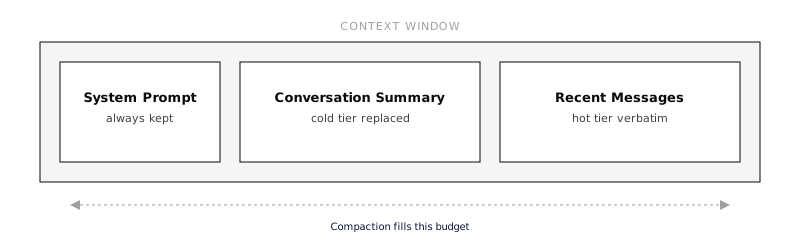
Long-running agent sessions accumulate messages until they exceed the model’s context window. When that happens, the LLM rejects the request. Context compaction automatically reduces the conversation size so the agent can keep working without losing important information.
Everruns provides multiple compaction strategies that can be combined. The default auto strategy cascades through all of them in order, from cheapest (free) to most expensive (LLM call), stopping as soon as the context fits.
How It Works
Section titled “How It Works”Compaction operates at two points:
-
Proactively: before each LLM call, Everruns estimates the token count. If it exceeds a configurable budget threshold (default 85% of the model’s context window), compaction runs before the call is made. This avoids the latency of a failed request.
-
Reactively: if the LLM still returns a
RequestTooLargeerror (estimation can undercount), the compaction cascade runs and the request is retried automatically.
In both cases, the same cascade of strategies executes:
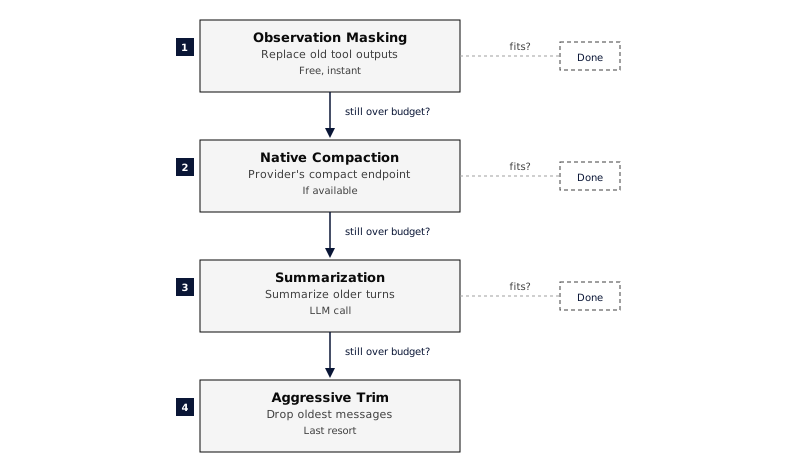
The UI shows a divider between messages whenever compaction happens:
Context compacted · 142 → 38 messages · observation_masking+summarization
Click the divider to see the cascade details, which strategies ran, how many messages each step produced, and the time taken.
Strategies
Section titled “Strategies”Auto (default)
Section titled “Auto (default)”Runs all strategies in order. Stops as soon as context fits. This is the recommended setting for most use cases.
Observation Masking
Section titled “Observation Masking”Replaces old tool outputs with compact summaries while keeping the message structure intact. This is free (no LLM call) and preserves tool call IDs for tracing.
Two summary formats:
| Format | Example | When to use |
|---|---|---|
one_line (default) | [read_file → 47 lines, 2340 bytes] | Most cases, minimal footprint |
head_tail | First 3 lines + ... (14 lines omitted) ... + last 3 lines | When partial output context helps |
The most recent N tool outputs are always kept verbatim (default: 5).
Native Provider Compaction
Section titled “Native Provider Compaction”Delegates compaction to the LLM provider’s own endpoint. Currently supported by OpenAI’s Responses API (/responses/compact). When available, this can be more intelligent than generic strategies since the provider understands its own tokenization. Everruns sends either a stateful response handle or a standalone transcript to the compact endpoint, never both. The returned ordered context is encrypted at rest as a durable checkpoint and reused across later turns and process restarts. Each request combines the latest checkpoint for the exact provider/model with raw messages written after its source boundary; changing provider or model falls back to raw history.
Compaction never deletes or rewrites session events. Public context.compacted events contain only counts, timing, strategy, and an optional checkpoint identifier. Provider-native encrypted context remains confined to the internal provider and storage paths.
Summarization
Section titled “Summarization”Uses an LLM to generate a structured summary of older messages. The summary replaces those messages in context and is wrapped in [CONVERSATION_SUMMARY] tags so subsequent compactions can re-summarize it.
You can configure:
- Which model to use (default: same as the agent)
- What information to preserve (decisions, files modified, errors, etc.)
- Custom instructions appended to the summarization prompt
Aggressive Trim
Section titled “Aggressive Trim”Last resort. Drops the oldest messages to fit within the token budget. The system prompt and the most recent messages are always preserved. This is lossy, dropped messages cannot be recovered unless Infinity Context is enabled.
Generic Harness Defaults
Section titled “Generic Harness Defaults”The built-in Generic harness enables both compaction and infinity_context by default. Together they keep long sessions unbounded without manual configuration.
| Capability | Role | Default in Generic |
|---|---|---|
| Infinity Context | Limits how many messages are loaded from the database into the prompt; provides query_history for retrieval | context_budget_tokens: 100000, min_recent_messages: 10 |
| Context Compaction | Reduces the size of messages that are in the prompt, masking tool outputs, summarizing, or trimming | strategy: auto, proactive: true, budget_percent: 0.85 |
The flow for a long-running Generic session:
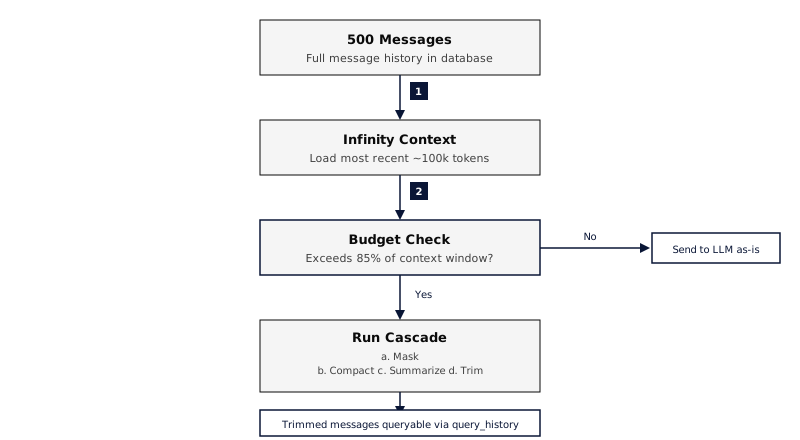
No configuration is needed, creating a session with the Generic harness gives you this behavior out of the box. To customize, override either capability’s config on the agent or session level.
Configuration
Section titled “Configuration”Compaction is a capability configured per agent or harness via AgentCapabilityConfig.
Default (auto strategy, proactive)
Section titled “Default (auto strategy, proactive)”{ "capabilities": ["compaction"]}Custom strategy and budget
Section titled “Custom strategy and budget”{ "capabilities": [ { "ref": "compaction", "config": { "strategy": "auto", "proactive": true, "budget_percent": 0.85 } } ]}Observation masking only (no LLM calls)
Section titled “Observation masking only (no LLM calls)”{ "capabilities": [ { "ref": "compaction", "config": { "strategy": "observation_masking", "observation_masking": { "keep_recent_tool_outputs": 10, "summary_format": "head_tail" } } } ]}Summarization with a cheaper model
Section titled “Summarization with a cheaper model”{ "capabilities": [ { "ref": "compaction", "config": { "strategy": "summarization", "summarization": { "model": "claude-haiku-4-5-20251001", "preserve": ["decisions", "files_modified", "errors", "api_keys"], "instructions": "Focus on architecture decisions and API contract changes" } } } ]}Full configuration with memory tiers
Section titled “Full configuration with memory tiers”{ "capabilities": [ { "ref": "compaction", "config": { "strategy": "auto", "proactive": true, "budget_percent": 0.80, "observation_masking": { "keep_recent_tool_outputs": 5, "summary_format": "one_line" }, "summarization": { "model": null, "preserve": ["decisions", "files_modified", "errors", "current_plan"], "instructions": null }, "memory_tiers": { "hot_messages": 20, "warm_messages": 100 } } } ]}Configuration Reference
Section titled “Configuration Reference”Top-level
Section titled “Top-level”| Field | Type | Default | Description |
|---|---|---|---|
strategy | string | "auto" | Compaction strategy: auto, native, observation_masking, or summarization |
proactive | boolean | true | Compact before hitting context limits (recommended) |
budget_percent | float | 0.85 | Trigger proactive compaction at this fraction of the context window |
For auto and native, proactive pressure invokes provider-native compaction
when the driver supports it and stores the result as a durable checkpoint. The
driver’s effective model context window takes precedence over the built-in
profile, so external drivers can report their actual limit. Stateful
previous_response_id requests skip local proactive pressure checks because
their request body is only a delta over provider-held context; reactive
too-large recovery remains available.
A native result must materially reduce provider-reported tokens, or serialized
bytes when token usage is unavailable: at least 5%, with a 32-unit floor for
small measurements. Smaller results do not install or replace a checkpoint and
do not emit context.compacted. A newly installed checkpoint
is not proactively replaced again until a meaningful raw-message suffix has
accumulated. Failed and no-op native attempts are also held behind a retry
watermark until estimated input grows by both 4,096 tokens and 5%, avoiding
repeated compact calls against the same source. Branch and rollback selection
ignore watermarks from a different transcript lineage. When it is re-armed, the
next native compact request preserves the
prior opaque checkpoint items in order before appending that suffix, for both
proactive and reactive compaction.
Observation Masking
Section titled “Observation Masking”| Field | Type | Default | Description |
|---|---|---|---|
keep_recent_tool_outputs | integer | 5 | Number of recent tool outputs to keep verbatim |
summary_format | string | "one_line" | How to summarize masked outputs: one_line or head_tail |
Summarization
Section titled “Summarization”| Field | Type | Default | Description |
|---|---|---|---|
model | string | null | null | Model for summarization. Null = same as the agent’s model |
preserve | string[] | ["decisions", "files_modified", "errors", "current_plan"] | Information categories to preserve in summaries |
instructions | string | null | null | Custom instructions appended to the summarization prompt |
Memory Tiers
Section titled “Memory Tiers”| Field | Type | Default | Description |
|---|---|---|---|
hot_messages | integer | 20 | Recent messages kept verbatim (full content) |
warm_messages | integer | 100 | Older messages with observation masking applied to tool outputs |
Messages beyond hot + warm are in the cold tier: replaced with a conversation summary. If Infinity Context is enabled, cold-tier messages remain queryable via query_history.
Memory Tier Diagram
Section titled “Memory Tier Diagram”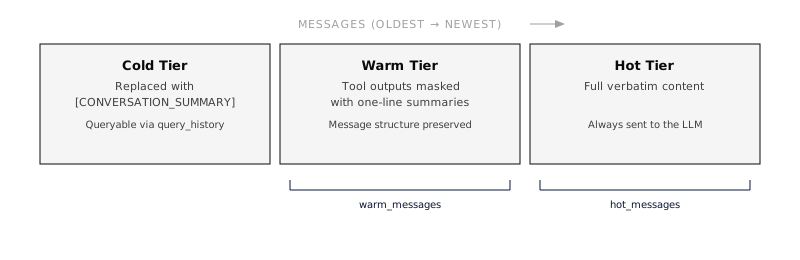
Combining with Infinity Context
Section titled “Combining with Infinity Context”Compaction and Infinity Context are complementary:
- Infinity Context limits how many messages are loaded from the database into the prompt, and provides
query_historyfor retrieval. - Compaction reduces the size of messages that are in the prompt, making tool outputs smaller, summarizing old turns, or trimming when nothing else works.
For long-running sessions, enable both:
{ "capabilities": [ "infinity_context", { "ref": "compaction", "config": { "strategy": "auto", "proactive": true } } ]}With both active, the flow is:
- Infinity Context limits messages loaded (e.g., last 100 messages)
- Compaction masks old tool outputs in those messages
- If still over budget, summarization or trim kicks in
- Cold-tier messages remain accessible via
query_history
Events
Section titled “Events”Compaction emits two SSE events:
| Event | When | Key fields |
|---|---|---|
context.compacting | Semantic compaction starts | reason (proactive_budget, request_too_large, manual), strategy, messages_before, optional tokens_before / bytes_before |
context.compacted | Material semantic reduction completes | strategy_used, messages_before, messages_after, optional before/after token or byte metrics, duration_ms, steps[], optional checkpoint_id |
Each step in the cascade is recorded with its strategy name, resulting message count, and duration.
Provider-encrypted native compact content is never included in these public events.
Observation masking alone remains an outbound model-view optimization and does
not emit context.compacted because it installs no semantic checkpoint.
Best Practices
Section titled “Best Practices”- Start with defaults. The
autostrategy withproactive: truehandles most cases well. - Lower
budget_percent(e.g., 0.70) if your agents use large tool outputs frequently, this gives more headroom before the context fills. - Increase
keep_recent_tool_outputsif your agent often references recent tool results across multiple turns. - Use a cheaper model for summarization (e.g., Haiku) to reduce cost and latency when the summarization step runs.
- Enable Infinity Context alongside compaction for sessions that run for hours or days.
- Customize
preserveto match your agent’s domain, if your agent tracks database schemas or API contracts, add those to the preserve list.
See Also
Section titled “See Also”- Infinity Context, Message history windowing and retrieval
- Capabilities Overview, How capabilities are configured
- Harnesses, Where capability configs are applied
- Events, SSE event streaming reference